MHB Before posting source code, please read this....

  • Thread starter Thread starter MarkFL
  • Start date Start date
  • Tags Tags
    Code Source
Click For Summary
The MHB Community discusses tools available on their toolbar designed to enhance the readability of posted source code by preserving whitespace and indentation. Users can utilize specific buttons for HTML and PHP code to wrap their code in appropriate tags, facilitating easier copying and testing. A user inquires about a fixed-width font option, and while there isn't a dedicated button, keyboard shortcuts are available for monospace and noparse tags. The community acknowledges the suggestion to improve tooltip descriptions for tags, leading to the implementation of additional JavaScript to clarify the function of less obvious tags. A new button for the [m] tags has also been added, complete with an explanatory tooltip.
MarkFL
Gold Member
MHB
Messages
13,284
Reaction score
12
Hello, MHB Community! (Wave)

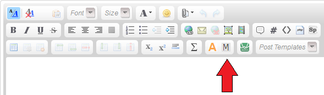
We have several tools on our toolbar that make posted source code stand out and preserve whitespace so that your indentation is preserved, making it easier to read and copy/paste for those who wish to take it and run it for testing.

For general code, you will find this button useful:

View attachment 5302

Next to that button, you will find buttons specifically for HTML and PHP code. Click the appropriate button, and then paste your code in between the generated tags, or paste your code into your post, then select it, and click the appropriate button to wrap the selected text in the tags.

Thanks! :D

 

Attachments

  • codetoolbar.png
    codetoolbar.png
    18.5 KB · Views: 168
Technology news on Phys.org
I have a related question and a suggestion.

Is there a button for fixed-width font?

It might be better to change the bubble hints to provide the description of the tag rather than just the tag's name. For example, I may not know what the sp tags does.
 
Evgeny.Makarov said:
Is there a button for fixed-width font?

No, but we do have keyboard shortcuts for it and the noparse tags:

[CTRL][M] = [m][/m] tags - monospace, with gray background.
[CTRL][Q] = [noparse][/noparse] tags.

Evgeny.Makarov said:
It might be better to change the bubble hints to provide the description of the tag rather than just the tag's name. For example, I may not know what the sp tags does.

Great suggestion! (Yes) I have added some javascript to do just that for several of the less obvious tags. :)

edit: I added a button for the [m][/m] tags:

View attachment 5316

And added an explanation of the button to its tooltip. (Yes)
 

Attachments

  • mlinebutton.png
    mlinebutton.png
    8.3 KB · Views: 134
Learn If you want to write code for Python Machine learning, AI Statistics/data analysis Scientific research Web application servers Some microcontrollers JavaScript/Node JS/TypeScript Web sites Web application servers C# Games (Unity) Consumer applications (Windows) Business applications C++ Games (Unreal Engine) Operating systems, device drivers Microcontrollers/embedded systems Consumer applications (Linux) Some more tips: Do not learn C++ (or any other dialect of C) as a...

Similar threads

  • · Replies 22 ·
Replies
22
Views
6K
  • · Replies 3 ·
Replies
3
Views
2K
  • · Replies 8 ·
Replies
8
Views
2K
  • · Replies 3 ·
Replies
3
Views
1K
Replies
11
Views
2K
  • Sticky
  • · Replies 1 ·
Replies
1
Views
5K
  • · Replies 7 ·
Replies
7
Views
4K
  • · Replies 3 ·
Replies
3
Views
2K
  • · Replies 15 ·
Replies
15
Views
6K