Cannot type "/ etc / hosts" (without the spaces)

  • Thread starter Thread starter Wrichik Basu
  • Start date Start date
  • Tags Tags
    Type
Click For Summary
SUMMARY

The forum discussion addresses an issue with submitting the string "/etc/hosts" on the Physics Forums website, which is blocked by Cloudflare's security measures. Users confirmed that while they can paste the string with spaces, submitting it without spaces triggers a "Problem encountered" dialog due to its classification as a known attack payload. The discussion highlights the need for adjustments in the site's handling of multipart/form-data requests to prevent such blocks. Additionally, users suggest that switching to application/json content might mitigate the issue.

PREREQUISITES
  • Understanding of Cloudflare security mechanisms
  • Familiarity with multipart/form-data request formats
  • Basic knowledge of web application security vulnerabilities
  • Experience with forum software like ZenForo
NEXT STEPS
  • Research Cloudflare's security features and how they classify attack payloads
  • Learn about multipart/form-data and its implications for web submissions
  • Explore potential solutions for handling known attack payloads in web applications
  • Investigate ZenForo's front-end XHR handling and possible modifications
USEFUL FOR

Web developers, security professionals, and forum administrators looking to understand and resolve content submission issues related to security filters.

Wrichik Basu
Science Advisor
Insights Author
Gold Member
Messages
2,180
Reaction score
2,690
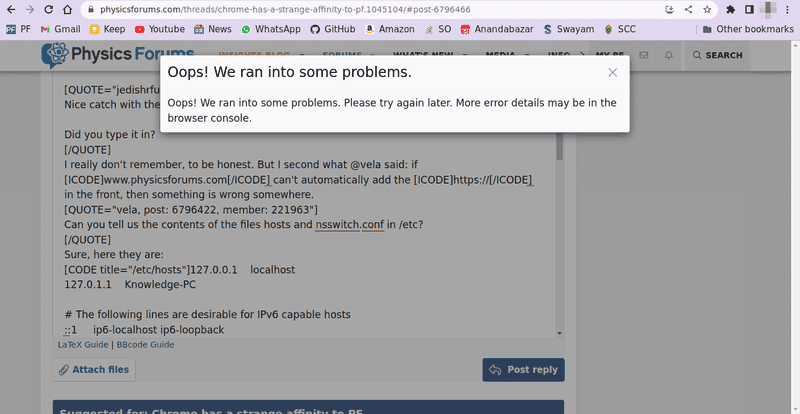
I was trying to paste the hosts file in this thread, and ran into an exception:
1662025162260.png


I can't paste the full error message from the console because PF is not allowing me to do so. Here is the error message:

Sorry, you have been blocked
You are unable to access physicsforums.com
Why have I been blocked?
This website is using a security service to protect itself from online attacks. The action you just performed triggered the security solution. There are several actions that could trigger this block including submitting a certain word or phrase, a SQL command or malformed data.

What can I do to resolve this?
You can email the site owner to let them know you were blocked. Please include what you were doing when this page came up and the Cloudflare Ray ID found at the bottom of this page.

Cloudflare Ray ID: 743cfbb7cc8df8d7 • Your IP: <Removed_by_me> • Performance & security by Cloudflare

Upon further testing, it turns out that I can paste the hosts file, but cannot type / etc / hosts (without the spaces). Neither in code blocks nor as plain text.
 
Computer science news on Phys.org
Test: ##\texttt{/} \texttt{etc} \texttt{/} \texttt{hosts}##

Works fine with me. (OK, I cheated a lot :smile:)
 
  • Haha
Likes Wrichik Basu
Quick test.
[code title="/ etc / hosts"]/ etc / hosts[/code]
I can confirm the problem. If I leave out the spaces in either the title or the body of the code block, then I can preview it just fine, but if I try to submit it gives the "Problem encountered" dialog and I cannot submit.
 
  • Like
Likes Wrichik Basu
Something about the format of the content in the request is tripping CF's detection.
 
  • Like
Likes Wrichik Basu
CloudFlare simply won't let the string /etc/hosts through in a multipart/form-data request, presumably because this is a known attack payload. This is also the case with many other strings like <script>.

I don't think CF would be so picky about application/json content, perhaps you could persuade ZenForo to rewrite their front end XHR handler?
 
  • Like
  • Informative
Likes Wrichik Basu, Greg Bernhardt and Vanadium 50
Take a screenshot, then post that.
 
pbuk said:
known attack payload
That's the key. If you type content like that, you shouldn't be surprised when its blocked. ("But your honor, the gun wasn't loaded!")
 
pbuk said:
CloudFlare simply won't let the string /etc/hosts through in a multipart/form-data request, presumably because this is a known attack payload. This is also the case with many other strings like <script>.
But how did you write these?
 
  • #10
Wrichik Basu said:
But how did you write these?
Click "Reply" and you'll see...
 
  • Informative
Likes jack action
  • #11
pbuk said:
Click "Reply" and you'll see...
This is what I see:

1662132954757.png
 
  • #12
Wrichik Basu said:
This is what I see:
Ah you also have to click the [ ] icon in the editor bar to leave WYSYWIG mode.
1662133729717.png
 
  • Like
Likes Wrichik Basu

Similar threads

Replies
1
Views
1K
  • · Replies 1 ·
Replies
1
Views
3K
  • · Replies 10 ·
Replies
10
Views
3K
Replies
63
Views
5K
  • · Replies 2 ·
Replies
2
Views
14K
Replies
2
Views
6K
  • · Replies 6 ·
Replies
6
Views
9K
  • · Replies 1 ·
Replies
1
Views
5K
  • · Replies 5 ·
Replies
5
Views
3K
  • · Replies 12 ·
Replies
12
Views
2K