Connection Speed vs Download Speed?

  • Thread starter Thread starter Saladsamurai
  • Start date Start date
  • Tags Tags
    Connection Speed
Join the discussion
Registration is free. Ask a follow-up in this thread, or start your own.
3 replies · 13K views
Saladsamurai
Messages
3,009
Reaction score
7
Hello :smile:

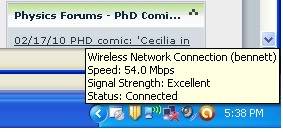
I am wondering about something. Why when I 'hover' over the windows connection icon in the system tray it is showing this:
1-1.jpg


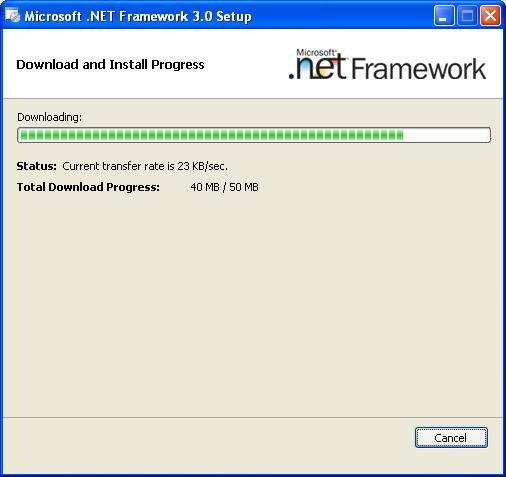
What does that speed mean? Because I am downloading something right now and it is certainly not downloading at 54.0 Mbps

This is the actual speed:
2-1.jpg


What is going on here?
 
Physics news on Phys.org
The connection speed is the total bandwidth of your internet connection, so it's the maximum amount of traffic you can have on your line at any moment. You almost never hit that total as a matter of course, but you're seeing traffic limiting on the content providers site. You don't control how fast a download is, the guy providing the download does (though he can't provide content any faster than your connection let's you download it.) Just like you can't download anything faster then your max capacity, they can't send something faster to you then their capacity. Websites limit download speeds on their sides at some fixed rate, usually depending on their overall traffic and bandwidth capacities.
 
Last edited:
54 mbps is the speed of your wireless network.

If you have a cable modem, it's ethernet connection speed is probably 100mbps or perhaps 1000 mbps (motorola sb6120). I'm not sure about dsl modem ethernet speeds.

Your motherboard ethernet connection speed is probably 1000 mpbs, but will run at the speed of the cable modem unless you have a switcher between the devices.

Your cable or dsl modem bandwidth is set by your isp, probably from 1mpbs to 25mpbs, and upload speed is often slower than download speed.

The download speeds reported by applications are usually in kilo-bytes per second, not mega-bits per second. For an approximate speed multiply KB by 8 or divide mbps by 8 to get comparable values.

You can go to a website like

http://www.speedtest.net

to measure your actual bandwidth.
 
Also, many servers throttle connections for each TCP session to regulate bandwidth usage on a per connection basis. This ensures that users with high bandwidth connections do not saturate the links to the web server being accessed and cause other users to experience poor performance.

Because of this, it is best to use sites like www.speakeasy.net[/url] or [url]www.speedtest.net[/URL] (as Jeff Reid has suggested) to obtain the most accurate reading for a given connection's data transfer rate.
 
Last edited by a moderator: