Discussion Overview
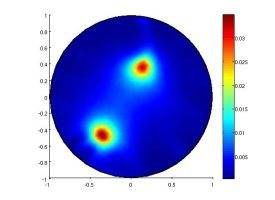
The discussion revolves around creating circular image plots with transparency in MATLAB, specifically focusing on how to manipulate a 500x500 matrix to achieve a desired visual effect. Participants explore various methods and challenges related to plotting techniques and transparency settings.
Discussion Character
- Exploratory
- Technical explanation
- Debate/contested
Main Points Raised
- One participant seeks guidance on plotting a 500x500 matrix as a circular image without displaying anything outside the circular region.
- Another participant suggests transforming x and y coordinates to polar coordinates for plotting, but does not clarify how this applies to the matrix directly.
- A participant expresses confusion about applying the suggested method, noting that their matrix lacks explicit coordinates and that they are using pcolor with "EdgeAlpha" set to zero.
- There are multiple requests for clarification and assistance, indicating ongoing difficulty in finding a solution.
- A later reply indicates a resolution involving the use of alpha data to control transparency, specifically mentioning the use of ROI to manage which parts of the image remain opaque or become transparent.
Areas of Agreement / Disagreement
Participants generally express uncertainty and confusion about the plotting techniques, with no consensus reached on the best approach until the final post, which presents a potential solution regarding alpha data.
Contextual Notes
Participants mention limitations in understanding plotting tools and the need for specific visual outcomes, such as making non-circular areas white, which may depend on the implementation of transparency settings.
Who May Find This Useful
This discussion may be useful for MATLAB users interested in advanced plotting techniques, particularly those dealing with image matrices and transparency effects.