Differences between Pillow and Pyplot in turning an array into an image

  • Context: Python 
  • Thread starter Thread starter Avatrin
  • Start date Start date
  • Tags Tags
    Array Image Turning
Click For Summary

Discussion Overview

This discussion revolves around the differences in how the Pillow library and Pyplot handle the conversion of a two-dimensional array into an image. Participants explore the implications of using different data types and modes in each library, particularly in the context of visualizing a field using line integral convolution. The conversation includes technical details about image modes and data types.

Discussion Character

  • Technical explanation
  • Debate/contested
  • Mathematical reasoning

Main Points Raised

  • One participant notes that using Pillow's fromarray function with the mode 'L' (8-bit pixels) may not yield meaningful results when the input array contains floating-point numbers.
  • Another participant suggests that Pyplot's figimage function might accept floating-point arrays, which could explain the difference in output quality compared to Pillow.
  • There is a discussion about the need to convert floating-point values to integers for Pillow to process the image correctly, with one participant proposing to use int(floor(element*256)) for conversion.
  • Participants mention that both fromarray and figimage functions have more parameters than shown, which could affect the output.
  • One participant describes their process of generating a noisy image with Numpy, using it with line integral convolution, and then converting the result into an image.
  • There is a mention of the 'LA' mode in Pillow, which is 8-bit pixels with alpha, and how it differs from the output produced by Pyplot.
  • Some participants express uncertainty about the correct data types required for each library's functions and the implications of using different modes.

Areas of Agreement / Disagreement

Participants generally agree that the data type and mode used in Pillow's fromarray function are critical for achieving the desired output. However, there is no consensus on the best approach to resolve the differences in output between Pillow and Pyplot, and multiple competing views remain regarding the handling of data types and image modes.

Contextual Notes

There are limitations regarding the assumptions about data types and the specific requirements of each library's functions. The discussion does not resolve the mathematical steps needed to convert the floating-point array for use with Pillow.

Avatrin
Messages
242
Reaction score
6
TL;DR
Pillow produces different output than Pylot from same array.
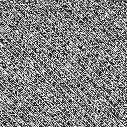
The other day I was trying to visualize a field using line integral convolution. I thought I kept failing for days since Pillow was giving me outputs similar to this one (img = Image.fromarray(output_image, 'L')):
EWnLd.png


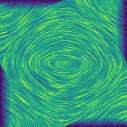
I thought I was making some mistake until I tried Pyplot (f.figimage(output_image)):
TiwNr.png


Except for being colored, this is the exact output I wanted. That leads me to wonder; Why is this? How do Pillow and Pyplot turn arrays into images that give them so fundamentally different outputs? For Pillow I tried RGB and LA as well, but it still gave me noise. Pyplot gave me the representation I wanted.

Also, I am not referring to the blue-green-yellow coloring of the Pyplot output; I want to know why Pillow did not capture the circular motion that line integral convolution created for the vector field while Pyplot did. The "output_image" array is the same for the two images above (i.e. I created both images during the same run of the code).

Also, output_image contain a two-dimensional array of floating-point number values between zero and one.
 
Technology news on Phys.org
In your code using the fromarray function in the Pillow Image class, the mode is 'L', which means 8-bit pixels. Since your array is floating point numbers (float type = 32 bits and double type = 64 bits), what you're going to get won't be meaningful, as far as I can tell. Most or all of the modes require data to be integer in type.

For the Pyplot function figimage, I can't tell from the matplotlib documentation what type the array should be. It's possible that the array data should be float, which would explain why your image comes out as you expected.

BTW, both fromarray and figimage take a lot more parameters than you show in your code.
 
  • Like
Likes   Reactions: Avatrin
Mark44 said:
In your code using the fromarray function in the Pillow Image class, the mode is 'L', which means 8-bit pixels. Since your array is floating point numbers (float type = 32 bits and double type = 64 bits), what you're going to get won't be meaningful, as far as I can tell. Most or all of the modes require data to be integer in type.

For the Pyplot function figimage, I can't tell from the matplotlib documentation what type the array should be. It's possible that the array data should be float, which would explain why your image comes out as you expected.

BTW, both fromarray and figimage take a lot more parameters than you show in your code.
Thank you! That makes a lot of sense. I guess I should try using int(floor(element*256)) for each element in the array to see if it gives me the output I want.

Regarding the parameters. Yeah, figimage takes a lot more parameteres than I show, but I was alright with the default values (for instance, the blue-yellow-green representation doesn't matter.. visualizing the vector field was what I needed to do). Looking through the documentation, fromarray only uses those two parameters, or am I wrong?
 
Right, fromarray uses only two parameters, so your code example had the right number of parameters. The documentation says that if you don't include a mode parameter, I guess it determines the mode from the image type.

Notice how they do things in the docs for fromarray:
Python:
im = Image.open('hopper.jpg')
a = np.asarray(im)
im = Image.fromarray(a)
First they open the file, then they use the numpy asarray function to convert the image data to an array, and finally they use fromarray to create an image.

With jpg and other image types, the image file header contains information about the size of an image (both in bytes and as a rectangular array of pixels), the number of bytes per pixel, plus a lot of other information.
 
Hmm, this actually didn't work. This is my current output having turned each element in my array to an integer:
pillowwithint.png


However, I am not opening any image; I am just doing this:
Python:
img = Image.fromarray(np.array(output_image), 'LA')
img.save('pillowwithint.png')

The reason for this is that LIC starts with a texture like white noise which I am initializing with Numpy:
Code:
noisy_image = numpy.random.rand(length_image,length_image)

Then I am using LIC to create the motion. Finally, I am turning the result into an image.

Mark44 said:
Right, fromarray uses only two parameters, so your code example had the right number of parameters. The documentation says that if you don't include a mode parameter, I guess it determines the mode from the image type.
PIL seems to be interpreting 'LA' like 'mode='LA'' as was intended (since other mode strings seem to be producing correct outputs. Also, it's not giving me an error).
 
Avatrin said:
Hmm, this actually didn't work. This is my current output having turned each element in my array to an integer:
View attachment 260034

However, I am not opening any image; I am just doing this:
Python:
img = Image.fromarray(np.array(output_image), 'LA')
img.save('pillowwithint.png')
What is output_image? Presumably from the name it's a variable that contains the filename of some image file, such as jpg or whatever. The Numpy array() function (https://docs.scipy.org/doc/numpy/reference/generated/numpy.array.html) takes 6 parameters, of which the last 5 are optional. In your example, it's possible you need to provide some parameters, particularly the ndmin.
Mode "LA" is 8-bit pixels with alpha. That's definitely different from what you got with pyplot's figimage() function.

The reason for this is that LIC starts with a texture like white noise which I am initializing with Numpy:
Code:
noisy_image = numpy.random.rand(length_image,length_image)
[/QUOTE]Again, I think there's a mismatch between the types you actually have and the types you need.
The code above creates a two-dimensional array of floating point numbers (64-bits, I believe) with values between 0.0 and 1.0. Your Pillow fromarray() function is, I believe, trying to process these numbers 8 bits at a time, resulting in garbage output.
Avatrin said:
Then I am using LIC to create the motion. Finally, I am turning the result into an image.PIL seems to be interpreting 'LA' like 'mode='LA'' as was intended (since other mode strings seem to be producing correct outputs. Also, it's not giving me an error).
 
Mark44 said:
What is output_image? Presumably from the name it's a variable that contains the filename of some image file, such as jpg or whatever. The Numpy array() function (https://docs.scipy.org/doc/numpy/reference/generated/numpy.array.html) takes 6 parameters, of which the last 5 are optional. In your example, it's possible you need to provide some parameters, particularly the ndmin.
Mode "LA" is 8-bit pixels with alpha. That's definitely different from what you got with pyplot's figimage() function.
Again, I think there's a mismatch between the types you actually have and the types you need.
The code above creates a two-dimensional array of floating point numbers (64-bits, I believe) with values between 0.0 and 1.0. Your Pillow fromarray() function is, I believe, trying to process these numbers 8 bits at a time, resulting in garbage output.
Okay, here's what I do; I stary with noisy_image as described above. I use it with LIC to visualize a vector field and the output is output_image, which, yes, is an array containing floating point numbers between 0.0 and 1.0. Using this with figimage does give me the correct output in my original post. However, that's what didn't work with fromarray.

So, as I wrote yesterday, I was going to run each element in output_image through int(floor(element*256)) to get an integer that can be represented by eight bits. However, using that array with pil.fromarray is what gave me the output in my previous post.
 

Similar threads

  • · Replies 5 ·
Replies
5
Views
2K
  • · Replies 1 ·
Replies
1
Views
2K
  • · Replies 2 ·
Replies
2
Views
2K
  • · Replies 19 ·
Replies
19
Views
3K
Replies
2
Views
2K
Replies
22
Views
7K
  • · Replies 3 ·
Replies
3
Views
4K
  • · Replies 7 ·
Replies
7
Views
3K
Replies
2
Views
3K
  • · Replies 4 ·
Replies
4
Views
3K