Fitting xtickslabels on a plot (matplotlib)

Click For Summary

Discussion Overview

The discussion revolves around improving the visualization of a plot created using matplotlib, specifically focusing on fitting x-tick labels more effectively and ensuring that titles and labels are not cropped. Participants explore various approaches to enhance the readability of the plot while addressing layout issues.

Discussion Character

  • Technical explanation
  • Conceptual clarification
  • Debate/contested

Main Points Raised

  • One participant seeks advice on improving the spacing and resolution of x-tick labels in a matplotlib plot.
  • Another participant suggests reducing the number of ticks by displaying only every "step"-th day, providing a code modification to implement this.
  • A third participant acknowledges the need to reduce the number of displayed dates but raises a concern about ensuring that the title and ylabel fit within the figure without being displaced.
  • A fourth participant reports that they were able to reproduce the plot without cropping issues in a Jupyter notebook environment, indicating that the problem may not be universal.

Areas of Agreement / Disagreement

Participants generally agree that it is unnecessary to display all dates on the x-axis. However, there is no consensus on the best approach to ensure that titles and labels fit properly within the figure, as experiences vary based on different environments.

Contextual Notes

Some limitations include the lack of specific data for testing proposed solutions and potential differences in behavior across different plotting environments (e.g., Jupyter notebook vs. other setups).

schniefen
Messages
177
Reaction score
4
TL;DR
Fitting xtickslabels on plot
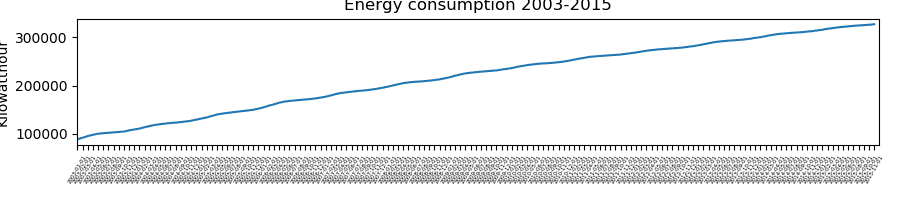
How could I improve the below code to fit all the xtickslabels on my plot more nicely (i.e. more spacing between the labels, higher resolution)? Thanks!
Python:
from pyplot import *
yearmonthday=['2003-01-01', '2003-02-01', '2003-03-01', ...] #len(yearmonthday) is 155
kwh = [88883, 99221, 100002, ...]
fig,ax=subplots(figsize=(9,2))
ax.plot(range(len(kwh)),kwh)
ax.set_xticks(range(len(yearmonthday)))
ax.set_xticklabels(yearmonthday, fontsize = 4,rotation=60)
ax.set_xlim(0,155,310)
fig.tight_layout()
ax.set_title('Energy consumption 2003-2015')
ax.set_ylabel('Kilowatthour')

plotx.png
 
Technology news on Phys.org
I propose to reduce the number of the ticks. You don't have to display a tick for each of the day, you can display only every second day for example, or every seventh day (if you prefer weekly basis).
Below I slightly updated your lines 6 and 7, in order to display a tick for every "step"-th day.

Python:
step = 7
ax.set_xticks(range(0, len(yearmonthday), step))
ax.set_xticklabels(yearmonthday[::step], fontsize=4, rotation=60)
 
  • Like
Likes   Reactions: schniefen and Ibix
You're right, it's not necessary to display all dates. However, how would one make the title and the ylabel also fit into the figure? fig.tight_layout() fits the xtickslabels into the figure, but displaces the title and the ylabel somewhat outside of it.

Python:
fig,ax=subplots(figsize=(8,3))
ax.plot(range(len(kwh)),kwh)
step = 7
ax.set_xticks(range(0, len(yearmonthday), step))
ax.set_xticklabels(yearmonthday[::step], fontsize=10, rotation=60)
ax.set_xlim(0,155)
ax.set_yticks([100000,200000,300000])
ax.set_yticklabels(['$10^5$','$2 \cdot 10^5$','$3\cdot10^5$'], fontsize=10)
plt.tight_layout()
ax.set_title('Energy consumption 2003-2015')
ax.set_ylabel('Kilowatthour')
savefig('plotx.png',dpi=1200)
plotx.png
 
Although I don't have your data, I tried to reproduce your code in jupyter notebook with %matplotlib inline option. And both, ylabel and title, look OK, not cropped as in your figure.
 
  • Like
Likes   Reactions: schniefen