For an informal presentation, would you use LaTeX to type this out?

Click For Summary
SUMMARY

This discussion focuses on the use of LaTeX for typesetting mathematical documents, particularly in relation to matrices and complex equations. Users express their preference for LaTeX over Microsoft Word for its efficiency and aesthetic appeal. Key suggestions include using macros for abbreviations, color-coding terms for clarity, and aligning equations using LaTeX commands such as \begin{align*}. The conversation emphasizes the importance of formatting and readability in mathematical presentations.

PREREQUISITES
  • Familiarity with LaTeX syntax and commands
  • Understanding of mathematical notation and typesetting
  • Basic knowledge of macros and abbreviations in LaTeX
  • Experience with formatting tools for equations and matrices
NEXT STEPS
  • Learn to use LaTeX macros for simplifying complex equations
  • Explore LaTeX color packages for enhancing document readability
  • Research alignment techniques in LaTeX, such as \begin{align*}
  • Study best practices for typesetting matrices in LaTeX
USEFUL FOR

Mathematicians, educators, students, and anyone involved in creating technical documents that require precise formatting and presentation of mathematical content.

Eclair_de_XII
Messages
1,082
Reaction score
91
TL;DR
Suppose I were doing an informal presentation on differential forms. I am strapped on presentation time, and need to pass out a long calculation. Can I use LaTeX to type it out, or is it more advisable to do it by hand, scan it, print copies, and distribute them to the class?
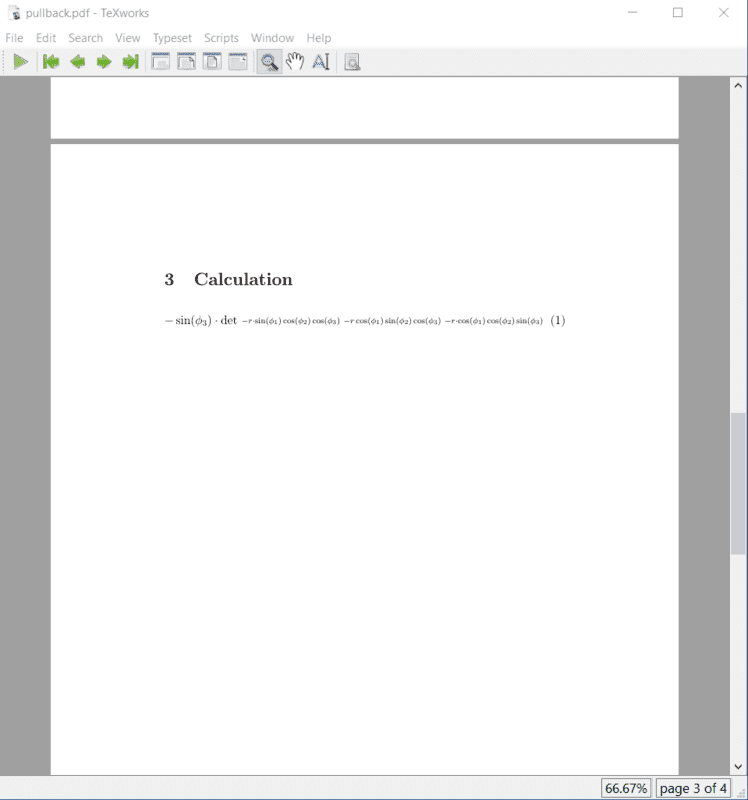
Is it possible to typehttps://drive.google.com/open?id=186OoXjmVjb3nhXjSBKEAq2u_6MF-UXlm into LaTeX, or should I just print out the thing as it is? If the former, I do not know how I would go about it; the matrices seem much too wide for me to fit onto a letter-size page. For the record, the typeset pdf looks something like:
Untitled.png


And that's just the first term of the first determinant expansion.

Also, this does not relate to my topic at all, but I'm using LaTeX for the first time, and now I am wondering what I was thinking when I chose to use Microsoft Word to type out all my lab reports and the like during my academic career. It seems faster and easier to type out equations than if I am using the office application. It also just looks much cleaner and nicer than my Word-processed reports. Now I feel a bit foolish and regretful.
 
Physics news on Phys.org
There is a lot of repetition in your original. CHeck out the ##\LaTeX## tutorial, especially 'multiple lines' and 'matrices'.
Including learning how to do it, a few hours should suffice to typeset it.
 
BvU said:
There is a lot of repetition in your original.

Could you elaborate, please?
 
Instead of \cos\phi_1 etc you could define some abbreviations
Rich (BB code):
$$
\def\cp{\cos\phi}    \def\sp{\sin\phi}
\def\cpo {\cp_1}  \def\cptw {\cp_2}  \def\cpt {\cp_3}
\def\spo {\sp_1}  \def\sptw {\sp_2}  \def\spt {\sp_3}

\cp_1 \ \cp_2 \\
\sp_1 \ \sp_2 \\
\cpt \\ r\cpo\cptw\cpt \quad r\spo\sptw\spt
$$
gives

$$
\def\cp{\cos\phi} \def\sp{\sin\phi}
\def\cpo {\cp_1} \def\cptw {\cp_2} \def\cpt {\cp_3}
\def\spo {\sp_1} \def\sptw {\sp_2} \def\spt {\sp_3}

\\ \cp_1 \ \cp_2 \\ \sp_1 \ \sp_2 \\ \mathstrut\ \\ r\cpo\cptw\cpt \quad r\spo\sptw\spt $$ etc and onwards:

$$\def\rssc{r\spo\sptw\cpt} \def\rscc{r\spo\cptw\cpt} \rssc\quad \rscc$$

or even fancier, with arguments:
$$\def\ssc{\spo\sptw\cpt} \def\scc{\spo\cptw\cpt}
\def \r#1{r#1}

\r{\scc}$$

$$\def\ssc{\spo\sptw\cpt} \def\scc{\spo\cptw\cpt}
\def \r#1{r#1}

\r{\scc}$$

And with a little planning you can probably mix \sp, \cp and the subscripts as arguments.
 
Last edited:
Now I am worried that people will not have the sanity to check the work at the bottom of https://drive.google.com/open?id=1PUufFSfCdoDw42GeFIO2pUtAGNLvWUDk.

I should definitely do something for the terms I simplified using the identity ##(\sin^2 + \cos^2)(x)=1##, and I feel like I should color-code some of these terms, or something.
 
With the abbreviations or macros ,
you could also make another notational change.
Instead of (say) ##\sin\phi_2## and ##\cos\phi_3##,
you could write ##S_2## ##\quad## and ##C_3##,
which is probably easier on the eyes.

(It can be coded so that you can switch back if you wished.
You could have similar lines, with the one you don't want now commented-out.)

##\color{red}{Colors}## (as you say) or [in case it's printed in b/w] ##\mathbf{bold}## or ##\underline{underline}## or ##\textsf{font change}## or ##{\Large size\ } change## would help.
(Right-click each to see the ##\LaTeX##.)
 
Last edited:
  • Like
Likes   Reactions: Eclair_de_XII and BvU
Don't know if my comments post was deleted, or that I simply messed up and didn't post. Your specimen sure looks different from the last time I saw it.

I had:

  • kudos for the ##\TeX##ing ! Was it indeed a few hours, or much more ?
  • pity you don't post the ##\LaTeX## source, this makes referring to a specific place difficult for us. But I understand it if you worry about copying.
  • loose the brackets: ##\ \cos\phi_1 \ ## instead of ##\ \cos(\phi_1) \ ## is easier on the eyes
  • align, manually or with \begin {align*} etc. e.g. for this make the big ( line up vertically.
1582622247756.png

  • another way to align is with \phantom{...} . The ... is typeset (for h and v spacing) but not rendered.
  • adjust sizes. The [ ] above should be bigger than the big (. Use \left [... \right ] or do it manually with \big \ Big \bbig \Bbig etc.

Eclair_de_XII said:
Now I am worried that people will not have the sanity to check the work
You can't force them. It's their problem, not yours.
 
BvU said:
Don't know if my comments post was deleted, or that I simply messed up and didn't post. Your specimen sure looks different from the last time I saw it.

I wanted to fix it some more, then kept on re-uploading my edited versions. I apologize for inconveniencing you and inadvertently wiping your comments. Uploading or sending work, realizing I could have done something better, and then re-sending multiple revisions is a bad habit of mine that I really should have quit by the end of my academic career.

BvU said:
Was it indeed a few hours, or much more ?

I'd say so. At most, this particular document took six hours, including the time I needed to learn some of the formatting I did not learn on here while typing out posts.

robphy said:
Instead of (say) ##\sin\phi_2## and ##\cos\phi_3##,
you could write ##S_2## ##\quad## and ##C_3##,
which is probably easier on the eyes.

(It can be coded so that you can switch back if you wished.
You could have similar lines, with the one you don't want now commented-out.)

##\color{red}{Colors}## (as you say) or [in case it's printed in b/w] ##\mathbf{bold}## or ##\underline{underline}## or ##\textsf{font change}## or ##{\Large size\ } change## would help.
(Right-click each to see the ##\LaTeX##.)

BvU said:
  • align, manually or with \begin {align*} etc. e.g. for this make the big ( line up vertically.
  • another way to align is with \phantom{...} . The ... is typeset (for h and v spacing) but not rendered.
  • adjust sizes. The [ ] above should be bigger than the big (. Use \left [... \right ] or do it manually with \big \ Big \bbig \Bbig etc.

Duly noted. Thanks for the tips.
 
Last edited:
Okay, through heavy revision, I think I have a https://drive.google.com/drive/folders/1V8a0NFuTeh3PMXOckBPAOqbMas69q8MY?usp=sharing of the calculation.

Additionally, I have made notes in the TeX document asking for help on how to do so and so.
 

Similar threads

  • · Replies 4 ·
Replies
4
Views
2K
  • · Replies 12 ·
Replies
12
Views
3K
  • · Replies 4 ·
Replies
4
Views
3K
  • · Replies 5 ·
Replies
5
Views
3K
  • · Replies 3 ·
Replies
3
Views
2K
  • · Replies 4 ·
Replies
4
Views
2K
  • · Replies 9 ·
Replies
9
Views
15K
  • · Replies 5 ·
Replies
5
Views
6K
  • · Replies 4 ·
Replies
4
Views
5K
  • · Replies 2 ·
Replies
2
Views
4K