Sam Gallagher
- 9
- 6
<< Mentor Note -- ZIP files are a security risk, and the file has been deleted. Please post the individual files instead. Thanks >>[/color]
I saw a post from 2009 of someone who needed a mixer component to play with. So for learning purposes I zipped a symbol, schematic, and .sub file together for LTSpice of the double balanced mixer that was given in that thread so that anyone that's learning about mixers or IQ modulation can play with it without dealing with a messy schematic!
Instructions:
In LTSPICE: (You'll have to do this when you want to use the mixer, because LTSpice is a pain sometimes)
Don't forget the .sub part.
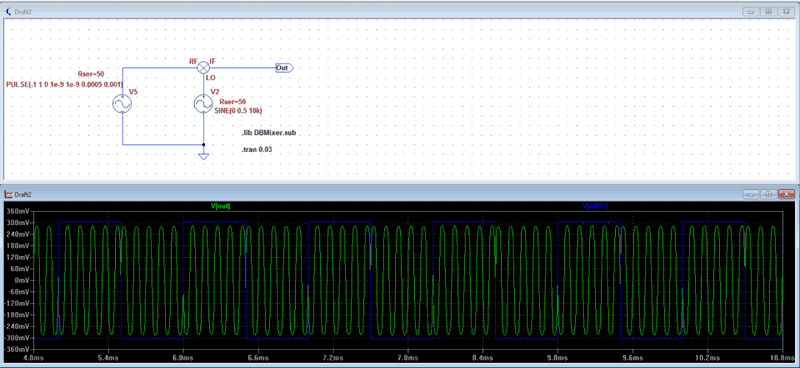
Example: Basic IQ modulation by mixing (which is multiplying) a sine wave by +1V and -1V (a square wave)
Until next time
~Sam Gallagher
I saw a post from 2009 of someone who needed a mixer component to play with. So for learning purposes I zipped a symbol, schematic, and .sub file together for LTSpice of the double balanced mixer that was given in that thread so that anyone that's learning about mixers or IQ modulation can play with it without dealing with a messy schematic!
Instructions:
- Unzip the file
- Place .sub file in your LTSpiceVI\lib\sub folder (for windows this is in Program Files(x86)*\LTC)
- Place the .asy (symbol) file in your symbol folder (also found in lib I'm pretty sure)
In LTSPICE: (You'll have to do this when you want to use the mixer, because LTSpice is a pain sometimes)
- Place the mixer symbol
- Ctrl+right click, change "Value" row to "DBMixer"
- Include the subcircuit in your netlist with a SPICE directive (.op button)
Don't forget the .sub part.
- Use the mixer!
- Bonus tip: Save a file with the mixer all set up as "mixer template" and use that to start when you want to do a quick mixer experiment.
Example: Basic IQ modulation by mixing (which is multiplying) a sine wave by +1V and -1V (a square wave)
Until next time
~Sam Gallagher
Last edited by a moderator: