Python Graphing a piecewise function (Python)

Click For Summary
The discussion focuses on writing a Python script to plot a specific function defined by parameters V_0, t_0, and τ. The user seeks guidance on achieving a plot that includes a horizontal line. Key points include the need to correctly apply conditions to the time array, ensuring that the function modifies the voltage values (Vt) based on the time conditions. It is emphasized that the condition should be applied element-wise rather than using a method that checks the entire array at once. Suggestions include using boolean indexing to set Vt values for times less than or equal to t_0 and explicitly defining the time and voltage arrays using NumPy's concatenate and linspace functions. The user expresses gratitude for the assistance received.
member 731016
I am trying to write a python script to plot the function,
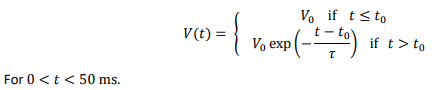
1683316565374.png

Where
##V_0 = 5~V##
##t_0 = 10~ms##
##\tau = 5~ms##

My script that I have written to try to do this is,
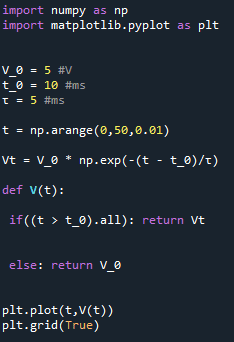
1683318107347.png

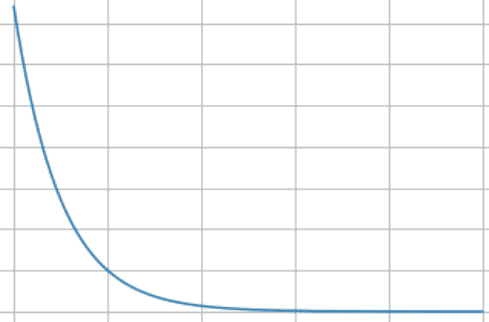
Which plots,
1683318013306.png

However, the plot is meant to look like this with the horizontal line.
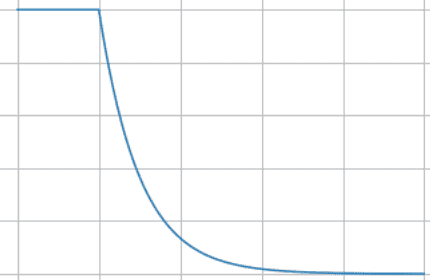
1683317219596.png

Can someone please give me some guidance to get that graph?

Many thanks!
 
Last edited by a moderator:
Technology news on Phys.org
(Please copy your code and paste it between [code] tags; don't just post a screenshot. It is better to call your variable tau rather than use a unicode symbol.)

(t > t_0).all is a method; its boolean value is True. Thus your function will only ever return the unmodified Vt. You need to add () after all to actually call the method. But that isn't what you want either.

(t > t_0).all() is True if every element of t is greater than t_0 and False otherwise. But you need to apply the condition on the level of each element; an if statement won't do that unless included in a loop over the index of the array.

Having calculated Vt, you only need to overwrite those elements where t <= t_0 is True. That can be done easily:
Python:
Vt[t <= t_0] = V_0 

plt.plot(t,Vt)

Alternatively, you can explicitly allocate your points to each range:
Python:
t = np.concatenate(
    [np.linspace(0,t_0, 21), np.linspace(t_0, t_max, 101)],
)

Vt = np.concatenate(
    [V0 * np.ones(21), V0 * np.exp(-np.linspace(0,t_max-t_0,101)/tau)]
)
 
Last edited:
  • Like
Likes member 731016
pasmith said:
(Please copy your code and paste it between [code] tags; don't just post a screenshot. It is better to call your variable tau rather than use a unicode symbol.)

(t > t_0).all is a method; its boolean value is True. Thus your function will only ever return the unmodified Vt. You need to add () after all to actually call the method. But that isn't what you want either.

(t > t_0).all() is True if every element of t is greater than t_0 and False otherwise. But you need to apply the condition on the level of each element; an if statement won't do that unless included in a loop over the index of the array.

Having calculated Vt, you only need to overwrite those elements where t <= t_0 is True. That can be done easily:
Python:
Vt[t <= t_0] = V_0

plt.plot(t,Vt)

Alternatively, you can explicitly allocate your points to each range:
Python:
t = np.concatenate(
    [np.linspace(0,t_0, 21), np.linspace(t_0, t_max, 101)],
)

Vt = np.concatenate(
    [V0 * np.ones(21), V0 * np.exp(-np.linspace(0,t_max-t_0,101)/tau)]
)
Thank you for your help @pasmith! That is very helpful!
 
Learn If you want to write code for Python Machine learning, AI Statistics/data analysis Scientific research Web application servers Some microcontrollers JavaScript/Node JS/TypeScript Web sites Web application servers C# Games (Unity) Consumer applications (Windows) Business applications C++ Games (Unreal Engine) Operating systems, device drivers Microcontrollers/embedded systems Consumer applications (Linux) Some more tips: Do not learn C++ (or any other dialect of C) as a...

Similar threads

  • · Replies 18 ·
Replies
18
Views
1K
  • · Replies 5 ·
Replies
5
Views
3K
  • · Replies 2 ·
Replies
2
Views
2K
Replies
4
Views
4K
  • · Replies 6 ·
Replies
6
Views
2K
  • · Replies 3 ·
Replies
3
Views
1K
  • · Replies 1 ·
Replies
1
Views
3K
  • · Replies 3 ·
Replies
3
Views
4K
  • · Replies 14 ·
Replies
14
Views
5K
  • · Replies 5 ·
Replies
5
Views
2K