Having trouble updating Button color in Tcl/Tk -- UPDATE: Figured it Out

  • Thread starter Thread starter berkeman
  • Start date Start date
  • Tags Tags
    Color
Click For Summary
The discussion centers on improving a Tcl/Tk test script for factory use, specifically addressing the issue of resetting the background color of Pass/Fail buttons after each test run. The original script required manual clicks to reset the button colors, which was deemed non-intuitive for technicians. The user attempted to reset the button colors to white within the command for a "Go" button but faced issues where the colors did not update as expected.After troubleshooting, it was discovered that the button color reset was being overridden by the subsequent test result updates. The solution involved inserting an "update" command after resetting the button colors, ensuring that the interface reflects the changes before executing the test logic. This adjustment made the button behavior more intuitive, allowing for a clearer visual indication of test results. The user expressed gratitude for the community's input, which facilitated the resolution of the issue.
berkeman
Admin
Messages
69,301
Reaction score
24,520
I'm improving an old Tcl/Tk test script of mine to be used in a simple test on the factory floor (previously I only used it in the R&D Lab for my own testing). With the current behaviour, I run the test and the Pass or Fail button changes from White to Green or Red, but I need to click the Pass or Fail button to reset the (background) color to White before running the test again. That's fine for my own work, but it will not be intuitive for the technicians on the factory floor.

I've been trying to get the Pass/Fail Buttons' background color to reset to White when re-running the test, but so far no joy. The code below runs, but the background color of the Pass/Fail Buttons does not change to White when re-running the test. Any thoughts? Or should I just change to some other display widget instead of using Buttons for the Pass/Fail indicators?

I'd expected this first part of the -command for "gobutton" to re-set the Pass/Fail Button colors to white:

-command { $passbutton configure -bg white; $failbutton configure -bg white;

Thanks!
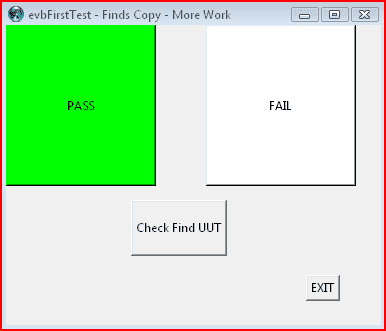
Code:
# (initial comments omitted)
#
# Procedure to make sure we can find the UUT node
proc finduut {} {
   source evbFirstTestConfig.tcl
   exec nodeutil -d$LONx -INUiFind.txt -ONUoFind.txt
   set filename "NUoFind.txt"
   set pattern {Received an ID message}
   set count 0
   set fid [open $filename r]
   while {[gets $fid line] != -1} {
       incr count [regexp -all -- $pattern $line]
   }
   close $fid
   if { $count == 0 } {return $count}

# Other test code goes here...

   return $count
}

# Configure window size
. configure -width 375 -height 300

# Create Quit and Run buttons
set quitbutton [ button .quitbutton -text "EXIT" -command "exit" ]

set gobutton [ button .gobutton -text "Check Find UUT" \
    -height 3 \
    -command { $passbutton configure -bg white; $failbutton configure -bg white; \
   if {[finduut] > 0} { $passbutton configure -bg green } \
       else { $failbutton configure -bg red } } ]

# Create Pass and Fail buttons

set passbutton [ button .passbutton -bg white -text "PASS" \
    -width 20 -height 10 \
    -command { $passbutton configure -bg white } ]

set failbutton [ button .failbutton -bg white -text "FAIL" \
    -width 20 -height 10 \
    -command { $failbutton configure -bg white } ]

# Place Pass/Fail buttons near the top
place $passbutton -y 0 -x 0
place $failbutton -y 0 -x 200

# Place Go and Quit buttons near the bottom
place $gobutton -y 175 -x 125
place $quitbutton -y 250 -x 300

upload_2019-2-15_9-17-49.png
 

Attachments

  • upload_2019-2-15_9-17-49.png
    upload_2019-2-15_9-17-49.png
    2.1 KB · Views: 817
Last edited:
Technology news on Phys.org
I am not at all familiar with TCL/TK, but I have designed stuff like this. From a human engineering point of view, what if you added a "Reset" button to reset the color to white when pushed? It should be plenty intuitive for the technicians on the floor what to do with it.
 
  • Like
Likes sysprog
Yeah, I'd thought of something along those lines too, but even so for some reason I'm having trouble changing the color of the Pass/Fail buttons back to white unless I actually click them. When I run the same lines (in almost the same way) as part of the gobutton command, it's not working. I'm hoping I'm just missing something simple. Thanks @kuruman :smile:
 
I likewise have little Tcl experience but: Can you insert a debug command to prove the section of code:

# Create Pass and Fail buttons

set passbutton [ button .passbutton -bg white -text "PASS" \
-width 20 -height 10 \
-command { $passbutton configure -bg white } ]

set failbutton [ button .failbutton -bg white -text "FAIL" \
-width 20 -height 10 \
-command { $failbutton configure -bg white } ]

gets executed after the If statement that changes the recalcitrant buttons to red/green? (I thought I saw an exit condition?)
Alternatively, can you place or duplicate this code section in the "main" script at least as a test so that the pass/fail buttons always begin as white?
 
  • Like
Likes sysprog
The point by @Klystron is well-taken. I suggest an "initializeButtons" procedure that returns them to their starting state. It will create the buttons, both white, and should be called when the module is loaded for the initial display. It should be called again after the "set count 0" statement which, if I am not mistaken, resets the count before the "while" loop begins. The buttons have to be reset when the count is reset at the beginning of each test.
 
Last edited:
  • Like
Likes sysprog
Concur with @kuruman

A naive rule when changing a personal script to general use was to apply a brief code review to place related actions into functions or sub-scripts such as "InitializeButtons" and to add comments for the next programmer (which you already have).
 
Last edited:
  • Like
Likes sysprog
Ah. I was going to ask if this language of yours re-renders objects automatically. If not, once it's set, it will stay that way, unless the event loop is triggered again - by, say, re-running an initialize routine.
 
  • Like
Likes sysprog and Klystron
It looks like once the (finduut > 0) condition is met (a 'pass' run has occurred) the button goes green, and then when you push the run button again, the 'gobutton' command line that sets the button to white also sets it to green if (finduut > 0) is still true (and sets the failbutton to red if it isn't). Pushing the passbutton manually causes '-command { $passbutton configure -bg white }' to be executed, as provided in the 'set' statement for the button. I agree with those who suggested a reset button as a simple solution.
 
Last edited:
sysprog said:
It looks like once the (finduut > 0) condition is met (a 'pass' run has occurred) the button goes green, and then when you push the run button again, the 'gobutton' command line that sets the button to white also sets it to green if (finduut > 0) is still true (and sets the failbutton to red if it isn't). Pushing the passbutton manually causes '-command { $passbutton configure -bg white }' to be executed, as provided in the 'set' statement for the button. I agree with those who suggested a reset button as a simple solution.
Good thought! I missed that. I'll have a look later today. Thanks for the help, guys.
 
  • #10
Hah! I figured it out finally.

Turns out that my code above was indeed changing the color of the buttons back to white for each re-test, but the display is not updated by default until the whole "gobutton" task finishes. So the buttons were resetting to white right before they got updated to the new test result color, which meant that continuous Pass or continuous Fail results didn't look like there was a return of the buttons to white ever.

The solution is to insert "update" into the sequence for the gobutton, right after I set the button colors back to white, and before the test code that takes a few seconds to run and display the result. The go button code below works much more intuitively now. :smile:

Code:
set gobutton [ button .gobutton -text "Check Find UUT" \
    -height 3 \
    -command { $passbutton configure -bg white; $failbutton configure -bg white; \
   update; \
   if {[finduut] > 0} { $passbutton configure -bg green } \
       else { $failbutton configure -bg red } } ]

Thanks everybody for your help and thoughts. It's great to have the PF to bounce this stuff off of... :smile:
 
  • Like
Likes kuruman

Similar threads

  • · Replies 1 ·
Replies
1
Views
2K
  • · Replies 4 ·
Replies
4
Views
3K
  • · Replies 48 ·
2
Replies
48
Views
12K