Heat equation with Neumann B.C. in Maple

Click For Summary
SUMMARY

The discussion focuses on solving the heat equation with Neumann boundary conditions using Maple. The user has implemented a centered difference approximation but is uncertain about the correctness of their code. A suggestion was made to utilize the pdsolve command in Maple, which effectively handles partial differential equations (PDEs) by allowing users to specify both boundary and initial conditions. The provided example demonstrates how to apply pdsolve for the heat equation with Neumann boundary conditions.

PREREQUISITES
  • Familiarity with Maple software
  • Understanding of partial differential equations (PDEs)
  • Knowledge of boundary conditions, specifically Neumann conditions
  • Experience with numerical methods, particularly centered difference approximation
NEXT STEPS
  • Research the pdsolve command in Maple for solving PDEs
  • Explore the implementation of centered difference methods for Neumann boundary conditions
  • Study examples of heat equation solutions in Maple
  • Learn about other boundary condition types, such as Dirichlet conditions, for comparative analysis
USEFUL FOR

Mathematicians, engineers, and students working on numerical methods for solving partial differential equations, particularly those interested in using Maple for computational solutions.

lolly
Messages
1
Reaction score
0
Hello!
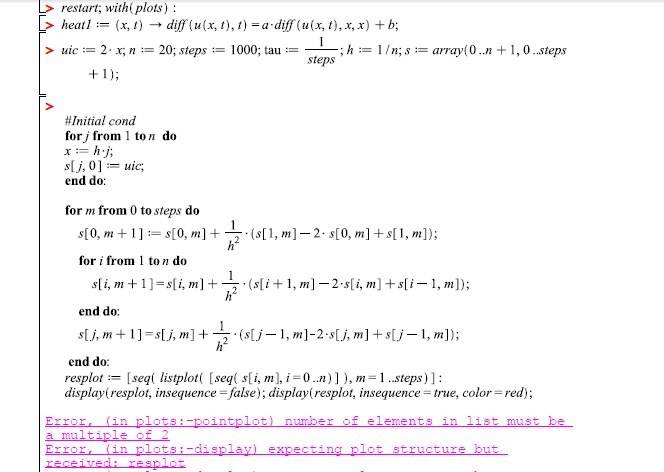
I have written the code in Maple for Heat equation with Neumann B.C. Could anyone check it? I will be very grateful!

Heat equation: diff(u(x,t),t)=diff(u(x,t),x,x);
Initial condition: U(x,0)=2*x;
Boundary conditions: Ux(0,t)=0; Ux(L,t)=0;
I use centered difference approximation for the Neumann conditions. For my case:

ec9a874377a5.jpg

The code:
7f770ce86447.jpg


I really do not know about my mistakes. I know how to solve it with Dirichle B.C. But I do not know how to write the code in Maple for Neumann B.C.
Thank You!
 
Physics news on Phys.org
</code>My suggestion would be to use the pdsolve command in Maple. This command allows you to solve Partial Differential Equations (PDE). You can specify the boundary conditions and initial conditions in the command and it will generate the solution to your PDE. For example, for the Heat equation with Neumann B.C., the following command could be used: pdsolve(diff(u(x,t),t)=diff(u(x,t),x,x),u(x,0)=2*x,u(0,t)=0,u(L,t)=0);Hope this helps!
 

Similar threads

  • · Replies 1 ·
Replies
1
Views
3K
  • · Replies 0 ·
Replies
0
Views
2K
  • · Replies 1 ·
Replies
1
Views
2K
  • · Replies 4 ·
Replies
4
Views
3K
  • · Replies 4 ·
Replies
4
Views
4K
  • · Replies 4 ·
Replies
4
Views
3K
  • · Replies 9 ·
Replies
9
Views
6K
  • · Replies 5 ·
Replies
5
Views
1K
Replies
3
Views
2K
  • · Replies 1 ·
Replies
1
Views
4K