user366312
Gold Member
- 88
- 3
- Homework Statement
- I need to create a histogram of Maxwell-Boltzman's distribution.
I have written the following source code:
[CODE lang="csharp" title="Maxwell-Bolzman" highlight="79, 81"]using System;
public class CommonDistributions
{
public static double Uniform(Random random)
{
return random.NextDouble();
}
static double Gaussian(Random random)
{
return Math.Sqrt(-2 * Math.Log(Uniform(random))) * Math.Cos(2 * Math.PI * Uniform(random));
}
public static double Gaussian(Random random, double mu, double sigma)
{
return sigma * Gaussian(random) + mu;
}
}
public class MaxwellBolzman
{
static double KB = 1.38064852e-23;
static double MaxwellVariance(double mass, double temperature)
{
return Math.Sqrt(KB * temperature / mass);
}
static double MaxwellComponent(Random random, double mass, double temperature)
{
double mu = 0.0;
double sigma = MaxwellVariance(mass, temperature);
return CommonDistributions.Gaussian(random, mu, sigma);
}
public static double Maxwell(Random random, double mass, double temperature)
{
double one = MaxwellComponent(random, mass, temperature);
double two = MaxwellComponent(random, mass, temperature);
double thr = MaxwellComponent(random, mass, temperature);
return Math.Sqrt(one * one + two * two + thr * thr);
}
}
public static class Normalization
{
public static int Normalize(double n_bins, double mu, double sigma, double gaussian)
{
var z = (gaussian - mu) / sigma;
if (z > 3 || z < -3)
{
return -1;
}
else
{
return (int)((z + 3) * n_bins / 6d);
}
}
}
class Program
{
static void Main(string[] args)
{
const double N = 1000000;
int time = (int)N;
int binsCount = 51;
Random rand = new Random();
int[] bins = new int[binsCount];
double mass = 14 * 1.67e-27;
double T = 300;
for (int i = 0; i < time; i++)
{
double gauss = MaxwellBolzman.Next(rand, mass, T);
int index = Normalization.Normalize(binsCount, mass, T, gauss);
if (index >= 0)
{
bins[index]++;
}
}
PointPairList list = new PointPairList();
for (int i = 0; i < bins.Length; i++)
{
list.Add(i, bins);
}
PlotForm form = new PlotForm("Maxwell-Bolzman");
form.AddBar(list, "Actual", Color.Blue);
form.AxisChange();
form.ShowDialog();
}
}[/CODE]
It gives the following output:
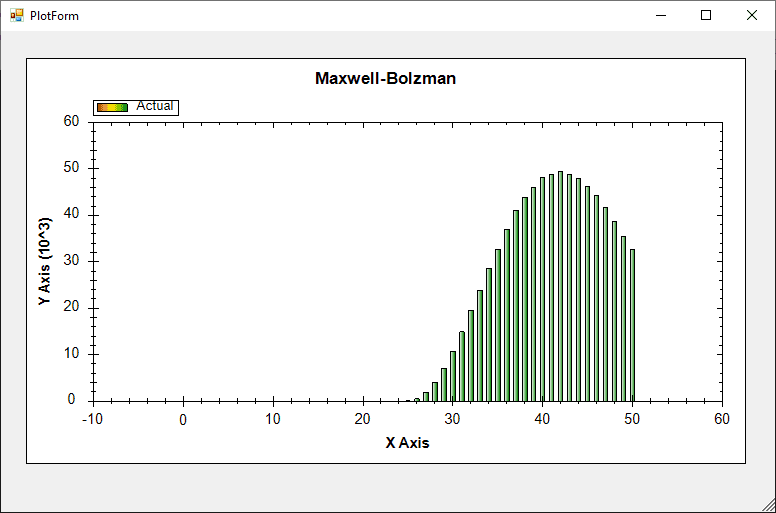
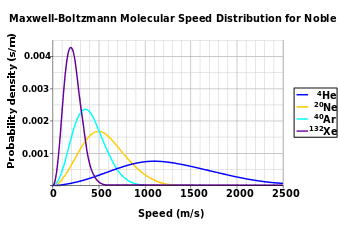
But, according to this link, the graph should look like the following:
[CODE lang="csharp" title="Maxwell-Bolzman" highlight="79, 81"]using System;
public class CommonDistributions
{
public static double Uniform(Random random)
{
return random.NextDouble();
}
static double Gaussian(Random random)
{
return Math.Sqrt(-2 * Math.Log(Uniform(random))) * Math.Cos(2 * Math.PI * Uniform(random));
}
public static double Gaussian(Random random, double mu, double sigma)
{
return sigma * Gaussian(random) + mu;
}
}
public class MaxwellBolzman
{
static double KB = 1.38064852e-23;
static double MaxwellVariance(double mass, double temperature)
{
return Math.Sqrt(KB * temperature / mass);
}
static double MaxwellComponent(Random random, double mass, double temperature)
{
double mu = 0.0;
double sigma = MaxwellVariance(mass, temperature);
return CommonDistributions.Gaussian(random, mu, sigma);
}
public static double Maxwell(Random random, double mass, double temperature)
{
double one = MaxwellComponent(random, mass, temperature);
double two = MaxwellComponent(random, mass, temperature);
double thr = MaxwellComponent(random, mass, temperature);
return Math.Sqrt(one * one + two * two + thr * thr);
}
}
public static class Normalization
{
public static int Normalize(double n_bins, double mu, double sigma, double gaussian)
{
var z = (gaussian - mu) / sigma;
if (z > 3 || z < -3)
{
return -1;
}
else
{
return (int)((z + 3) * n_bins / 6d);
}
}
}
class Program
{
static void Main(string[] args)
{
const double N = 1000000;
int time = (int)N;
int binsCount = 51;
Random rand = new Random();
int[] bins = new int[binsCount];
double mass = 14 * 1.67e-27;
double T = 300;
for (int i = 0; i < time; i++)
{
double gauss = MaxwellBolzman.Next(rand, mass, T);
int index = Normalization.Normalize(binsCount, mass, T, gauss);
if (index >= 0)
{
bins[index]++;
}
}
PointPairList list = new PointPairList();
for (int i = 0; i < bins.Length; i++)
{
list.Add(i, bins);
}
PlotForm form = new PlotForm("Maxwell-Bolzman");
form.AddBar(list, "Actual", Color.Blue);
form.AxisChange();
form.ShowDialog();
}
}[/CODE]
It gives the following output:
But, according to this link, the graph should look like the following: