karimi67
- 1
- 0
hi
there is an assembly of parts which i want to do static analyse on. i make the parts in cataia and import them as ''igs'' into workbench.problem 1: there are near 7 parts in my assembly which when gets into ansys , ansys doesn't recognize some of them and doesn't show them but it recognize the other parts as solids1,2,3... what can i do if i want the whole assembly in ansys ?
problem 2: instead of importing the whole , after importing some of the parts i tried to make the other parts by its geometry feature but after making the part and pressing generate ansys automatically turns the whole assembly as one parts , i mean it doesn't know the contact sufaces anymore , it automatically merge the whole contact surfaces together . what can i do?> this are the assembly pls take a lokk
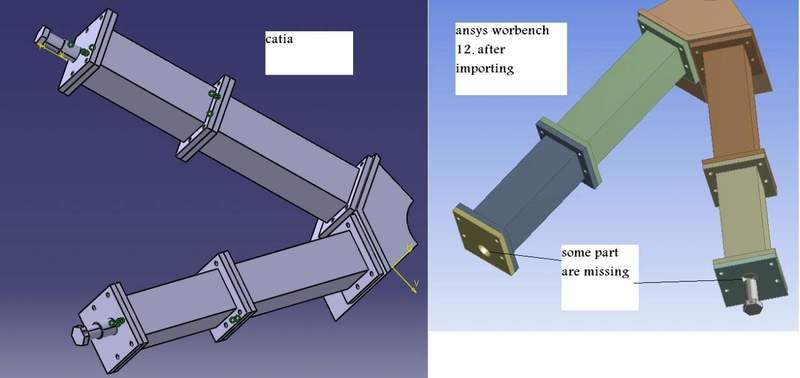
there is an assembly of parts which i want to do static analyse on. i make the parts in cataia and import them as ''igs'' into workbench.problem 1: there are near 7 parts in my assembly which when gets into ansys , ansys doesn't recognize some of them and doesn't show them but it recognize the other parts as solids1,2,3... what can i do if i want the whole assembly in ansys ?
problem 2: instead of importing the whole , after importing some of the parts i tried to make the other parts by its geometry feature but after making the part and pressing generate ansys automatically turns the whole assembly as one parts , i mean it doesn't know the contact sufaces anymore , it automatically merge the whole contact surfaces together . what can i do?> this are the assembly pls take a lokk