How Do You Calculate Day-Specific Phase Shifts in Excel for Sine Waves?

Click For Summary

Discussion Overview

The discussion revolves around calculating phase shifts for sine waves in Excel, specifically how to adjust the sine wave based on a specified number of days for both forward and backward shifts. Participants explore the implications of changing cycle lengths and how to implement these calculations effectively in Excel.

Discussion Character

  • Technical explanation
  • Mathematical reasoning
  • Debate/contested

Main Points Raised

  • One participant describes their current setup for generating a sine wave in Excel, including parameters for cycle length and phase shift.
  • Another participant provides the general sine wave expression, indicating the roles of amplitude, period, and phase shift.
  • There is a repeated emphasis on calculating the phase shift to achieve a specific number of days forward or backward, with examples given (e.g., 20 days).
  • Concerns are raised about the clarity of attached screenshots, with suggestions to provide clearer visual aids instead of Excel files.
  • A suggestion is made regarding a different form of the sine wave that could facilitate the desired phase shift, indicating a need for clarity on cell references used in the calculations.

Areas of Agreement / Disagreement

Participants express a shared understanding of the sine wave functionality and the need for a formula to calculate phase shifts. However, there is no consensus on the exact formula or method to achieve the desired phase shift, and multiple approaches are suggested.

Contextual Notes

Participants note that the cycle length of the sine wave can vary, which may affect the calculations. There is also mention of potential issues with the clarity of visual aids provided, which could impact the discussion.

steven757
Messages
7
Reaction score
1
TL;DR
Phase Shift
Hi,

I have created a sine wave with the following options:

1.) - changing the period/length in days of the sine wave (Cycle Length in Days)

2.) - calculating the start value of the "dummy" so that the sine wave always starts with -1 (Dummy Start at Cycle Trough) when the phase shift is set to "0".

3.) - calculating the phase shift, so that the sine wave moves a specific amount of time/days forward when I enter a positive value greater "0" in the "Phase Shift" input cell ("N2") or backward when I enter a negative value smaller "0" in the "Phase Shift" input cell ("N2").

Here is my Excel formula:

=+SIN((2*PI()*$H$2*B4)-$N$2)

I have attached my Excel file so you can easily see how my calculations work.

Now my problem/question:
I want make a phase shift of the sine wave with a specific amount of days e.g. 20 days forward or backward.

How can I calculate the phase shift value I enter in the cell "N2" with a formula so that the sine wave moves exactly e.g. 20 days forward or backward?

This formula should of course also work when I change the period/length in days of the sine wave (Cycle Length in Days) I enter in cell "F2".

Many thanks for your help.

Steven
 

Attachments

Physics news on Phys.org
A sine wave has the expression ##y(t)=A\cdot \sin(ct+p)##. ##A## is the amplitude, ##1/c## the period, and ##p## the phase shift.
 
  • Like
Likes   Reactions: dextercioby
steven757 said:
Summary:: Phase Shift

Now my problem/question:
I want make a phase shift of the sine wave with a specific amount of days e.g. 20 days forward or backward.

How can I calculate the phase shift value I enter in the cell "N2" with a formula so that the sine wave moves exactly e.g. 20 days forward or backward?

1626354531430.png

https://www.electronics-tutorials.ws/wp-content/uploads/2018/05/accircuits-acp27.gif
 
Hi fresh_42 and berkeman,

Thank you for your answers.

I have understood the sine wave functionality and the issue with the positive and negative phase.

What I want is a formula to calculate the phase shift exactly as described in my post above. I have also attached an Excel file so you can see what I want.

Thanks
 
steven757 said:
Summary:: Phase Shift

Now my problem/question:
I want make a phase shift of the sine wave with a specific amount of days e.g. 20 days forward or backward.
How many days is a full cycle of the sine wave? That corresponds to a full ##2\pi## cycle of the sine wave.
steven757 said:
I have also attached an Excel file so you can see what I want.
We generally don't open Excel file attachments around here. It's too easy for there to be problems embedded in them. Instead, just attach a screenshot PDF or JPEG that shows the cells and formulas that you are asking about. Thanks.
 
Hi berkeman,

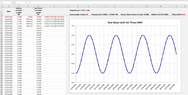
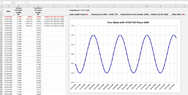
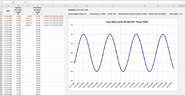
I have attached three screenshots:

1.) - with NO phase shift (in cell P2 the value 0.00 is entered)
2.) - with POSITIVE phase shift (in cell P2 the value 1.00 is entered)
3.) - with NEGATIVE phase shift (in cell P2 the value -1.00 is entered)

All screenshots uses 80 days for a full cycle of the sine wave. BUT the cycle length changes, it is NOT always 80 days it could be also 125 days, 95 days, 168 days, and so forth.

I hope this helps.
 

Attachments

  • Sine Waves with NEGATIVE Phase Shifts.png
    Sine Waves with NEGATIVE Phase Shifts.png
    36.4 KB · Views: 185
  • Sine Waves with NO Phase Shifts.png
    Sine Waves with NO Phase Shifts.png
    34.2 KB · Views: 208
  • Sine Waves with POSSIRIVE Phase Shifts.png
    Sine Waves with POSSIRIVE Phase Shifts.png
    34.7 KB · Views: 211
  • Like
Likes   Reactions: jim mcnamara
I have noticed that the screenshots are not very sharp and also can't easily be read so I have attached a PDF file.
 

Attachments

Last edited:
steven757 said:
3.) - calculating the phase shift, so that the sine wave moves a specific amount of time/days forward when I enter a positive value greater "0" in the "Phase Shift" input cell ("N2") or backward when I enter a negative value smaller "0" in the "Phase Shift" input cell ("N2").

Here is my Excel formula:

=+SIN((2*PI()*$H$2*B4)-$N$2)

You want a different form of the sine wave, sin(k(d - d0))

A positive value of d0 will shift the sine wave left by d0 days, a negative value will shift it right.

I'm not sure which of those cell references corresponds to the day number d. But basically you want the shift to be grouped with the day, (d - d0).
 

Similar threads

  • · Replies 8 ·
Replies
8
Views
2K
  • · Replies 16 ·
Replies
16
Views
15K
  • · Replies 6 ·
Replies
6
Views
3K
  • · Replies 1 ·
Replies
1
Views
6K
  • · Replies 6 ·
Replies
6
Views
5K
  • · Replies 3 ·
Replies
3
Views
3K
  • · Replies 2 ·
Replies
2
Views
2K
  • · Replies 1 ·
Replies
1
Views
2K
  • · Replies 10 ·
Replies
10
Views
1K
  • · Replies 6 ·
Replies
6
Views
2K