How is the MOC 3052 triac driver optocoupler supposed to work?

  • Thread starter Thread starter Wrichik Basu
  • Start date Start date
  • Tags Tags
    Work
Click For Summary
SUMMARY

The MOC 3052 Triac driver optocoupler is designed to control a BT 139 Triac, with the Gate connected to the optocoupler's green wire. When the 5V DC supply is active, the LED should illuminate only when connected to the correct terminals. However, unexpected behavior occurs when the LED glows with incorrect connections, indicating potential wiring issues or misunderstandings of the circuit. Properly following the datasheet's wiring diagram, particularly ensuring the correct orientation of MT1 and MT2, resolves these issues and allows for expected operation.

PREREQUISITES
  • Understanding of optocouplers, specifically the MOC 3052 model.
  • Familiarity with Triac operation, particularly the BT 139 specifications.
  • Basic knowledge of AC and DC voltage measurements.
  • Ability to read and interpret electronic circuit diagrams.
NEXT STEPS
  • Review the MOC 3052 datasheet for detailed wiring instructions.
  • Study the operational characteristics of the BT 139 Triac, focusing on gate current and latching current.
  • Learn about the significance of resistor values in Triac circuits and their impact on performance.
  • Explore troubleshooting techniques for optocoupler and Triac circuits to identify common issues.
USEFUL FOR

Electronics enthusiasts, circuit designers, and engineers working with optocouplers and Triacs, particularly those troubleshooting or designing control circuits for AC loads.

Wrichik Basu
Science Advisor
Insights Author
Gold Member
Messages
2,180
Reaction score
2,690
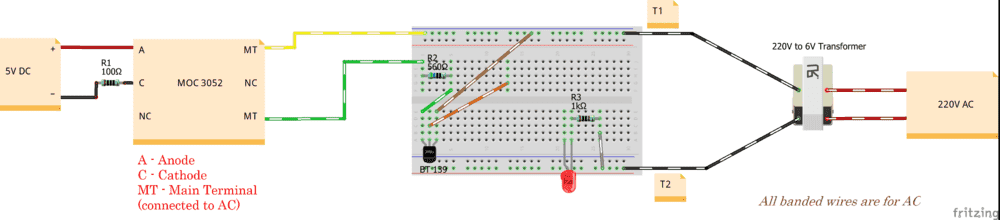
I have the following circuit with the MOC 3052 Triac driver optocoupler:
1608825062158.png


The diagram of the MOC 3052 has been made with respect to its datasheet. The two legs of the transformer are labelled T1 and T2. The green wire of the optocoupler has been connected to the Gate of the BT 139 Triac. Also, as you can see, the LED is connected to T2 via a resistor. To switch on the LED, its other terminal has to be connected to T1. (This has been tested to work.)

Now, the two main terminals (MT) of the optocoupler are supposed to be connected only when the 5V DC supply is on. Am I right?

If yes, this is what I found instead: when the 5V DC supply is on, the LED glows when touched to either the yellow wire or the green wire (or to the gate of the Triac). Fine, that's expected. Now, I switch off the 5V DC. The LED glows when connected to the yellow terminal (expected), but it glows when connected to the green wire as well, which is unexpected. Why does this happen?

I have rechecked my wiring, and everything seems to be fine.

Also, when the DC is on, the Triac is supposed to be turned on by the optocoupler. I checked and found that the Gate is getting a voltage of around 7.4V AC (expected, as mains is currently > 220V) , but the Triac is still not on as the LED does not glow when connected to the orange wire. Where am I going wrong?
 
Last edited:
Engineering news on Phys.org
Wrichik Basu said:
it glows when connected to the green wire as well
Because current can flow through the Triac from Gate to MT1 to complete the circuit.

Wrichik Basu said:
Gate is getting a voltage of around 7.4V
Somethings not right here, maybe you could describe it more carefully? The Triac Gate should look like a diode, and can't support 7V.

Try rewiring your circuit like Figure 7 in the datasheet, so the Gate trigger current flows to/from MT2 through the resistor & IC to the Gate and then through MT1 to return to the source.

Also, your LED test load may not have enough current to make the Triac latch on so you can't trigger it with a pulse. However, it will turn on when the Gate current is flowing.

This is a good review of how Triacs work:
https://www.electronicshub.org/triac/
 
If there is a clearer electronic circuit diagram, it will be easier to understand. In any case, I suspect that the problem is related to latching current and holding current. Please try to carefully check whether the latching current and holding current are sufficient to maintain the normal operation of the circuit.
 
Last edited:
alan123hk said:
If there is a clearer electronic circuit diagram, it will be easier to understand. In any case, I suspect that the problem is related to latching current and holding current. Please try to carefully check whether the latching current and holding current are sufficient to maintain the normal operation of the circuit.
Yes, that will be an issue, but not for this experiment. He is continuously triggering in this test.

However, I 100% agree. There is a good reason that EEs always have a schematic.
 
  • Like
Likes   Reactions: alan123hk
DaveE said:
Because current can flow through the Triac from Gate to MT1 to complete the circuit.
Okay, that explains it.
DaveE said:
Somethings not right here, maybe you could describe it more carefully?
Currently the potential difference (P.D.) between T1 and T2 of the transformer is 7.28V (RMS). I replaced R2 from 560 Ω to 1 kΩ. With the multimeter, the P.D. between the gate and T2 is still around 7.28V.

The BT 139 datasheet says that maximum gate current is 2 A, and peak gate power is 5 W. The power rating of my resistor is 250 mW, so with the peak voltage being 10.3 V, the current came out to be 0.0243 A. Using V=IR, the resistance comes out to be 424 Ω. I am using 1 kΩ currently. Am I going wrong somewhere in my calculations?
DaveE said:
Try rewiring your circuit like Figure 7 in the datasheet, so the Gate trigger current flows to/from MT2 through the resistor & IC to the Gate and then through MT1 to return to the source.
That's exactly the problem — I mistakenly mixed up MT1 and MT2. Now the LED, when connected to MT1, glows only when the 5V DC supply is on. Thanks!
 
  • Like
Likes   Reactions: DaveE

Similar threads

  • · Replies 2 ·
Replies
2
Views
2K
Replies
7
Views
2K
Replies
12
Views
2K
  • · Replies 8 ·
Replies
8
Views
2K
  • · Replies 3 ·
Replies
3
Views
3K
Replies
8
Views
4K
Replies
6
Views
5K
  • · Replies 6 ·
Replies
6
Views
2K
  • · Replies 4 ·
Replies
4
Views
1K
Replies
3
Views
5K