How to give a step input in Matlab?

Click For Summary
SUMMARY

The discussion focuses on implementing a step input for a state space equation in MATLAB using the ODE45 solver. The user requires a method to define the acceleration function, specifically for theta double dot, which alternates between +63 and -63 for 0.136 milliseconds each. Key parameters include Omega at 219, Zeta at 0.03, and Gamma(i) divided by M(i) at 0.01. The user seeks assistance in coding this functionality to achieve the expected oscillatory graph output.

PREREQUISITES
  • Understanding of MATLAB programming, specifically ODE45 function.
  • Familiarity with state space equations and their representation.
  • Knowledge of conditional statements in MATLAB for defining piecewise functions.
  • Basic concepts of control systems and oscillatory behavior in dynamic systems.
NEXT STEPS
  • Research how to implement piecewise functions in MATLAB for dynamic simulations.
  • Learn about MATLAB's ODE45 solver and its parameters for better control over simulations.
  • Explore state space representation and its applications in control systems.
  • Investigate methods for visualizing simulation results in MATLAB to compare expected vs. actual outputs.
USEFUL FOR

Engineers, control system designers, and MATLAB users looking to simulate dynamic systems with step inputs and analyze their behavior over time.

Ben9622111222
Messages
31
Reaction score
0
Hello,

I have a state space equation at hand.. This attached with this...

upload_2015-9-25_7-50-55.png

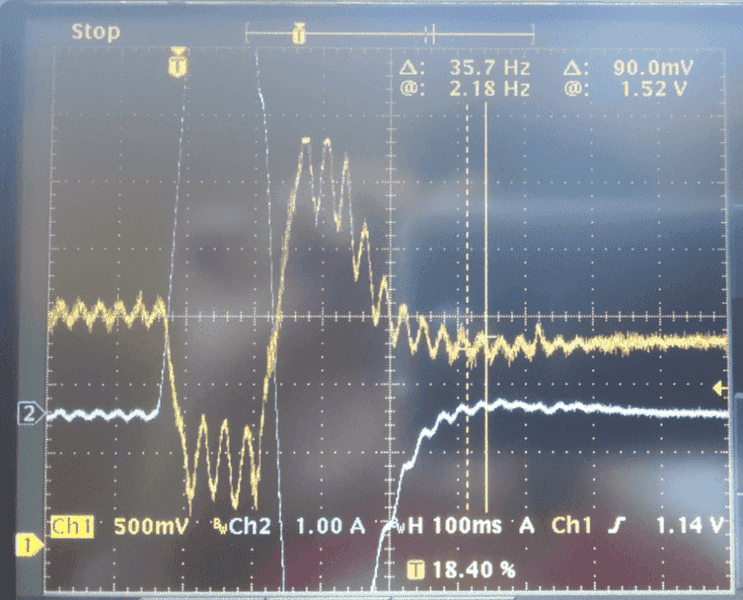
Now the term (theta double dot) is a positive step for 0,136 milli seconds and negative step for next 0,136 millisecond and 0 at all other times.
So that when I simulate I will get a graph as below:
upload_2015-9-25_7-53-54.png

This is the nature of the graph I am expecting.

Iam using Matlab ODE45 to solve this. It is pretty easy I think, but I can't figure out how to give this acceleration function.

I hope the question is clear. The values are

Omega = 219,
Zeta = 0,03
Gamma(i) divided by M(i)=0,01
theta double dot = -63 and +63 in the above said intervals respectively.
 

Attachments

  • upload_2015-9-25_7-59-11.png
    upload_2015-9-25_7-59-11.png
    144.2 KB · Views: 496
Physics news on Phys.org
Posting code would be more helpful than that picture :smile:

The value of the independent variable (t in your case) is passed to the user-defined function calculating the derivatives. You can easily calculate the value of ##\ddot{\theta}## in that function using if's based on the value of t.
 
The code I used and the results are attached here. Obviously its wrong. The expected nature of the curve is like the one shown in the first post( the oscilloscope display). Please help if anyone knows.
matlab code.JPG
command line.JPG
matlab graph.JPG
 

Similar threads

Replies
5
Views
8K
  • · Replies 5 ·
Replies
5
Views
6K
  • · Replies 1 ·
Replies
1
Views
3K
  • · Replies 1 ·
Replies
1
Views
2K
  • · Replies 3 ·
Replies
3
Views
2K
  • · Replies 6 ·
Replies
6
Views
4K
  • · Replies 13 ·
Replies
13
Views
4K