Improving Fourier Transform Visualization in Python

Click For Summary
SUMMARY

This discussion focuses on improving Fourier Transform visualization in Python using NumPy and Matplotlib. Thibaut seeks to enhance the clarity of the Fourier transform peaks and center the zero-order peak. Key solutions include utilizing the NumPy function fftshift to reorder the FFT output and adjusting the color map in Matplotlib for better contrast. These adjustments will significantly improve the visual representation of the Fourier transform data.

PREREQUISITES
  • Familiarity with Python programming
  • Understanding of Fourier Transform concepts
  • Experience with NumPy 1.21 or later
  • Knowledge of Matplotlib 3.4 or later for data visualization
NEXT STEPS
  • Implement numpy.fft.fftshift to center the zero-frequency component
  • Explore various color maps in Matplotlib to enhance data visualization
  • Study the documentation for numpy.fft.fft2 for advanced Fourier Transform techniques
  • Learn about image interpolation methods in Matplotlib for better visual output
USEFUL FOR

Data scientists, Python developers, and anyone involved in signal processing or data visualization who seeks to enhance their Fourier Transform representations.

Tibo123
Messages
6
Reaction score
0
Hello,

My name is Thibaut. I am looking to improve my code in python in order to have a better look a my Fourier transform. as you can see on the image, we barely see any detail of the peaks on the image. Also it's not centred. the zero order peak in on the corner, not in the centre.

Any idea how to fix it?

Thibaut

image: click here
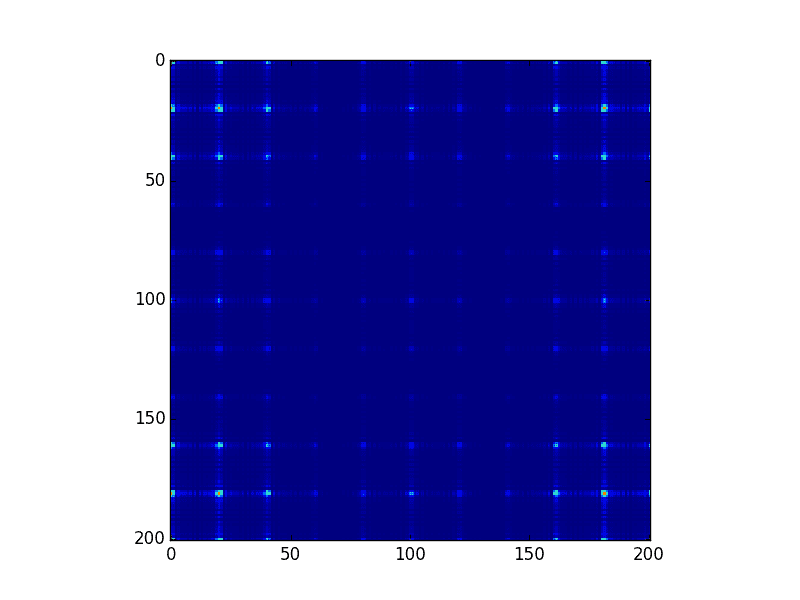
figure_1.png


Python:
import numpy as np
import matplotlib.pyplot as pltx = np.linspace(-100, 100.0, 201.0, endpoint = True)
y = np.linspace(-100, 100.0, 201.0, endpoint = True)
xx, yy = np.meshgrid(x, y, sparse=True)
def f1(a,b):
    return np.piecewise(a, [abs(a) < 2, abs(a) >= 2], [1, 0]) * np.piecewise(b, [abs(b) < 2, abs(b) >= 2], [1, 0])
       
def f2(r,c):
    spacing=10
    a=np.zeros([r,c])
    for ii in range (r):
        for jj in range(c):
           if (ii%spacing)==0 and (jj%spacing)==0 and abs(ii-100)<55 and abs(jj-100)<55:
               a[ii,jj]=1
           else:
               a[ii,jj]=0
    return a

h = np.fft.fft2(f1(xx,yy))
g = np.fft.fft2(f2(201,201))

k=abs(h)*abs(g)plt.imshow(np.abs(k),interpolation='nearest')     
#plt.imshow(f1(xx,yy),interpolation='nearest')
#plt.imshow(f2(200,200),interpolation='nearest')
plt.show()
 
Technology news on Phys.org
It is good practice to read the documentation behind some of these "ready-to-use" functions when using them.

By default, the Discrete Fast Fourier Transform in Numpy returns the components in standard order, which contains the zero-frequency term first, followed by the positive frequency terms (in increasing order) up till the Nyquist frequency and finally the negative frequency terms (in decreasing negative order). The reason for this default behaviour is due to the way the FFT algorithm works, if I'm not mistaken. With this knowledge, you can re-order the array yourself, or use the in-built fftshift function.

As for your visualisation, you can always change the colour map to one with better contrast for your data range. The details can be easily found on the matplotlib website.
 

Similar threads

  • · Replies 7 ·
Replies
7
Views
4K
Replies
4
Views
5K
  • · Replies 7 ·
Replies
7
Views
3K
  • · Replies 2 ·
Replies
2
Views
3K
Replies
9
Views
8K