IPad bloated battery & securing files

Click For Summary
SUMMARY

The discussion centers on the risks associated with a bloated battery in an iPad 3rd generation, specifically regarding potential explosions and data security. Users express concerns about the battery's condition and the implications of having sensitive data on the device. Recommendations include safely transporting the device to a service center for battery removal and considering data destruction methods, such as physically damaging the memory chip. The conversation emphasizes the importance of using secure password management practices and the risks of storing sensitive information on mobile devices.

PREREQUISITES
  • Understanding of lithium-ion battery safety and risks
  • Familiarity with iPad 3rd generation hardware components
  • Knowledge of data security practices, including encryption and password management
  • Basic skills in electronics repair, particularly soldering and component removal
NEXT STEPS
  • Research lithium-ion battery disposal and safety protocols
  • Learn about iFixit repair guides for iPad 3rd generation
  • Explore secure password management applications and their features
  • Investigate methods for physically destroying electronic data, such as shredding or incineration
USEFUL FOR

Individuals concerned about the safety of bloated lithium-ion batteries, data security professionals, and anyone involved in electronics repair or data destruction.

chirhone
Messages
300
Reaction score
25
I left my Ipad 3rd gen on a table for 2 weeks and today I just saw it in this condition:
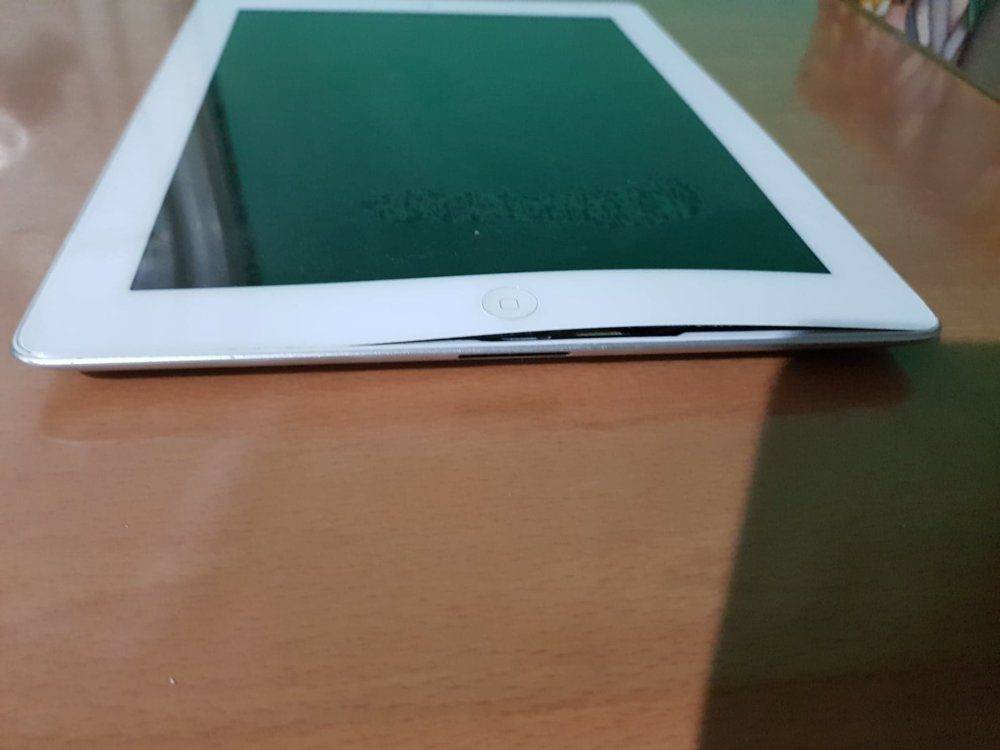
battery movement.jpg


Has anyone ever seen anything like it? In your experience, is the screen salvageable and is the battery in that location?

It's an old (3rd gen 64gig) made in 2012.

I don't use it anymore because it can't run many programs. I don't want the service center to remove the battery because they may read my files. And battery replacement for it is expensive. Where is the memory located in case I'll let someone just dispose of the battery and I'll keep the memory?

Also if I'll just wrap it and keep it without removing the bloated battery. What would happen to it?
 
Last edited:
Computer science news on Phys.org
I read on the internet a bloated battery can explode. And I found a service center that can remove the battery while I watch him do it, but it will be 18 hours before I can visit them. So I put the ipad in a metallic container of good thickness and taped it to seal from the air.
ipad isolate.jpg


But I need to know if the ipad can explode and shred the metallic container itself. Without any source of oxygen. Can the bloated lithium battery chain react and cause an explosion like a mini-C4? How do you compute how much energy can a bloated lithium battery explode? I saw in the net the battery is like this:

https://www.stuff-review.com/wp-con...teardown-pulling-out-battery-1603-590x442.jpg

I know I need to send it asap to the service center but it will be 18 hours before that can happen. I'll leave it in center of parking in concrete but concerned about the explosive energy of it.
 

Attachments

  • 1581848494389.png
    1581848494389.png
    47.6 KB · Views: 301
Here is background of the concerns

20200216_213026.jpg


This is put on amazon package when returning anything with lithium batteries even tiny ones.

https://www.google.com/amp/s/www.th...on-cargo-ban-faa-department-of-transportation

Last year I was in Singapore and got approached by security in the boarding area. They said xray showed I put a cellphone in the checked in baggage. They requested my key or they will open it up to remove the cellphone and battery.

This is because of the genuine concerns it can explode. The above links quote:

"Most infamously, airlines banned passengersfrom bringing a Samsung Galaxy Note 7 on a commercial flight because of its battery malfunction that led to the device catching fire and in some cases exploding."

How does it really explode? I already wrapped the ipad metal container with strings. My concern now is the escaping gas when I bring it to the service center tomorrow inside my car. Would the escaped gas filled my car?
 
Had bloated batteries lying around for months without any problems. The issue with the Samsung Note 7 was the batteries catching fire due to bad design. I don't think you have anything to worry about in taht aspect, just don't bother trying to turn it on.

Memorywise it's likely to be soldered onto the motherboard so not really removable. If you don't want the device then just pry it open and remove the battery then just smash the ipad in half. No one is going to go through the bother of unsoldering memory and soldering it into another device just to check what is on it on a smashed device.
 
MikeeMiracle said:
Had bloated batteries lying around for months without any problems. The issue with the Samsung Note 7 was the batteries catching fire due to bad design. I don't think you have anything to worry about in taht aspect, just don't bother trying to turn it on.

Memorywise it's likely to be soldered onto the motherboard so not really removable. If you don't want the device then just pry it open and remove the battery then just smash the ipad in half. No one is going to go through the bother of unsoldering memory and soldering it into another device just to check what is on it on a smashed device.

No more problem with it. I was able to transport it safely by enclosing in grocery plastic that can trap moisture and air so any leaking gas can be contained even if it gets out of the metal container. The service center tested the unit and said the circuit itself was already damaged from grounded battery. Can that happen? Here is inside it.

received_213878582998052.jpeg


received_602739967233771.jpeg
Where is the 64 gig memory located? I read stuff by Hawking that even if you burn it, information is not destroyed (remember the black hole information paradox)? So I need to retrieve it and scramble (encrypt it) before burning it for ultimate security. It contains some passwords with wide ranging security implications.
 
There's a few things to note here.

If no one knows it's important then there is no reason to think it is and go to the bother of trying to retrieve it. I worked for a defence company whose physical building security was not what you would expect so as not to attract attention to it and it seemed like just a normal company's computers.

If you are really determined to do something with the data like encrypt it you need to identfy the memory chip, remove it, find a duplicate device, open that up removing it's memory and solder the memory from the original onto it. In all honestly, it's not worth the hassle, the better method would be just to destroy the original.

iFixit has a breakdown of the device here:

https://www.ifixit.com/Teardown/iPad+3+4G+Teardown/8277

Step 17 & 19 show memory modules in yellow and I think that's what you are after. Take a nail and hammer and put holes through it, the only people capable of retriving any data from it then will be the manufacturer or a nation state and it will be a long slow process to retrieve anything that has not been destroyed by the nail. If your intent on total destruction then try and shred these chips somehow.
 
  • Like
Likes   Reactions: chirhone
Also I have to say it, a mobile device is not the place to store sensitive passwords, they are companion devices and their security is not amazing, even the ones from Apple. A proper encrypted password manager application on a proper computer is far more secure.
 
MikeeMiracle said:
Also I have to say it, a mobile device is not the place to store sensitive passwords, they are companion devices and their security is not amazing, even the ones from Apple. A proper encrypted password manager application on a proper computer is far more secure.

I put my some bank passwords in my "Samsung Notes" app in my S9 and its locked with password. It can be hacked by outsiders and not secured?
 
If you get infected by malware and your storing data unencrypted in standard application with no encryption then that data is not secure. Malware is much easier to detect / remove on a proper computer than a mobile device. Download a proper password manager application if you must put passwords onto your phone.

A better option is to use the banks mobile application, you generally only have to put your password in once that way and then a different code is used to unlock it when needed. That way you don't have to remember your password each time and the application on your phone gets linked to your bank account so that passcode to access it is useless without that specific copy of the application on your phone.

Im assuming you had more than bank passwords on your ipad that you have got so concerned about, passwords can be changed and that is far easier than trying to destroy computer chips.
 
  • #10
MikeeMiracle said:
If you get infected by malware and your storing data unencrypted in standard application with no encryption then that data is not secure. Malware is much easier to detect / remove on a proper computer than a mobile device. Download a proper password manager application if you must put passwords onto your phone.

A better option is to use the banks mobile application, you generally only have to put your password in once that way and then a different code is used to unlock it when needed. That way you don't have to remember your password each time and the application on your phone gets linked to your bank account so that passcode to access it is useless without that specific copy of the application on your phone.

Im assuming you had more than bank passwords on your ipad that you have got so concerned about, passwords can be changed and that is far easier than trying to destroy computer chips.

I used Samsung Pass or fingerprint to log in my bank accounts. Can samsung or others can behind Samsung Pass?

My problem now is with too frequent washing of alcohol for coronavirus, my fingers got so dried, it has difficulty recognizing my fingerprints!
 
  • #11
chirhone said:
I read stuff by Hawking that even if you burn it, information is not destroyed
If you take a hammer to the RAM module, whatever is in it will definitely be destroyed, regardless of what Stephen Hawking has to say on the matter.

The link that @MikeeMiracle gave in post 6 shows where the RAM module is, in step 15. It's shown inside a yellow box.
 
  • #12
Mark44 said:
If you take a hammer to the RAM module, whatever is in it will definitely be destroyed, regardless of what Stephen Hawking has to say on the matter.

The link that @MikeeMiracle gave in post 6 shows where the RAM module is, in step 15. It's shown inside a yellow box.
If you want the data and don't want others snooping it, expertly removing that RAM module will well preserve the data, and it may cost you significantly to get the data back if you can't do it yourself; but smashing the module, although it will make the data unrecoverable for us regular folks, will not definitely sufficiently destroy the data if you need that recovery of the data be beyond the recovery capability of the National Laboratories or the NSA -- if you really need to accomplish that, melt it or burn it to ashes.
 
  • #13
sysprog said:
but smashing the module, although it will make the data unrecoverable for us regular folks, will not definitely sufficiently destroy the data if you need that recovery of the data be beyond the recovery capability of the National Laboratories or the NSA -- if you really need to accomplish that, melt it or burn it to ashes.
A bigger hammer will probably do the trick...
 
  • Like
Likes   Reactions: sysprog
  • #14
Yeah we techs have always worked in accordance with that principle -- use the smallest hammer that will probably work, and if it doesn't work, use a bigger hammer. :wink:
 

Similar threads

Replies
19
Views
6K
  • · Replies 1 ·
Replies
1
Views
3K
  • · Replies 123 ·
5
Replies
123
Views
19K
  • · Replies 8 ·
Replies
8
Views
2K
  • · Replies 3 ·
Replies
3
Views
4K
  • · Replies 6 ·
Replies
6
Views
3K
  • · Replies 4 ·
Replies
4
Views
3K
  • · Replies 1 ·
Replies
1
Views
4K
  • · Replies 42 ·
2
Replies
42
Views
7K
  • · Replies 1 ·
Replies
1
Views
3K