anonim
- 39
- 2
- Homework Statement
- Gui game
- Relevant Equations
- -
Is it possible to bring it into this shape using the gridlayout?
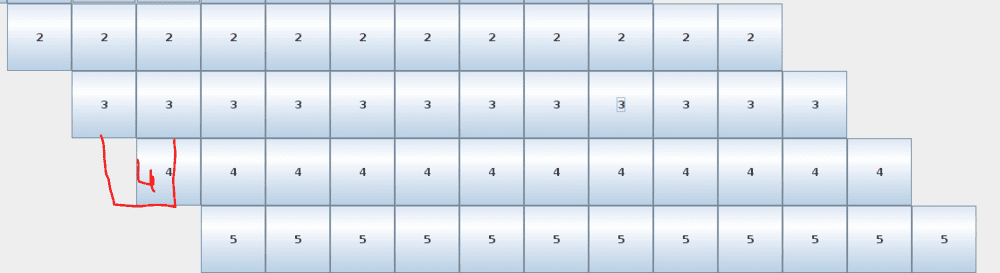 I use empty label to add this empty grid
 This is my code:
actually i don't know much about this , I'm trying to learn
This is my code:
actually i don't know much about this , I'm trying to learn
Java:
import javax.swing.*;
import java.awt.*;
public class test {
    public static void main(String[] args) {
        JFrame frame = new JFrame();
        frame.setTitle("Buttons");
        frame.setSize(800, 800);
        int size=12;
        int flag1=0,count=0,count2=0;
        frame.setLayout(new GridLayout(1,2,0,0));
        JPanel panel = new JPanel();
        GridLayout layout = new GridLayout(size,(size*2),0,0);
        panel.setLayout(layout);

        for(int i=1; size>=i; i++){
            for(int k=0; i-1>k; k++){
                panel.add(new JLabel());
                count2++;
            }

            for(int k=0; size>k; k++){
                JButton button = new JButton(""+i);
                button.setBackground(Color.WHITE);
                panel.add(button);
                count2++;
            }

            for(int k=0; (size*2)-(count2)>k; k++){
                panel.add(new JLabel());
                flag1=1;
            }
            if(flag1==1){
                    count2=0;
                    flag1=0;
            }

        }

        frame.add(panel);
        frame.setVisible(true);
    }
}
Last edited by a moderator: