JButton in JPanel with gridlayout

  • Context: Comp Sci 
  • Thread starter Thread starter anonim
  • Start date Start date
  • Tags Tags
    gui java
Click For Summary
SUMMARY

This discussion focuses on creating a custom layout for JButtons within a JPanel using GridLayout in Java Swing. The provided code demonstrates how to implement a GridLayout with dynamic button creation and empty labels for spacing. The user expresses a preference for using the NetBeans GUI editor for more complex layouts and suggests that GridBagLayout may be a more suitable alternative for intricate designs. The conversation highlights the limitations of GridLayout for advanced UI requirements.

PREREQUISITES
  • Java Swing framework knowledge
  • Understanding of GridLayout and GridBagLayout in Java
  • Familiarity with JPanel and JFrame components
  • Basic programming skills in Java
NEXT STEPS
  • Explore Java Swing GridBagLayout for complex layouts
  • Learn about the NetBeans GUI editor for designing Java applications
  • Investigate event handling in Java Swing for button interactions
  • Study best practices for UI design in Java applications
USEFUL FOR

Java developers, UI designers, and anyone interested in creating complex user interfaces using Java Swing.

anonim
Messages
39
Reaction score
2
Homework Statement
Gui game
Relevant Equations
-
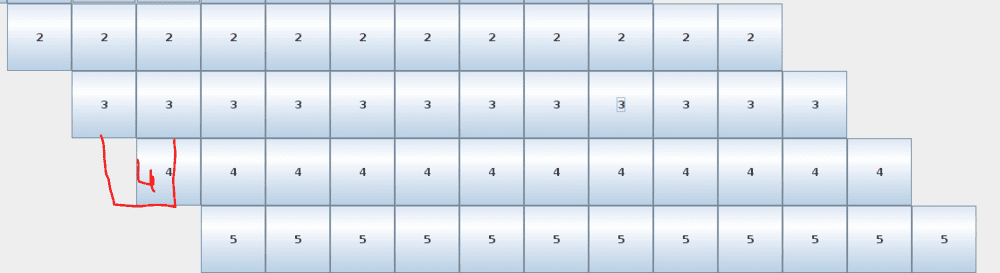
Is it possible to bring it into this shape using the gridlayout?
1611993051269.png
I use empty label to add this empty grid

1611993065565.png
This is my code:
Java:
import javax.swing.*;
import java.awt.*;
public class test {
    public static void main(String[] args) {
        JFrame frame = new JFrame();
        frame.setTitle("Buttons");
        frame.setSize(800, 800);
        int size=12;
        int flag1=0,count=0,count2=0;
        frame.setLayout(new GridLayout(1,2,0,0));
        JPanel panel = new JPanel();
        GridLayout layout = new GridLayout(size,(size*2),0,0);
        panel.setLayout(layout);   

        for(int i=1; size>=i; i++){         
            for(int k=0; i-1>k; k++){
                panel.add(new JLabel());  
                count2++;            
            }
         
            for(int k=0; size>k; k++){
                JButton button = new JButton(""+i);
                button.setBackground(Color.WHITE);
                panel.add(button);
                count2++;
            }
         
            for(int k=0; (size*2)-(count2)>k; k++){                  
                panel.add(new JLabel());
                flag1=1;                                   
            }
            if(flag1==1){
                    count2=0;
                    flag1=0;
            }

        }

        frame.add(panel);
        frame.setVisible(true);
    }
}
actually i don't know much about this , I'm trying to learn
 
Last edited by a moderator:
Physics news on Phys.org
I would use the Netbeans GUI editor to do complex layouts and for this layout, I think grid bag layout is better.
 

Similar threads

  • · Replies 2 ·
Replies
2
Views
5K
  • · Replies 3 ·
Replies
3
Views
4K
  • · Replies 3 ·
Replies
3
Views
3K
  • · Replies 1 ·
Replies
1
Views
1K
  • · Replies 2 ·
Replies
2
Views
2K
  • · Replies 2 ·
Replies
2
Views
3K
  • · Replies 2 ·
Replies
2
Views
7K
  • · Replies 10 ·
Replies
10
Views
4K
  • · Replies 1 ·
Replies
1
Views
1K
  • · Replies 2 ·
Replies
2
Views
2K