"Lost" Content in Excel Spreadsheet

  • Thread starter Thread starter WWGD
  • Start date Start date
  • Tags Tags
    Excel Lost
Click For Summary

Discussion Overview

The discussion revolves around a user experiencing issues with an Excel spreadsheet where the content is not visible despite the file indicating that it contains data. Participants explore potential causes and solutions related to Excel's functionality, settings, and possible software conflicts.

Discussion Character

  • Exploratory
  • Technical explanation
  • Debate/contested

Main Points Raised

  • One participant notes that the file shows an average and count but the data itself is not visible, suggesting a possible issue with the Excel program or file.
  • Another participant questions whether the user is viewing an image instead of the data, referencing the appearance of "picture1."
  • Suggestions are made to open the file in alternative software like Google Sheets or LibreOffice Calc to check for visibility issues.
  • Participants propose switching from page break view to normal view as a potential fix.
  • There is a suggestion that the issue might stem from a Nitro plugin used for importing PDFs into Excel, which may not be functioning correctly.
  • One participant offers to help troubleshoot the file if it is shared, while another notes that the issue seems specific to the user's copy of Excel, as the file opened correctly on another PC.
  • Several participants recommend rebooting the PC and checking for hidden columns within the view settings.
  • A later post humorously describes a solution involving clicking "New Window" in the View tab, which unexpectedly resolved the issue.
  • Participants engage in light-hearted banter about the strange nature of the problem and the "voodoo" solution that worked.

Areas of Agreement / Disagreement

Participants do not reach a consensus on the exact cause of the issue, as multiple potential explanations and solutions are discussed. The problem remains somewhat unresolved, with various hypotheses presented.

Contextual Notes

Limitations include the lack of clarity on whether the issue is due to Excel settings, software conflicts, or user error. The discussion reflects uncertainty about the underlying cause of the visibility problem.

WWGD
Science Advisor
Homework Helper
Messages
7,795
Reaction score
13,095
Hi All,
I somehow cannot see the content of an Excel data file; please see bottom of document listing average of 34133, count of 11199, etc. Yet the data is for some reason I can't figure out, not visible/available. This Excel 2010. EDIT: The saved file has 329KB of data. But only that which is in the screenshot is what I have available. ?
Any ideas? EDIT2: I opened up another document in this same Excel copy which came out without any problems, so it seems the program is not corrupted.
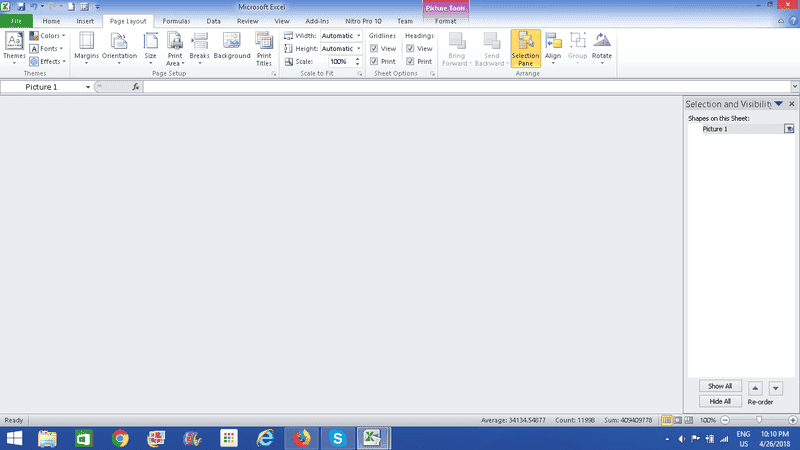
upload_2018-4-26_22-10-34.png
 

Attachments

  • upload_2018-4-26_22-10-34.png
    upload_2018-4-26_22-10-34.png
    23.6 KB · Views: 761
Last edited:
Computer science news on Phys.org
Have you gone to the "view" tab to see if anything there looks odd? Why does the word "picture1" show up? It seems to suggest that you are viewing an image instead of the data.
 
  • Like
Likes   Reactions: davenn and WWGD
phinds said:
Have you gone to the "view" tab to see if anything there looks odd? Why does the word "picture1" show up? It seems to suggest that you are viewing an image instead of the data.
Thanks, I don't see anything unusual : Screenshot of View:

upload_2018-4-26_22-45-37.png
 

Attachments

  • upload_2018-4-26_22-45-37.png
    upload_2018-4-26_22-45-37.png
    28.8 KB · Views: 721
out of sample test:

what happens when you open the excel file in Google Sheets (or Libre office calc or ...)?
 
  • Like
Likes   Reactions: WWGD
I doubt if it will help but try taking it out of page break view and put it back to normal view
 
  • Like
Likes   Reactions: WWGD and davenn
Is this "Excel data file" really a PDF that you're trying to import using the Nitro add in that you have installed? Perhaps it just hasn't read the file properly.
 
  • Like
Likes   Reactions: WWGD
Does Print Preview show anything? Can you post a screenshot of the File, Properties dialog from Windows Explorer? Like this below...

Also, have you tried re-booting your PC?

Excel File Properties.JPG
 

Attachments

  • Excel File Properties.JPG
    Excel File Properties.JPG
    33.8 KB · Views: 1,192
  • Like
Likes   Reactions: WWGD
@WWGD, I have a lot of experience w/ Excel. If you want to send me a copy of the file I'll see if I can figure anything out.
 
  • Like
Likes   Reactions: WWGD and berkeman
phinds said:
@WWGD, I have a lot of experience w/ Excel. If you want to send me a copy of the file I'll see if I can figure anything out.
Thanks, Phinds, but it seems like an issue with _my_ copy of Excel. I was able to open the file up in another PC without any problem.
 
  • #10
WWGD said:
Thanks, Phinds, but it seems like an issue with _my_ copy of Excel. I was able to open the file up in another PC without any problem.
Good. Can you just reinstall Excel?
 
  • #11
berkeman said:
Does Print Preview show anything? Can you post a screenshot of the File, Properties dialog from Windows Explorer? Like this below...

Also, have you tried re-booting your PC?
Here it is View attachment 224770
I checked to see, within 'View' whether there were hidden columns, but that does not seem to be the case:
upload_2018-5-1_14-19-15.png
 

Attachments

  • upload_2018-5-1_14-19-15.png
    upload_2018-5-1_14-19-15.png
    49.7 KB · Views: 668
  • #12
phinds said:
Good. Can you just reinstall Excel?
I may have to; it seems like the only option.
 
  • #13
I could be that plugin that you have installed. Before reinstalling, try disabling the Nitro10 plugin and restarting first.
 
  • #14
Borg said:
I could be that plugin that you have installed. Before reinstalling, try disabling the Nitro10 plugin and restarting first.
Thanks. I don't even remember installing it, though.
 
  • #15
From what I Googled, it looks like it reads in PDF files into Excel and attempts to create a spreadsheet from it. At the beginning of the thread, it sounded like you were doing that and then couldn't read the result. So, if you're using that plugin regularly, it's better to try temporarily disabling it, instead of having to reinstall it later.
 
  • Like
Likes   Reactions: WWGD
  • #16
Borg said:
From what I Googled, it looks like it reads in PDF files into Excel and attempts to create a spreadsheet from it. At the beginning of the thread, it sounded like you were doing that and then couldn't read the result. So, if you're using that plugin regularly, it's better to try temporarily disabling it, instead of having to reinstall it later.
Hi, thanks for the help. I actually did some import-export ( using the Import/Export Wizard )but from SQL Server to Excel and back. Strangely, every thing was working fine until one day I could not find the content in Excel. Will try disabling right now.
[
 
  • #17
Thanks all, problem solved, though by a sort of Voodoo. Hoping someone can understand what happened : I did a search , found a site suggesting I just click on the " New Window" on the "View" tab. I did and file content magically came back without any changes. Guess will need some cat claws, blood of a salamander and the new moon next time something like this happens.
 
  • Like
Likes   Reactions: berkeman
  • #18
WWGD said:
Guess will need some cat claws, blood of a salamander and the new moon next time something like this happens.
This only works if the new moon comes on a Friday, and you stand on one leg while performing the incantation. Standard Microsoft regs.
 
  • Like
Likes   Reactions: WWGD
  • #19
phinds said:
This only works if the new moon comes on a Friday, and you stand on one leg while performing the incantation. Standard Microsoft regs.
Weird thing is you may be working on your file, accidentally hit on a key, not knowing which, and you just entered the Twilight Zone. Fortunately, others have entered it and lived long-enough to exitr it and put in the advice.
 
  • Like
Likes   Reactions: phinds
  • #20
WWGD said:
...you may be working on your file, accidentally hit on a key, not knowing which, and you just entered the Twilight Zone.
Yeah, I can sure see that happening... . :-p . :biggrin:
WWGD said:
to exitr it
Lol... carry on.
 

Similar threads

  • · Replies 20 ·
Replies
20
Views
3K
  • · Replies 5 ·
Replies
5
Views
2K
  • · Replies 2 ·
Replies
2
Views
2K
  • · Replies 1 ·
Replies
1
Views
1K
  • · Replies 14 ·
Replies
14
Views
1K
  • · Replies 14 ·
Replies
14
Views
4K
  • · Replies 6 ·
Replies
6
Views
3K
  • · Replies 3 ·
Replies
3
Views
2K
Replies
4
Views
3K
  • · Replies 1 ·
Replies
1
Views
2K