MCNPX - Question in SDEF card about AXS and EXT

  • Thread starter Thread starter Alexander Camargo
  • Start date Start date
  • Tags Tags
    Limits Mcnp Mcnpx
Click For Summary

Discussion Overview

The discussion revolves around the use of the SDEF card in MCNPX, specifically regarding the AXS and EXT commands for defining limits on the x and y axes in a disk source configuration. Participants explore how to set these limits effectively within the constraints of the commands available.

Discussion Character

  • Technical explanation
  • Debate/contested

Main Points Raised

  • One participant describes their setup with a disk source and seeks clarification on how to define limits for both the x and y axes using the AXS and EXT commands, noting the challenge of using only one command for each.
  • Another participant proposes a simplified approach using a rectangular parallel beam configuration, providing an alternative code snippet and discussing its implications for the setup.
  • A third participant inquires about the potential differences in results when using a cone model compared to the disk source model, suggesting a curiosity about the impact of geometry on outcomes.
  • A later reply suggests that the difference in results between the cone and disk models is likely minimal due to the small angle and low energy involved in the scenario.

Areas of Agreement / Disagreement

Participants express differing views on the best approach to defining limits with the SDEF card, and while there is some agreement on the potential minimal impact of geometry on results, the discussion remains unresolved regarding the optimal configuration for the original problem.

Contextual Notes

Participants have not fully resolved the limitations of the AXS and EXT commands in defining multiple limits, and there are assumptions about the impact of geometry on results that remain unverified.

Alexander Camargo
Messages
37
Reaction score
10
My code version is 2.7

I have a disk source of R=0.3 cm, 60 cm above in z axis. I want set limits for the x and y axis, but, I can only put one command "axs" and "ext". How can i define two limits with one command?

my code it is like this
SDEF pos=0 0 60 rad=d1 axs=1 0 0 ext=d2 PAR=2 ERG=0.018 VEC=0 0 1 DIR=-1
SI1 0 0.3
SP1 -21 1
SI2 -1 9
SP2 0 1

i want define x to -1 to 9, and y to 9 to 9.

Like this
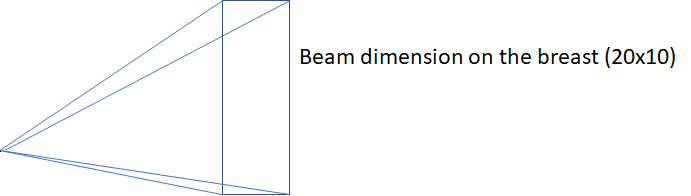
upload_2018-10-24_21-5-38-png.png


Help me in the question, please.
 

Attachments

  • upload_2018-10-24_21-5-38-png.png
    upload_2018-10-24_21-5-38-png.png
    3.3 KB · Views: 648
Engineering news on Phys.org
Hi,
for my part I will simplified with a rectagular parallel beam:
***
sdef par=P pos 0 0 -60 axs 0 0 1 ext 0 vec 0 0 1 dir 1 erg 1 &
X=d1 y=d2 Z=0
Si1 -1 9
sp1 0 1
Si2 -9 9
sp2 0 1
***
In YX plan it gives :

upload_2018-11-2_11-20-35.png
 

Attachments

  • upload_2018-11-2_11-20-35.png
    upload_2018-11-2_11-20-35.png
    21.4 KB · Views: 695
Hi, I'm using the same model as yours. do you know if there is any difference in results the cone model, for this?

very thanks.
 
The difference must be low because the angle is less than 10 deg and the Energy is very low (18 keV)
 

Similar threads

Replies
2
Views
2K
Replies
1
Views
2K
  • · Replies 0 ·
Replies
0
Views
2K
  • · Replies 3 ·
Replies
3
Views
3K
  • · Replies 3 ·
Replies
3
Views
3K
  • · Replies 7 ·
Replies
7
Views
4K
  • · Replies 2 ·
Replies
2
Views
2K
  • · Replies 2 ·
Replies
2
Views
3K
  • · Replies 1 ·
Replies
1
Views
3K
Replies
6
Views
2K