Problem Installing Anaconda 2.4.0.0 , Win 10

  • Thread starter Thread starter WWGD
  • Start date Start date
Click For Summary
SUMMARY

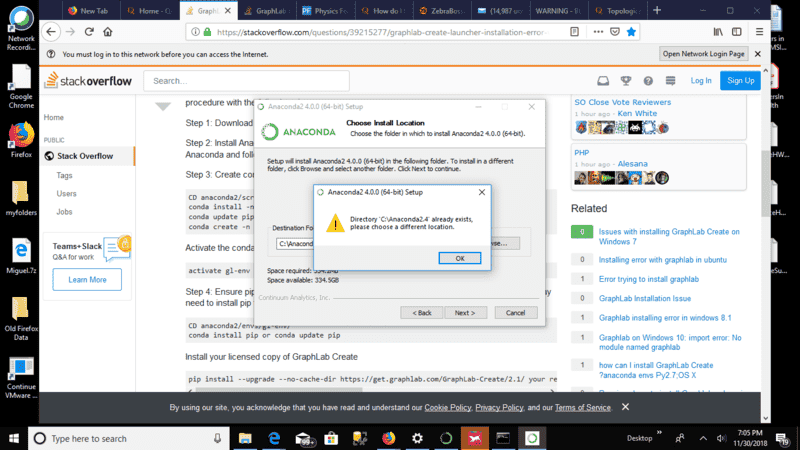
The forum discussion centers on the installation issues of Anaconda 2.4.0.0 on Windows 10, particularly when attempting to install Graphlab Create from Turi. Users encountered an error stating "Directory x already exists, please choose a different location" during installation. The discussion highlights that the installation may require Administrator privileges and suggests using Miniconda as an alternative for managing dependencies. Additionally, users faced dependency issues related to missing MKL BLAS packages, which can be resolved by installing the accelerate package.

PREREQUISITES
  • Understanding of Anaconda 2.4.0.0 installation procedures
  • Familiarity with Python 2.7 and its package management
  • Knowledge of dependency management in Python environments
  • Basic command line usage for conda commands
NEXT STEPS
  • Research how to install the accelerate package in Anaconda
  • Learn about using Miniconda for package management
  • Explore troubleshooting common Anaconda installation errors
  • Investigate the differences between Anaconda and Miniconda
USEFUL FOR

This discussion is beneficial for data scientists, Python developers, and anyone attempting to install Graphlab Create or manage Python environments using Anaconda on Windows systems.

WWGD
Science Advisor
Homework Helper
Messages
7,772
Reaction score
13,002
Hi,
I am having trouble installing Graphlab Create from Turi in my Win10. I . First step is to install Anaconda 2.4.0.0 . Everything goes OK, until I need to choose the destination folder. Then I keep getting the same error message to the effect that "Directory x already exists , please choose a different location" . This happens no matter where I choose to save/install

upload_2018-11-30_19-6-23.png


I tried Stack Overflow's recommendation, but it is not working. Anyone, please?
 

Attachments

  • upload_2018-11-30_19-6-23.png
    upload_2018-11-30_19-6-23.png
    50.7 KB · Views: 1,034
  • upload_2018-11-30_19-21-34.png
    upload_2018-11-30_19-21-34.png
    52.4 KB · Views: 584
Computer science news on Phys.org
Why are you trying to install such an ancient version? The latest stable version seems to be 5.3.1.
 
  • Like
Likes WWGD

Attachments

  • upload_2018-11-30_19-45-0.png
    upload_2018-11-30_19-45-0.png
    31.4 KB · Views: 570
Okay, it seems to be a bug in the installer. The only thing which comes into my mind is that the directory you are trying to install in requires Administrator privileges. However, since I'm not on a Windows, it is difficult to help you more.
 
  • Like
Likes WWGD
eys_physics said:
Okay, it seems to be a bug in the installer. The only thing which comes into my mind is that the directory you are trying to install in requires Administrator privileges. However, since I'm not on a Windows, it is difficult to help you more.
Sorry, forgot to update you. I somehow overcame that. Issue now is to activate the Anaconda Environment. My apologies for making you work extra :).

I am actually trying to fix dependency issues: This is my command line:Error: Dependencies missing in current win-64 channels:
- anaconda 4.0|4.0.0* -> scipy 0.17.0 np110py27_0 -> blas * mkl
- anaconda 4.0|4.0.0* -> numpy 1.10.4 py35_0 -> blas * mkl
- anaconda 4.0|4.0.0* -> scipy 0.17.0 np110py34_0 -> blas * mkl
- anaconda 4.0|4.0.0* -> scikit-learn 0.17.1 np110py27_0 -> blas * mkl
- anaconda 4.0|4.0.0* -> numexpr 2.5 np110py35_0 -> blas * mkl
- anaconda 4.0|4.0.0* -> scikit-learn 0.17.1 np110py34_0 -> blas * mkl
- anaconda 4.0|4.0.0* -> pytables 3.2.2 np110py35_2 -> numexpr 2.5* -> numpy 1.11* -> blas * mkl
- anaconda 4.0|4.0.0* -> pytables 3.2.2 np110py34_2 -> numexpr 2.5* -> numpy 1.11* -> blas * mkl
- anaconda 4.0|4.0.0* -> scipy 0.17.0 np110py35_0 -> blas * mkl
- anaconda 4.0|4.0.0* -> pytables 3.2.2 np110py27_2 -> numexpr 2.5* -> numpy 1.11* -> blas * mkl
- anaconda 4.0|4.0.0* -> pytables 3.2.2 np110py35_2 -> numexpr 2.5* -> blas * mkl
- anaconda 4.0|4.0.0* -> numpy 1.10.4 py34_0 -> blas * mkl
- anaconda 4.0|4.0.0* -> numexpr 2.5 np110py34_0 -> blas * mkl
- anaconda 4.0|4.0.0* -> numpy 1.10.4 py27_0 -> blas * mkl
- anaconda 4.0|4.0.0* -> scikit-learn 0.17.1 np110py35_0 -> blas * mkl
- anaconda 4.0|4.0.0* -> pytables 3.2.2 np110py27_2 -> numexpr 2.5* -> blas * mkl
- anaconda 4.0|4.0.0* -> pytables 3.2.2 np110py34_2 -> numexpr 2.5* -> blas * mkl
- anaconda 4.0|4.0.0* -> numexpr 2.5 np110py27_0 -> blas * mkl

You can search for this package on anaconda.org with

anaconda search -t conda blas * mkl

EDIT: I found nothing in a search in anaconda.org , nor in Stackoverflow:

https://stackoverflow.com/questions...-error-occurred-while-creating-conda-environm
 
Last edited:
Anyone, please?
 
It seems like you are missing MKL BLAS, which is included in the accelerate package, see https://docs.anaconda.com/accelerate/install/#installing-accelerate
 
  • Like
Likes WWGD
Thanks, eys
 
Sorry, eys_ phydics to have you work extra, I have a sort of glue in my brain recently, can't get much done .
 
  • #10
WWGD said:
Sorry, eys_ phydics to have you work extra, I have a sort of glue in my brain recently, can't get much done .

sniffing glue is never good o_O

I've found the anaconda installs to be pretty clean on Ubuntu, a bit less so on Windows. (I have dual boot-- may be useful if you're doing a lot of programming )
 
  • Like
Likes WWGD
  • #11
StoneTemplePython said:
sniffing glue is never good o_O

I've found the anaconda installs to be pretty clean on Ubuntu, a bit less so on Windows. (I have dual boot-- may be useful if you're doing a lot of programming )
Pain killers were becoming too hard to get. You know, the whole 5-0 thing.
 
  • #12
I've _never_ gotten anaconda installer to work, and I've used it on and off for years. I always started with miniconda. Try to see which specific packages this Graphlab Create thing wants and then install them with miniconda conda command.
 
  • #13
jamesson said:
I've _never_ gotten anaconda installer to work, and I've used it on and off for years. I always started with miniconda. Try to see which specific packages this Graphlab Create thing wants and then install them with miniconda conda command.
I did get it to work, but it took a long while.
 

Similar threads

  • · Replies 38 ·
2
Replies
38
Views
6K
  • · Replies 25 ·
Replies
25
Views
4K
  • · Replies 11 ·
Replies
11
Views
4K
Replies
1
Views
15K
  • · Replies 9 ·
Replies
9
Views
8K
Replies
2
Views
6K
Replies
10
Views
2K
  • · Replies 6 ·
Replies
6
Views
9K
  • · Replies 6 ·
Replies
6
Views
5K
  • · Replies 4 ·
Replies
4
Views
6K