Problems with plotting a function in Maple

Click For Summary
SUMMARY

This discussion addresses issues encountered while plotting a function in Maple for a simulation involving the multiplicity of two Einstein solids. The user faced challenges with defining the axes and achieving the desired range of x (0 to 100) and y (0 to 2E96). Suggestions included adjusting plot line colors, zooming into the plot, and exploring alternative software such as MATLAB and Mathematica, which provided better results for handling large values and approximations.

PREREQUISITES
  • Familiarity with Maple 2023 plotting functions
  • Understanding of function definitions and simplifications in mathematical software
  • Knowledge of numerical ranges and domain constraints in plotting
  • Experience with alternative plotting tools like MATLAB and Mathematica
NEXT STEPS
  • Explore advanced plotting techniques in Maple 2023
  • Learn how to manipulate axis definitions and ranges in MATLAB
  • Investigate Mathematica's capabilities for handling large numerical values
  • Research strategies for visualizing functions with extreme values in Python
USEFUL FOR

Mathematicians, physicists, and software developers working on simulations or visualizations involving complex functions and large numerical ranges.

EdisT
Messages
17
Reaction score
0
Hey so I'm working on a simulation to compute the multiplicity of two Einstein solids.. long story short I'm having a tough time plotting a function. To start, I defined the following:


upload_2016-3-4_3-1-5.png


upload_2016-3-4_3-1-34.png

Which, when simplified yields:
upload_2016-3-4_3-1-44.png

I named this simplified result K:
upload_2016-3-4_3-2-47.png

Plotting this...
upload_2016-3-4_3-3-20.png


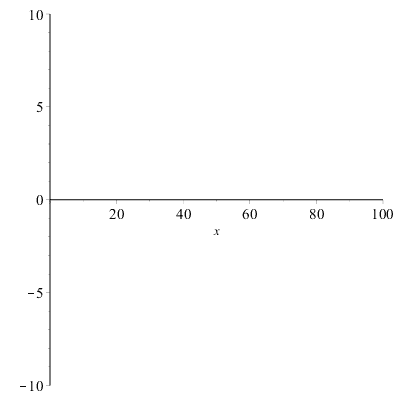
What I get is
upload_2016-3-4_3-3-58.png


However if I don't define my axis, Maple yields the following:
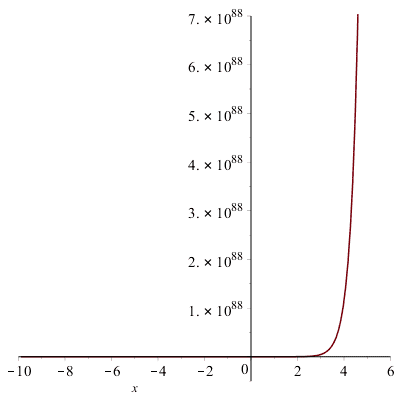
upload_2016-3-4_3-4-45.png


This is fine, except I would like x to go from 0 to 100 and y to go from 0 to 2E96 (which when computed by hand yields actual results close to the boundaries of that range). However if I manually go into the axes definition of the image above, and change it to the desired values, I get:
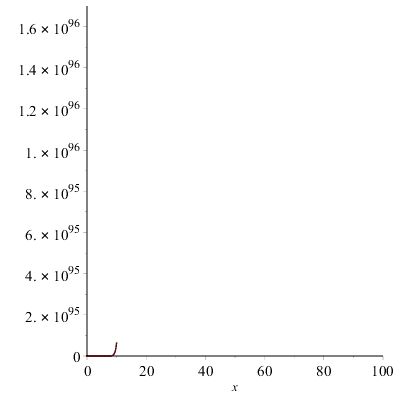
upload_2016-3-4_3-8-17.png


So the plot is not defined at any value outside of whatever Maple decided it should be: I can only change the axes values but not the range and domain of the actual function.. any ideas?
 
Physics news on Phys.org
You could try plotting it using smaller constants just to see if its the function itself somehow.

It may be that even a small increment in x is either 0 or skyrockets way beyond the range limits hence you see no plot line. Can you change the plot line color that way you would see the line drawn over the x-axis until it takes off toward the moon.

Or can you zoom into the plot that is made until you've reached the domain and range you want. You''ll probably find the same result and that the software is working as designed.

Also have you tried it in MATLAB? Its pretty good about plotting things.
 
Last edited:
I ended up plotting in Mathematica after starting from MATLAB (which didn't work because it approximates infinity at around 7E96 I think, and even when I divided it by 1E96 it would first calculate the factorial, approximate it to infinity, then say infinity divided by a large-ish number is "NaN"). Then I tried to plot it with Maple.. didn't work because of it's approximation of infinity. Tried to do it in Python .. same reason. Ended with Mathematica.. it works wonders :D
 

Similar threads

  • · Replies 1 ·
Replies
1
Views
2K
  • · Replies 5 ·
Replies
5
Views
2K
  • · Replies 2 ·
Replies
2
Views
1K
  • · Replies 0 ·
Replies
0
Views
2K
  • · Replies 3 ·
Replies
3
Views
2K
  • · Replies 3 ·
Replies
3
Views
2K
  • · Replies 1 ·
Replies
1
Views
2K
  • · Replies 7 ·
Replies
7
Views
5K
  • · Replies 6 ·
Replies
6
Views
2K
  • · Replies 1 ·
Replies
1
Views
4K