Query runs fine in MySQL, but returns empty list in Python

  • Context: Python 
  • Thread starter Thread starter Wrichik Basu
  • Start date Start date
  • Tags Tags
    Data Position
Click For Summary
SUMMARY

The forum discussion addresses an issue where a MySQL query returns an empty list when executed through Python's mysql.connector. The query aims to retrieve the leaderboard position of a specific member by using a variable to rank members based on their scores. The solution involves splitting the query into two separate execute statements, as the mysql.connector's execute() function does not handle multiple SQL statements by default. Additionally, using window functions like RANK() or DENSE_RANK() is recommended for resolving ties in leaderboard positions.

PREREQUISITES
  • Understanding of MySQL 8.0 window functions (RANK, DENSE_RANK)
  • Familiarity with Python 3.12 and mysql.connector
  • Basic knowledge of SQL query execution and result handling
  • Experience with database schema design, specifically in MySQL
NEXT STEPS
  • Learn how to implement MySQL window functions for ranking data.
  • Explore the use of the multi=True parameter in mysql.connector for executing multiple statements.
  • Investigate SQLAlchemy for abstracting database interactions in Python.
  • Study best practices for optimizing SQL queries and reducing memory overhead.
USEFUL FOR

Backend developers, data analysts, and anyone working with MySQL and Python who needs to optimize query execution and handle ranking in datasets.

Wrichik Basu
Science Advisor
Insights Author
Gold Member
Messages
2,180
Reaction score
2,690
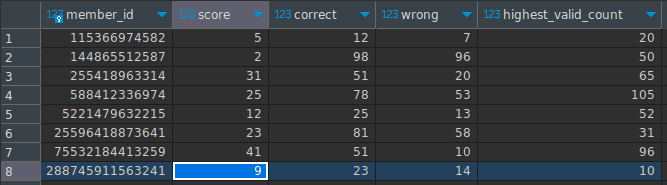
I have a database that looks like this:
1709852202892.png


I want to get the "leaderboard position" of a particular member. The idea is to order the data by the score column, and then retrieve the row position of that particular member id. This is my query in MySQL:
[CODE lang="sql" title="MySQL"]SET @rowNum := 0;
SELECT rowNum
FROM(
SELECT (@rowNum := @rowNum + 1) AS rowNum, member_id
FROM members
ORDER BY score DESC) tmp
WHERE member_id = 288745911563241;[/CODE]

This works as I want in MySQL, returning the appropriate row number:

1709852458956.png


But, when I try to do the same via mysql.connector in Python 3.12, I get an empty list. This is my code in Python:
Python:
import mysql.connector

mydb = mysql.connector.connect(host="localhost", user="user_name",
                               password="pwd", database="db_name")
mycursor = mydb.cursor()


def main():
    mycursor.execute("SET @rowNum := 0; "
                     "SELECT rowNum FROM( "
                     "SELECT (@rowNum := @rowNum + 1) AS rowNum, member_id "
                     "FROM members "
                     "ORDER BY score DESC) tmp "
                     "WHERE member_id = 288745911563241;")
    print(mycursor.fetchall())
    mycursor.close()
    mydb.close()


if __name__ == '__main__':
    main()

Any idea why I am facing this?

In case anyone wants to test, this is the code for the dummy database:
SQL:
CREATE DATABASE db_name;

USE db_name;

CREATE TABLE members (
    member_id BIGINT PRIMARY KEY NOT NULL,
    score BIGINT NOT NULL,
    correct BIGINT NOT NULL,
    wrong BIGINT NOT NULL,
    highest_valid_count BIGINT NOT NULL
);

INSERT INTO members VALUES
    (115366974582, 5, 12, 7, 20),
    (588412336974, 25, 78, 53, 105),
    (144865512587, 2, 98, 96, 50),
    (255418963314, 31, 51, 20, 65),
    (5221479632215, 12, 25, 13, 52),
    (25596418873641, 23, 81, 58, 31),
    (75532184413259, 41, 51, 10, 96),
    (288745911563241, 9, 23, 14, 10);
 
Technology news on Phys.org
Could be all sorts of reasons why it doesn't work, but a robust (and probably more efficient) way to do this is to use two queries, one to get the member's score and another to COUNT the number of rows with a higher (or higher-or-equal) score.
 
  • Love
Likes   Reactions: Wrichik Basu
jedishrfu said:
My first thought can execute() function process multiple sql statements?
I tried splitting into two execute() statements, but it was not working. Now I tried it again and it is working. Programming can be spooky at times!
pbuk said:
a robust (and probably more efficient) way to do this is to use two queries, one to get the member's score and another to COUNT the number of rows with a higher (or higher-or-equal) score.
Indeed, that's the best approach. Selecting less data means lesser memory overhead, especially for a bot that's supposed to be online all the time. Thanks a lot!
 
I'm not a python expert but don't you need an iterator to process the result as in:

Code:
iterator = cursor.execute(operation, params=None, multi=True)


See:

Code:
operation = 'SELECT 1; INSERT INTO t1 VALUES (); SELECT 2'
for result in cursor.execute(operation, multi=True): 
if result.with_rows:   
    print("Rows produced by statement '{}':". format(result.statement))   
    print(result.fetchall()) 
else:   
    print("Number of rows affected by statement '{}': {}".format(result.statement, result.rowcount))

https://dev.mysql.com/doc/connector-python/en/connector-python-api-mysqlcursor-execute.html

?

This would probably be a statement handle in ODBC.

Regards.
 
Wrichik Basu said:
I have a database that looks like this:

View attachment 341440

I want to get the "leaderboard position" of a particular member. The idea is to order the data by the score column, and then retrieve the row position of that particular member id.

How do you resolve ties? The RANK() or DENSE_RANK() window functions will resolve ties for you (see here), but you will have to rank all the scores before querying results for individual members. If you need to do that multiple times, then it makes sense to do the calculation once in a temporary table and then query that.

Code:
DROP TEMPORARY TABLE IF EXISTS ranked_by_score;
CREATE TEMPORARY TABLE ranked_by_score AS
SELECT 
member_id,
score,
RANK() OVER w AS 'rank',
DENSE_RANK() OVER w AS 'dense rank',
ROW_NUMBER() OVER w AS 'row_number' 
FROM members 
WINDOW w AS (ORDER BY score DESC);
 
My advice here is for you to abstract this into a higher-level representation of your data (using an ORM or even a query builder). My recommendation here is https://www.sqlalchemy.org/

This will be the first of many if you don't migrate your code to a more maintainable and repeatable structure
 
As other's have suggested, by default, executor does not handle multiple statements. The mysql docs: https://dev.mysql.com/doc/connector-python/en/connector-python-api-mysqlcursor-execute.html show that there is a multi=True parameter that you can pass into it, but it's also just as easy to just split them into two execute statements:


Python:
import mysql.connector

mydb = mysql.connector.connect(host="localhost", user="user_name",
                               password="pwd", database="db_name")
mycursor = mydb.cursor()

def main():
    mycursor.execute("SET @rowNum := 0;")
   
    mycursor.execute("SELECT rowNum FROM( "
                     "SELECT (@rowNum := @rowNum + 1) AS rowNum, member_id "
                     "FROM members "
                     "ORDER BY score DESC) tmp "
                     "WHERE member_id = 288745911563241;")
   
    print(mycursor.fetchall())
   
    mycursor.close()
    mydb.close()

if __name__ == '__main__':
    main()

Honestly, from a code readability perspective, I like this more, anyway.