MHB Slashed fraction instead of vertical one

  • Thread starter Thread starter TheBigBadBen
  • Start date Start date
  • Tags Tags
    Fraction Vertical
Click For Summary
SUMMARY

The discussion focuses on creating aesthetically pleasing slashed fractions in LaTeX, specifically using the nicefrac package. Users share various methods, including \nicefrac{a_1}{a_2} and custom commands like \newcommand{\slfrac}[2]{\left.#1\middle/#2\right.}. The consensus is that the nicefrac package improves the appearance of fractions by adjusting the size of the numerator and denominator, making them closer to the slash. Participants also emphasize the importance of aesthetics in mathematical typesetting.

PREREQUISITES
  • Familiarity with LaTeX typesetting
  • Understanding of LaTeX packages, specifically units and nicefrac
  • Basic knowledge of custom LaTeX commands
  • Awareness of mathematical notation and formatting standards
NEXT STEPS
  • Explore the nicefrac package documentation for advanced usage
  • Learn how to create custom LaTeX commands for specific formatting needs
  • Investigate other LaTeX packages that enhance mathematical typesetting
  • Study best practices for typesetting fractions in LaTeX to improve readability
USEFUL FOR

Mathematicians, educators, and anyone involved in typesetting mathematical documents using LaTeX who seeks to enhance the visual quality of their work.

TheBigBadBen
Messages
79
Reaction score
0
Is there any way to nicely LaTeX a "slashed" fraction? In other words, if I want to write $a_1/a_2$ instead of $\frac{a_1}{a_2}$ or even $\dfrac{a_1}{a_2}$, is there a way to make it look nice?
 
Physics news on Phys.org
You mean like $$^{a_1}\!\!/\!_{a_2}$$?

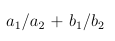
It turns out that in real $\LaTeX$, you can use
Code:
\documentclass{article}
\usepackage{units}
\begin{document}

$\nicefrac{a_1}{a_2}$

\end{document}
which looks like:
 

Attachments

  • slashed_fraction.png
    slashed_fraction.png
    242 bytes · Views: 144
Last edited:

Attachments

  • Screen Shot 2013-06-06 at 11.00.02 PM.png
    Screen Shot 2013-06-06 at 11.00.02 PM.png
    540 bytes · Views: 145
Last edited:
What works on MHB is ^{a_1}/_{a_2}.
See my previous post for how it looks (slightly adjusted with negative space \!).
 
TheBigBadBen said:
Is there any way to nicely LaTeX a "slashed" fraction? In other words, if I want to write $a_1/a_2$ instead of $\frac{a_1}{a_2}$ or even $\dfrac{a_1}{a_2}$, is there a way to make it look nice?
What exactly is ugly about $a_1/a_2$, i.e., what do you want to change? The nicefrac package makes the numerator and denominator smaller and moves them closer to the slash; that's what is calls "nice" as opposed to fractions with regular slash, which it calls "ugly". This is debatable. The StackOverflow method simply makes the height of the slash equal to the height of its arguments.

And how is $a_1/a_2$ different from the following example?

TheBigBadBen said:
A sample result:

View attachment 872

The TeXbook does not recommend any special care with slash in fractions. There is a subtlety, though:

"TEX does not treat $/$ as a binary operation, even though a slash stands for division (which qualifies as a binary operation on mathematical grounds). The reason is that printers traditionally put extra space around the symbols $+$, $−$, and $*$, but not around $/$. If TEX were to typeset $/$ as a binary operation, the formula ‘\$1/2\$’ would come out ‘$1\mathbin{/}2$’, which is wrong; so TEX considers $/$ to be an ordinary symbol."

Another advice from the TeXbook is not to overuse \frac (or, rather, \over in plain TeX). E.g., instead of $\dfrac{\frac{a}{b}}{2}$ it is recommended to type $\dfrac{a/b}{2}$.
 
Evgeny.Makarov said:
Another advice from the TeXbook is not to overuse \frac (or, rather, \over in plain TeX). E.g., instead of $\dfrac{\frac{a}{b}}{2}$ it is recommended to type $\dfrac{a/b}{2}$.
That applies especially in exponents. I always write $x^{1/2}$ in preference to $x^{\frac12}$, also $$\int_{-\pi/2}^{\pi/2}f(t)\,dt$$ rather than $$\int_{-\frac\pi2}^{\frac\pi2}f(t)\,dt$$.
 
Evgeny.Makarov said:
What exactly is ugly about $a_1/a_2$, i.e., what do you want to change? The nicefrac package makes the numerator and denominator smaller and moves them closer to the slash; that's what is calls "nice" as opposed to fractions with regular slash, which it calls "ugly". This is debatable. The StackOverflow method simply makes the height of the slash equal to the height of its arguments.

What annoys me is that the size of the slash doesn't adjust to the size of the numerator and denominator. To me, ${a_1}^2/{B_1^2}$ does not look pretty. I think the StackOverflow method captures my aesthetics.

I think I like Serena's approach is probably what I'll use here.
 
If you are really worried about the aesthetics, you could always do something like this:

Code:
\newcommand{\name}{% name is whatever you want to call it   
   \leavevmode   
   \begingroup   
   \setbox 2 = \hbox {\small \(a_1\)}%   
   \setbox 0 = \hbox {/}%   
   \dimen 0 = \ht 0  \advance \dimen 0 by -\ht 2   
   \raise \dimen 0 \box 2   
   \kern -0.3333\wd0/\kern -0.3333\wd 0   
   \lower \dp 0 \hbox {\small \(a_2\)}%   
   \endgroup 
}
\begin{document}
something \name\space something
\end{document}
 
Here's an overview, using MiKTeX.

http://www.mathhelpboards.com/attachment.php?attachmentid=875
 
  • #10
I like Serena said:
Here's an overview, using MiKTeX.

http://www.mathhelpboards.com/attachment.php?attachmentid=875

I can't view your attachment
 
  • #11
TheBigBadBen said:
I can't view your attachment

Huh?
What do you see?
As far as I can tell, you quoted the picture I uploaded.
That is, in your quote the picture shows normally.
 
  • #12
Anyway, here's the overview as far as it renders here.

\(

\newcommand{\slfrac}[2] { \left.#1\middle/#2\right. }

\verb|\newcommand{\ILS}[2] { ^{#1}\!\!/\!_{#2} }| \\
\newcommand{\ILS}[2] { ^{#1}\!\!/\!_{#2} }
\verb|\newcommand{\dILS}[2] { ^{ \displaystyle #1}\!\!/\!_{ \displaystyle #2} }| \\
\newcommand{\dILS}[2] { ^{ \displaystyle #1}\!\!/\!_{ \displaystyle #2} }
\verb|\newcommand{\xILS}[2] { \left. ^{ \displaystyle #1}\!\!\middle/\!_{ \displaystyle #2} \right. }| \\
\newcommand{\xILS}[2] { \left. ^{ \displaystyle #1}\!\!\middle/\!_{ \displaystyle #2} \right. }

\begin{array}{|l|ccc|}
\hline \\
\verb|\frac{#1}{#2}| & \frac{1}{2} & \frac{a_1}{a_2} & \frac{a_1^2}{B_1^2} \\ \\
\verb|\dfrac{#1}{#2}| & \dfrac{1}{2} & \dfrac{a_1}{a_2} & \dfrac{a_1^2}{B_1^2} \\ \\
\verb|#1/#2| & 1/2 & a_1/a_2 & a_1^2/B_1^2 \\ \\
\verb|\left.#1\middle/#2\right.| & \slfrac{1}{2} & \slfrac{a_1}{a_2} & \slfrac{a_1^2}{B_1^2}\\ \\
\verb|\ILS{#1}{#2}| & \ILS{1}{2} & \ILS{a_1}{a_2} & \ILS{a_1^2}{B_1^2}\\ \\
\verb|\dILS{#1}{#2}| & \dILS{1}{2} & \dILS{a_1}{a_2} & \dILS{a_1^2}{B_1^2}\\
\verb|\xILS{#1}{#2}| & \xILS{1}{2} & \xILS{a_1}{a_2} & \xILS{a_1^2}{B_1^2}\\
\hline
\end{array}

\)
 
Last edited:
  • #13
Let me retry the attachment.
I was fiddling with it before to get it to show neatly.

http://www.mathhelpboards.com/attachment.php?attachmentid=877&d=1370685379
 

Attachments

  • slashed_fractions.png
    slashed_fractions.png
    5 KB · Views: 110
  • #14
So before, the attachment just showed up as a "couldn't load image" error at that spot before. Not sure what happened there. At any rate, I can see your latest post just fine. Thank you for the table! I stand by my aesthetic opinion here, so \middle/ seems to work best for me. I think that's what I'm going to be using from now on, if it comes up; I think it will look better for nested fractions too.
 
Last edited:

Similar threads

  • · Replies 4 ·
Replies
4
Views
4K
  • · Replies 2 ·
Replies
2
Views
4K
Replies
2
Views
2K
  • · Replies 1 ·
Replies
1
Views
779
  • · Replies 10 ·
Replies
10
Views
4K
  • · Replies 2 ·
Replies
2
Views
3K
  • · Replies 1 ·
Replies
1
Views
2K
  • · Replies 6 ·
Replies
6
Views
2K
  • · Replies 3 ·
Replies
3
Views
3K
  • · Replies 7 ·
Replies
7
Views
2K