Software for entering Mathematics Equations

  • Context: Undergrad 
  • Thread starter Thread starter sonnichs
  • Start date Start date
Click For Summary

Discussion Overview

The discussion revolves around software options for entering mathematics equations, particularly in the context of physics. Participants explore various tools, including traditional software and AI-based solutions, while considering usability and accessibility for individuals with specific needs, such as those with physical limitations or unfamiliarity with certain technologies.

Discussion Character

  • Exploratory
  • Technical explanation
  • Debate/contested
  • Mathematical reasoning

Main Points Raised

  • One participant expresses a desire for modern software alternatives to traditional handwriting for entering physics equations, mentioning previous use of MathCad and a preference for free programs.
  • Another suggests considering LaTeX for note-taking, highlighting its large community and availability of tools, though noting a potential learning curve for newcomers.
  • A different participant recommends TeXstudio as a free option and mentions using AutoHotkey for keyboard shortcuts to streamline the typing of long TeX commands.
  • Fritz shares experiences with AI tools, specifically mentioning how handwriting recognition software has effectively converted handwritten equations into a GUI format, expressing satisfaction with the results.
  • Some participants note that AI tools like chatGPT and Claude can generate LaTeX from equations, which Fritz finds valuable for quickly formatting his work.
  • Fritz raises concerns about the reliability of AI outputs, particularly regarding the accuracy of mathematical derivations and the potential for errors in AI-generated content.

Areas of Agreement / Disagreement

Participants generally agree on the potential benefits of using LaTeX and AI tools for entering mathematics equations, but there remains uncertainty regarding the reliability and accuracy of AI-generated outputs. Multiple competing views on the best software options and methods for entering equations are present, with no consensus reached.

Contextual Notes

Some participants mention limitations in their familiarity with LaTeX and AI technologies, which may affect their ability to fully utilize these tools. The discussion also reflects varying levels of comfort with technology and differing needs based on physical capabilities.

sonnichs
Messages
15
Reaction score
2
TL;DR
Freeware other than MS for converting mathematics equations
I am not sure where to best put this post-possibly it belongs in general physics as well.

I presently use an ancient device for writing: a pencil, to enter physics equations into a notebook. Especially with arthritis and my horrible handwriting (I got a D in grade school!), it would be nice to clean my entries up and possibly pass them on the AI programs that appear of late.

Some years back I used MathCad for this and it was OK but costly and possibly obsolete by now. I see some new programs out there now and before I choose one wondered if any have a large base in the physics world or if you have used any of them. For obvious reasons I prefer free programs (no "trial" types).

I see several out there: MathType, LIBREoffice, MathMagic, MathCast. In the best of worlds, all of the major math items (derivatives, integrals, matrices, symbols etc) appear on a GUI list that can be dropped to the typing area. I think Libre has a drop-down with several categories-thats OK but not as nice.

thanks for any input
Fritz
 
Physics news on Phys.org
It may be of interest to you to also consider writing notes directly using LaTeX, possibly in the form of a single tool like TeXworks or something similar. If you are completely unfamiliar with LaTeX this will of course introduce a learning curve (although I recall some of the tools to have at least some level of GUI support), but the LaTeX community is large and mature allowing easy access to lots of tools and guidance.
 
  • Like
Likes   Reactions: berkeman and FactChecker
I use https://texstudio.org/, which is free.

I also use https://autohotkey.com/ for keyboard shortcuts, which makes it easier to type long TeX commands.

You can also search in
which has some websites that allow a guided input.
 
  • Informative
  • Like
Likes   Reactions: berkeman, SammyS and FactChecker
Thank you for your replies. I can see the value of LaTex--a lot of people use it now. (I was born pre-sputnik) I am still looking thru the links that were sent as well.
My reply is late because I did some research on this first and am finding that AI may be what works here. I am not an AI advertising bot for sure but it certainly shows value in many cases. We used machine learning, correlation etc 30 years ago and just didn't call it AI. I've read a few simple books since and it has momentum.
So here is what I found with AI:
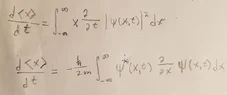
1) I entered the simple pencil written "slop" in the first attachment.
2) I fed this to chatGPT and got the output as shown in the 2nd attachment. (You need to select all the output, right click, print-to-pdf).
I am quite impressed in that
(a) it recognized my handwriting and converted it nicely to a GUI.
(b) it actually got the right result.
This is a simple problem but typical of those that show a depth of thinking (Ehrenfest, recognizing an integral category, dealing with V etc) but it comes at a less skilled but high clerical cost.
I have tried this with a few other simple QM type problems and it seems to work. The main difficulty is being sure that it shows the derivation as that is what I want to compare to mine (I lose so many minus signs in an hour these days that I have to sweep them up off the floor! I like to have something reliable do the clerical work so I can check for errors).

So-since I like to do QM problems as a way of practice, using this type of AI to mainly format my writing and do the substitutions may be a way to do more problems faster. I often find that the hard part is the concept-but past that the clerical part can take (at least me) a long time.

I have more research to do but as of now it looks like Grok and Claude will do similar things. None is entirely "free" but probably in cost/problem it isn't bad.

Thanks again
Fritz
 

Attachments

  • dxdt.webp
    dxdt.webp
    13.4 KB · Views: 19
  • Derive second equation steps.pdf
    Derive second equation steps.pdf
    118.5 KB · Views: 22
  • Like
Likes   Reactions: PeroK
Just use one of the LLMs to generate latex
 
Yes--I see. Both CLAUDE and chatGPT reduce equations into LaTEX markdown. It took me a while to recognize this since i don't know LaTEX. So we have come full circle to where Filip Larsen posted.
I suppose for me using the handwriting recognition is valuable--I get LaTEX in a few seconds! The AI side of solving is more complex. I notice errors come up so AI is still growing.
I know some things about AI such as basics on NLP, ANNs, ML and so on but I never saw a good draft on how it reduces equations. I am interested it what it uses here.
Thanks--Fritz
 
  • Like
Likes   Reactions: Filip Larsen

Similar threads

  • · Replies 7 ·
Replies
7
Views
3K
  • · Replies 3 ·
Replies
3
Views
2K
  • · Replies 8 ·
Replies
8
Views
4K
  • · Replies 1 ·
Replies
1
Views
2K
  • · Replies 2 ·
Replies
2
Views
2K
  • · Replies 29 ·
Replies
29
Views
8K
  • · Replies 4 ·
Replies
4
Views
2K
  • · Replies 6 ·
Replies
6
Views
2K
  • · Replies 25 ·
Replies
25
Views
6K
  • · Replies 8 ·
Replies
8
Views
2K