What is the Difference Between a TeX Distribution and a TeX Editor?

Click For Summary
SUMMARY

The discussion clarifies the distinction between a TeX distribution, specifically MikTeX, and a TeX editor, such as TexStudio. MikTeX is a complete set of programs and packages necessary for processing TeX files into documents, while a TeX editor provides a user-friendly interface for creating and compiling these files. Users encountering installation issues with MikTeX should first ensure that any previous installations are completely uninstalled. For optimal use, it is recommended to install a TeX editor after setting up a TeX distribution.

PREREQUISITES
  • Understanding of TeX distributions, specifically MikTeX
  • Familiarity with TeX editors, particularly TexStudio
  • Basic knowledge of Windows operating system for software installation
  • Awareness of LaTeX document preparation system
NEXT STEPS
  • Learn how to uninstall software on Windows 10 to remove previous MikTeX installations
  • Explore the features and installation process of TexStudio as a TeX editor
  • Research common troubleshooting steps for MikTeX installation issues
  • Study LaTeX syntax and document structure using resources like "The Not So Short Introduction to LaTeX"
USEFUL FOR

This discussion is beneficial for individuals learning LaTeX, including students, educators, and researchers who require document preparation, as well as software developers and technical writers looking to utilize TeX distributions and editors effectively.
mech-eng
Messages
825
Reaction score
13
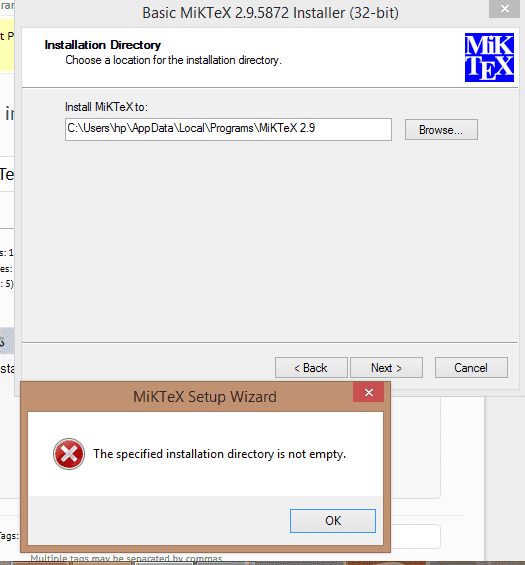
To learn LaTex, I want to install MikTex but in installing it, I come across with a problem.
installation error.png


It appears when click next. What is the problem and how can I solve it?

Thank you.
 
Computer science news on Phys.org
First question is whether you install using administrator account. If you do, then have you another installation of MikTex there?
 
QuantumQuest said:
First question is whether you install using administrator account. If you do, then have you another installation of MikTex there?

There is folder named miktex under the folder Program Files (x86). But there are a lot of subfolder under miktex folder. So how will I proceed now?

Thank you.
 
mech-eng said:
There is folder named miktex under the folder Program Files (x86). But there are a lot of subfolder under miktex folder. So how will I proceed now?

From your answer, I assume that you use administrator rights - if you don't you have to do so. Now, what do you mean there are a lot of subfolders there? You are in the process of installing. Were these files created by the current installation process or they were already there i.e. there is a previous installation of MikTex on your machine?
 
QuantumQuest said:
From your answer, I assume that you use administrator rights - if you don't you have to do so. Now, what do you mean there are a lot of subfolders there? You are in the process of installing. Were these files created by the current installation process or they were already there i.e. there is a previous installation of MikTex on your machine?

Probably, yes there is a previous installation of MikTex on my machine as you suspected in #2.

Thank you.
 
mech-eng said:
Probably, yes there is a previous installation of MikTex on my machine as you suspected in #2.

If that's the case, then uninstall the previous version of MikTex, using the relevant section of the control panel and make sure that nothing is left in "Program Files" from the previous installation of MikTex. Then you have to do the installation for the version of MikTex you want, all over again.

EDIT: If you run Windows 10 you can uninstall programs by just using your start menu.
 
Last edited:
But if it is installed, isn't it better to use it, but I cannot start it orI cannot find its exe file to start. How I can try to start it?

Thank you.
 
mech-eng said:
But if it is installed, isn't it better to use it, but I cannot start it orI cannot find its exe file to start. How I can try to start it?

MikTex is a TeX distribution. In order to use it, you need a TeX editor or IDE to edit, compile and view TeX documents. I recommend TexStudio, which is a decent and free LaTeX IDE but there are other great TeX editors / IDEs as well. You can find it here. You can download and install it. It features syntax highlighting, autocompletion, inline spell and grammar checker and much more. It is best to install it having already a TeX distribution installation (like MikTex) on your machine, in order to be identified by TexStudio. If it won't, there is an easy configuration process you can easily find on the net.
 
  • Like
Likes mech-eng
  • #10
QuantumQuest said:
MikTex is a TeX distribution. In order to use it, you need a TeX editor or IDE to edit, compile and view TeX documents.

What is the difference between a TeX distribution and a TeX editor?

Thank you.
 
  • #11
mech-eng said:
What is the difference between a TeX distribution and a TeX editor?

Thank you.
The same as the difference between a compiler and an IDE in programming.

The distribution is the set of programs and packages that allow your computer to process a TeX file into a finished document. It can be used by issuing some commands in a terminal window (as was always the case before windowing came around). To create the TeX file, you need some kind of editor (anything from Notepad to emacs).

A TeX editor or IDE serves as a windowing front end and will include an editor to create your TeX file and will display the finshed result (e.g., the PDF file), with everything running with button clicks instead of command lines.
 
  • Like
Likes mech-eng

Similar threads

Replies
1
Views
2K
  • · Replies 4 ·
Replies
4
Views
2K
  • · Replies 5 ·
Replies
5
Views
2K
  • · Replies 14 ·
Replies
14
Views
4K
Replies
35
Views
10K
  • · Replies 7 ·
Replies
7
Views
2K
  • · Replies 1 ·
Replies
1
Views
2K
  • · Replies 25 ·
Replies
25
Views
4K
Replies
3
Views
2K
  • · Replies 1 ·
Replies
1
Views
8K