What's Causing Phantom Scan Reconstruction Errors in NRecon?

  • Thread starter Thread starter MarkTheQuark
  • Start date Start date
Click For Summary
SUMMARY

The discussion addresses issues related to phantom scan reconstruction errors encountered in NRecon while using the SkyScan 1272 MicroCT scanner. The primary cause identified is the selection of an angle smaller than 7.5 degrees, which prevents the generation of necessary data files for reconstruction. Users are advised to consult Bruker's support resources or contact their local distributor for assistance. Additionally, software updates for the scanner can be found on the Bruker microCT website.

PREREQUISITES
  • Understanding of MicroCT scanning principles
  • Familiarity with NRecon software for image reconstruction
  • Knowledge of Bruker SkyScan 1272 scanner specifications
  • Basic troubleshooting skills for software errors
NEXT STEPS
  • Research the impact of angle selection on MicroCT scan quality
  • Learn about common errors in NRecon and their resolutions
  • Explore Bruker's software updates for the SkyScan 1272
  • Investigate best practices for using phantom rods in BMD quantification
USEFUL FOR

This discussion is beneficial for MicroCT technicians, researchers conducting bone mineral density studies, and anyone involved in troubleshooting NRecon software issues.

MarkTheQuark
Messages
5
Reaction score
2
So, my lab started doing some MicroCT scans, and they designed me to learn and try to solve some problems. The first issue that I noticed by doing some research both in some papers and in the manual from Bruker, it's that they tried to quantify the "BMD" without using the Phantom rods. So they did the scan for the phantom.

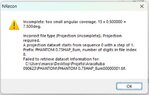
But now, everytime I try to reconstruct the phantom scan on the NRecon, it shows the message in the image linked on the post.

Does anyone knows what is causing this or how to fix this issue?
 

Attachments

  • Imagem do WhatsApp de 2023-08-14 à(s) 10.17.48.jpg
    Imagem do WhatsApp de 2023-08-14 à(s) 10.17.48.jpg
    23.8 KB · Views: 120
Biology news on Phys.org
It appears you've selected too small an angle ie < 7.5 degrees so the process failed to generate a data file needed for the next process. That process failed when it couldn't find the file.

I would contact the Bruker company about the error or look on their website to see if they have answered the same question using the error text as part of your search.

10 SERVICE AND SUPPORT


The SkyScan 1272 scanner is designed as a maintenance-free instrument and doesn’t require any
periodical service.

New versions of control software and all associated program packages supplied with your scanner may
be available for download in the “Software Updates” section of the Bruker microCT website:

http://www.bruker-microct.com/products/downloads.htm.

In the case of any problem please contact your local distributor. A list of distributors is available at:

http://www.bruker-microct/company/distributors.htm.
 

Similar threads

Replies
7
Views
2K
  • · Replies 1 ·
Replies
1
Views
4K
  • · Replies 1 ·
Replies
1
Views
3K
  • · Replies 13 ·
Replies
13
Views
2K
  • · Replies 4 ·
Replies
4
Views
3K
Replies
1
Views
5K
  • · Replies 11 ·
Replies
11
Views
6K
Replies
17
Views
5K
  • · Replies 4 ·
Replies
4
Views
7K
  • · Replies 4 ·
Replies
4
Views
3K