Why can't I open java applets on my computer?

  • Context: Java 
  • Thread starter Thread starter adjacent
  • Start date Start date
  • Tags Tags
    Java
Click For Summary

Discussion Overview

The discussion revolves around issues related to opening Java applets on various web browsers, specifically focusing on troubleshooting steps and potential causes for the problems encountered. Participants share their experiences and suggest various solutions, including adjustments to security settings and browser configurations.

Discussion Character

  • Technical explanation
  • Debate/contested
  • Experimental/applied

Main Points Raised

  • One participant reports being unable to open a specific Java applet and seeks advice on changing security settings.
  • Another participant mentions that lowering the security level results in a slow computer and a white screen when attempting to open applets.
  • Several participants suggest restarting the machine as a first troubleshooting step.
  • Multiple suggestions are made to reset Firefox and clear the Java cache as potential solutions.
  • One participant discusses the ongoing conflict between Microsoft, Apple, and Oracle regarding security and virus issues related to Java.
  • Another participant confirms that the applet works for them after allowing it to run in Chrome and suggests adjusting Java security settings to add the website as an exception.
  • Some participants express frustration with their current Java and browser versions, noting that they are using the same versions as others who report success.
  • There are recommendations to uninstall and reinstall Java, as well as to reset Internet Explorer and create a temporary user profile to troubleshoot further.
  • One participant humorously suggests formatting their computer after unsuccessful attempts to resolve the issue.

Areas of Agreement / Disagreement

Participants do not reach a consensus on a single solution, as multiple troubleshooting steps are proposed and experiences vary. Some participants report success while others continue to face issues.

Contextual Notes

Participants express uncertainty regarding the effectiveness of various solutions, and there are mentions of potential conflicts between different software versions and settings. The discussion highlights the complexity of troubleshooting Java applet issues across different browsers.

adjacent
Gold Member
Messages
1,552
Reaction score
62
Can't open java applets :(

I just visited thishttp://www.astro.ucla.edu/~wright/Balloon2.html and found that I can't open the java applet.
I encountered this:
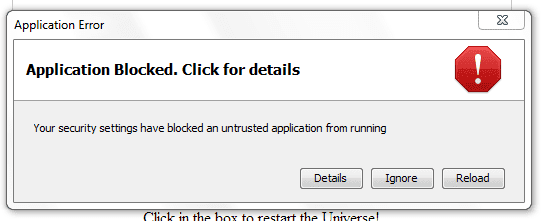
attachment.php?attachmentid=68370&stc=1&d=1396792321.png


Then I tried opening applets from other websites and tried using firefox.This is the result from firefox and chrome.

attachment.php?attachmentid=68371&stc=1&d=1396792459.png


From where can I change that security setting? I have searched Google but could not find an answer.
I am using java 7 update 51
 

Attachments

  • fgfg.PNG
    fgfg.PNG
    6.8 KB · Views: 852
  • gyt.PNG
    gyt.PNG
    2 KB · Views: 794
Last edited:
Technology news on Phys.org
I just put the security level to medium:
attachment.php?attachmentid=68372&stc=1&d=1396793140.png


Then I found out the my computer becomes as slow as a snail when I open any applet.And I get a white screen.
 

Attachments

  • tyu.PNG
    tyu.PNG
    14.6 KB · Views: 802
Last edited:
First thing to try - restart the machine.
 

Attachments

  • clearJavaCache.jpg
    clearJavaCache.jpg
    48.7 KB · Views: 759
Microsoft and Apple have been in a war with Oracle and Adobe over who causes viruses. Microsoft and Apple inevitably win these battles because the operating system can block versions of Java, Flash, and Acrobat that the authors of the OS think are a conduit for viruses.

Update your Java.
 
Routaran said:
Step 3: Do what adjacent suggested and also clear the java cache by following the steps in my screenshot and try again. (Start>Control Pannel>Java)
:smile: Can't stop laughing.I am adjacent and also the OP :wink:
I have cleared the cache and nothing works.

D H said:
Update your Java.
But Java 7 update 51 IS the latest versionCan you check if it works for you?If so,which version of java and chrome/firefox are you using?
 
Last edited:
LoL oops! Kinda got used to you posting solutions, assumed someone else posted the question :)
But I really should read names more carefully

Yep, the applet worked for me fine. I'm running Chrome and it asked me twice if I wanted to allow the java application to run, I allowed it both times. The security settings must be what's causing the issue here.

jump into your java settings again. Under the Security tab, add the website address as an exception
Then go into the advanced tab
Ensure that the following are checked

Default Java for browsers: Mozilla Family
Java Plugin: Enable the next-generation...
Application Installation: Install if hinted
Secure Execution Environment: Everything on except for Show site certificate from server...
Mixed Code: Enable - show warning if needed
Advanced Security Settings: Everything on execpt Use SSL 2.0, TLS 1.1, TLS 1.2 (This will be the same as the browser settings generally)

Restart your browser and try again. Also give IE a go and see what it does.
 
  • Like
Likes   Reactions: 1 person
Routaran said:
Yep, the applet worked for me fine. I'm running Chrome and it asked me twice if I wanted to allow the java application to run, I allowed it both times. The security settings must be what's causing the issue here.

...
Restart your browser and try again. Also give IE a go and see what it does.

I did what you said. It still does not work.(The simpler version works ).
Which java and chrome version are you using?
EDIT:Can you check if you have some other java thing installed?(Like adobe flash player?)

IE doesn't even load webpages correctly.
Your browser does not support Java, or Java is not enabled. Sorry!
It's been 5 years since I left IE.
 
Last edited:
Chrome: Version 33.0.1750.154 m
Java: Version 7 Update 51 (build 1.7.0_51-b13)

I would uninstall Java, rename /program files (x86)/java to /program files (x86)/java_old or something
reboot
then download and reinstall the latest update.
again, reset Firefox and blow out all the cache from java and try again.
oh and while you're at it, reset IE as well. Browsers sometimes share some settings.

if that still doesn't work, then there may be something up with your user profile.
I would try creating a temp profile, logging into that and checking what happens there.
 
Last edited:
  • Like
Likes   Reactions: 1 person
  • #10
Routaran said:
Chrome: Version 33.0.1750.154 m
Java: Version 7 Update 51 (build 1.7.0_51-b13)
I have exactly the same version of both java and chrome .
Routaran said:
I would uninstall Java, rename /program files (x86)/java to /program files (x86)/java_old or something
reboot
then download and reinstall the latest update.
again, reset Firefox and blow out all the cache from java and try again.
oh and while you're at it, reset IE as well. Browsers sometimes share some settings.

if that still doesn't work, then there may be something up with your user profile.
I would try creating a temp profile, logging into that and checking what happens there.
Nothing worked.
I think it's time to format my computer :wink:
 
  • #11
Nuke and Pave!
 

Similar threads

Replies
4
Views
2K
  • · Replies 3 ·
Replies
3
Views
2K
  • · Replies 4 ·
Replies
4
Views
5K
  • · Replies 12 ·
Replies
12
Views
5K
  • · Replies 13 ·
Replies
13
Views
2K
  • · Replies 1 ·
Replies
1
Views
12K
  • · Replies 4 ·
Replies
4
Views
20K
Replies
8
Views
4K
  • · Replies 15 ·
Replies
15
Views
3K
  • · Replies 4 ·
Replies
4
Views
4K