Why is my insertion sort code not working for certain array sizes?

  • Context: C/C++ 
  • Thread starter Thread starter waver.
  • Start date Start date
  • Tags Tags
    C++ Sort
Join the discussion
Ask a follow-up here, or get your own question answered by working scientists, mathematicians and engineers — people, not an autocomplete.
Real named experts · corrections over time · the nuance an AI answer skips
5 replies · 2K views
waver.
Messages
8
Reaction score
0
hi Guys
i wrote a insertion sort code which is
Code:
#include <iostream> /*Waver*/
using namespace std;
int main()

{
int n,i,m;
float a[100],k;

count<<"enter the amount of number";
cin>>n;

for(i=0; i<n; i++)
cin>>a[i];

for(i=1; i<=n; i++)
{
    for(m=1 ; m<=i; m++)
    {
      if(a[m]<a[m-1])
      {
          k=a[m-1];
          a[m-1]=a[m];
          a[m]=k;
      }

    }
}
for(i=0; i<n; i++)
count<<a[i] <<"  ";
return 0;
}
it work fine with some size used in array and won't work with other size
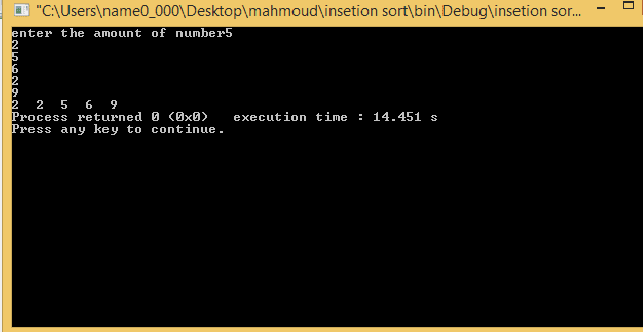
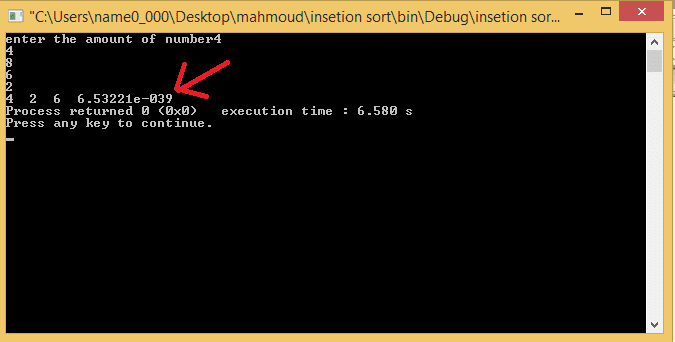
i mean when i enter n=5 it work fine when i enter n=4 it won't work and sort is wrong

when n=5
fy3fnp.jpg
and when n=4
the sort is wrong and error appear with last number
s5l6jl.jpg


i just want to know what i did wrong . thanks in advance
 
on Phys.org
Hint: You are mixing 0-based and 1-based indexing in your logic. This is not a good idea. Read about off-by-one errors, and go from there.
 
I would use your debugger and step through the code making sure you agree with what values the computer has set. Doing this you should be able to locate your mistake.

If you think that's too difficult then sprinkle print statements after key lines to see values of indexes and other key variables.
 
jedishrfu said:
I would use your debugger and step through the code making sure you agree with what values the computer has set. Doing this you should be able to locate your mistake.

If you think that's too difficult then sprinkle print statements after key lines to see values of indexes and other key variables.

the debugger didnt cought any thing
14vc6h.jpg
 
When I said use the debugger to step through your code, I didn't mean run your code in the debugger.

The debugger can literally step one line at a time and as you do that you can inspect the values of any variable to see if they are what you expect. Many times you will see your error right away.

Or in the case of @rcgldr's hint you will discover that you looped one too many times.