Why is my insertion sort code not working for certain array sizes?

  • Context: C/C++ 
  • Thread starter Thread starter waver.
  • Start date Start date
  • Tags Tags
    C++ Sort
Click For Summary

Discussion Overview

The discussion revolves around a user's implementation of an insertion sort algorithm in C++. The user reports that the code works correctly for certain array sizes but fails for others, specifically noting issues when the input size is 4 compared to 5. The focus is on debugging the code and understanding the underlying issues related to indexing.

Discussion Character

  • Technical explanation
  • Debugging assistance
  • Conceptual clarification

Main Points Raised

  • The user describes their insertion sort code and the specific problem encountered with different array sizes.
  • One participant suggests that the issue may stem from mixing 0-based and 1-based indexing, indicating a potential off-by-one error.
  • Another participant recommends using a debugger to step through the code and verify variable values to locate the mistake.
  • A different participant advises changing the loop condition from <= to < to avoid indexing beyond the end of the array.
  • One participant clarifies that using the debugger means stepping through the code line by line, rather than running it as a whole, to inspect variable values directly.

Areas of Agreement / Disagreement

Participants generally agree that the issue is related to indexing, but there are multiple suggestions on how to resolve it, indicating that the discussion remains unresolved regarding the best approach to fix the code.

Contextual Notes

There are indications of potential off-by-one errors and confusion regarding array indexing, but specific assumptions or definitions are not fully explored.

waver.
Messages
8
Reaction score
0
hi Guys
i wrote a insertion sort code which is
Code:
#include <iostream> /*Waver*/
using namespace std;
int main()

{
int n,i,m;
float a[100],k;

count<<"enter the amount of number";
cin>>n;

for(i=0; i<n; i++)
cin>>a[i];

for(i=1; i<=n; i++)
{
    for(m=1 ; m<=i; m++)
    {
      if(a[m]<a[m-1])
      {
          k=a[m-1];
          a[m-1]=a[m];
          a[m]=k;
      }

    }
}
for(i=0; i<n; i++)
count<<a[i] <<"  ";
return 0;
}
it work fine with some size used in array and won't work with other size
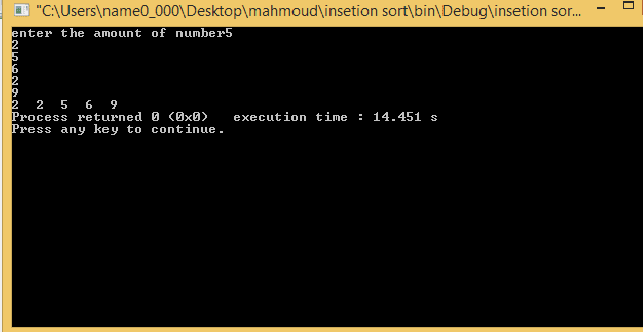
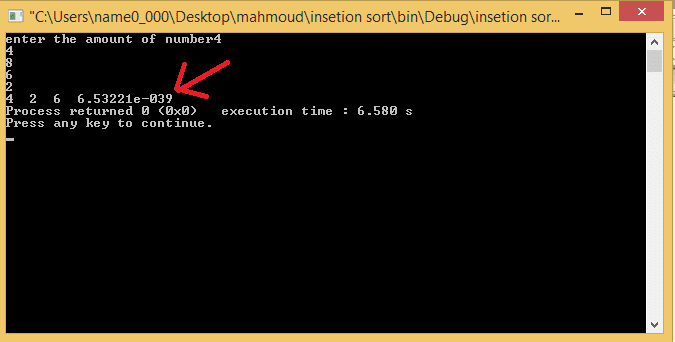
i mean when i enter n=5 it work fine when i enter n=4 it won't work and sort is wrong

when n=5
fy3fnp.jpg
and when n=4
the sort is wrong and error appear with last number
s5l6jl.jpg


i just want to know what i did wrong . thanks in advance
 
Technology news on Phys.org
Hint: You are mixing 0-based and 1-based indexing in your logic. This is not a good idea. Read about off-by-one errors, and go from there.
 
I would use your debugger and step through the code making sure you agree with what values the computer has set. Doing this you should be able to locate your mistake.

If you think that's too difficult then sprinkle print statements after key lines to see values of indexes and other key variables.
 
jedishrfu said:
I would use your debugger and step through the code making sure you agree with what values the computer has set. Doing this you should be able to locate your mistake.

If you think that's too difficult then sprinkle print statements after key lines to see values of indexes and other key variables.

the debugger didnt cought any thing
14vc6h.jpg
 
Change the second (or the third) for loop to use < instead of <=. You're indexing beyond the end of the array.
 
When I said use the debugger to step through your code, I didn't mean run your code in the debugger.

The debugger can literally step one line at a time and as you do that you can inspect the values of any variable to see if they are what you expect. Many times you will see your error right away.

Or in the case of @rcgldr's hint you will discover that you looped one too many times.
 

Similar threads

  • · Replies 39 ·
2
Replies
39
Views
5K
  • · Replies 10 ·
Replies
10
Views
3K
Replies
20
Views
2K
  • · Replies 25 ·
Replies
25
Views
3K
  • · Replies 22 ·
Replies
22
Views
4K
Replies
12
Views
2K
  • · Replies 6 ·
Replies
6
Views
12K
  • · Replies 15 ·
Replies
15
Views
4K
  • · Replies 118 ·
4
Replies
118
Views
10K
  • · Replies 30 ·
2
Replies
30
Views
4K