What is the Software that has this Plotting Style?

Click For Summary

Discussion Overview

The discussion revolves around identifying the software that produces a specific plotting style, characterized by a clean and simple aesthetic. Participants explore various software options for creating graphs, particularly focusing on semi-log plots and the default styles of different plotting tools.

Discussion Character

  • Debate/contested
  • Technical explanation
  • Exploratory

Main Points Raised

  • Some participants note that the plot in question is a semi-log plot but seek clarification on the specific software that generates such a style.
  • Others suggest that many powerful plotting software options allow customization of line size, color, and style, but they emphasize the need for a default style that matches the example provided.
  • Several participants mention specific software packages, including Matlab, Mathematica, Origin, PGF/TikZ, PGFPlots, and D3, as potential candidates for creating similar plots.
  • One participant points out that the typography of the plot suggests it may have originated from older line plotters, indicating that modern software may not replicate that exact style by default.
  • Another participant shares a LaTeX example using PGFPlots to illustrate the capability of LaTeX in plotting data, while also expressing skepticism about the ease of creating plots from actual data using PGF/TikZ.
  • Some participants express uncertainty about whether current software can replicate the "plotter style" aesthetics of older plotting tools.

Areas of Agreement / Disagreement

Participants generally agree that the plot style is reminiscent of older plotting software, but there is no consensus on which modern software can replicate it by default. Multiple competing views on software capabilities and styles remain unresolved.

Contextual Notes

Participants mention various software options and their capabilities, but there are limitations in identifying a specific software that produces the desired plot style as a default. The discussion also reflects varying levels of familiarity with the software mentioned and the historical context of plotting tools.

Who May Find This Useful

This discussion may be useful for individuals interested in data visualization, particularly those seeking software recommendations for creating specific types of plots or exploring the capabilities of different plotting tools.
ecastro
Messages
249
Reaction score
8
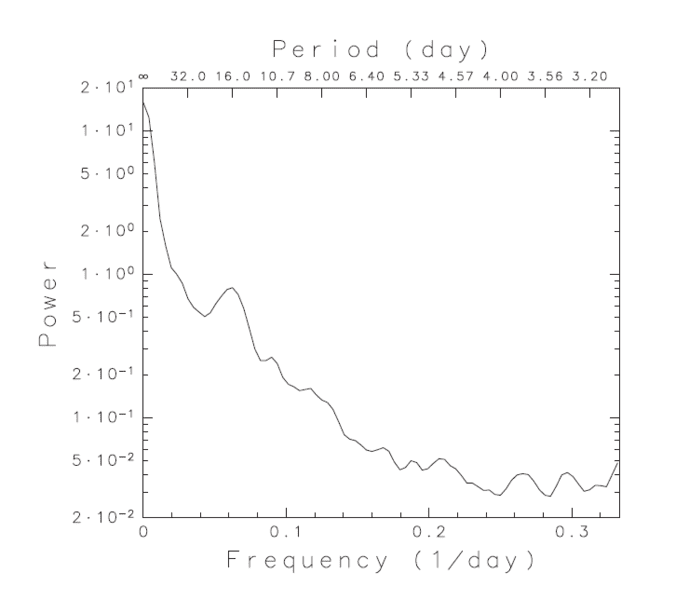
What is the software that has this kind of plot:

upload_2017-6-19_17-35-40.png


I want to use it for plotting graphs because it looks clean. Thank you in advance.

Edit: To avoid confusion, I want to know what software produces this graphing style, not the kind of plot.
 
Last edited:
Computer science news on Phys.org
jedishrfu said:

Well, I know that it is a semi-log plot. What I meant is what kind of software creates a graph in this style. For example, when Python plots points, a graph may look like this:

aXFQh.png


The line width, sizes, and fonts used in the graph are different from the graph that I presented. I wanted to know which software when it plots points, creates the graph that I presented.
 
Any powerful plotting software allows the user to specify color, line size, line style, data point symbol, etc., etc., etc. of the lines and axis. They usually change the color automatically when several lines of data are over-plotted on the same graph. As the user, you would need to specify any specific characteristic that you want to change.
 
Perhaps you could do an image search on google with your image to find a web apge describing the software used.

I gave you the name of the plot to further refine your search.

As @FactChecker has said so succinctly, there are many many software plotting packages for a variety of languages that can do these kinds of plots and just seeing one plot would make it hard to identify which one. It could very well be a custom package too. Based on the typography it looks like a line plotter created it.

One could check into Matlab, Mathematica or Origin software to see what scientific plots they support.
 
Don't know about the software used to create the graph in the OP, but if you're preparing a diagram or graph to include in a LaTeX document then consider using PGF/TikZ and/or PGFPlots. These are LaTeX packages that let you create diagrams and plots that are well-integrated with the document (e.g., axis or graph labels will by default appear in the same font and size as the rest of the document and can include LaTeX-formatted math).

Personally I just use whatever is handy (e.g., the 'plot' function if I happen to be working in Matlab or Octave) for creating quick plots in the course of investigating something and I use PGF/TikZ or PGFPlots when it's time to prepare a diagram or graph to present as part of a document.
 
  • Like
Likes   Reactions: fluidistic
FactChecker said:
Any powerful plotting software allows the user to specify color, line size, line style, data point symbol, etc., etc., etc. of the lines and axis.

Yes, this is true, but I want to know the software, if any, which has this plot style as its default.

256bits said:
Investigate
http://www.astro.caltech.edu/~tjp/pgplot/ ( a little old maybe - 8 bit )
http://www.astro.caltech.edu/~tjp/pgplot/example.html
View attachment 205761

an upgrade,
http://plplot.sourceforge.net/
http://plplot.sourceforge.net/examples.php?demo=29

So there you go.
Check which plotting package your Python uses = is it plplot

All of them seems different... :frown:

wle said:
Don't know about the software used to create the graph in the OP, but if you're preparing a diagram or graph to include in a LaTeX document then consider using PGF/TikZ and/or PGFPlots. These are LaTeX packages that let you create diagrams and plots that are well-integrated with the document (e.g., axis or graph labels will by default appear in the same font and size as the rest of the document and can include LaTeX-formatted math).

I think it would be difficult to create a plot from actual data using PGF/Tikz and/or PGFPlots. But yes, I want to prepare a graph that fits well with LaTeX.
 
Getting back to your original post. I think the software that created this was used to create reports for line plotters like the calcomp based on the typography of the labels.

Since plotters are no longer in vogue, you probably won't find software that will create charts in this exact style.

https://en.wikipedia.org/wiki/Calcomp

the 1976 manual has several charts that look similar in style to your chart (no loglog or double axes though) Page 5.76 shows their supported characters chart.

http://bitsavers.informatik.uni-stuttgart.de/pdf/calcomp/CalComp_Software_Reference_Manual_Oct76.pdf
 
  • Like
Likes   Reactions: FactChecker
  • #10
ecastro said:
Yes, this is true, but I want to know the software, if any, which has this plot style as its default.
As @jedishrfu said, it looks very much like the old line-plotter output. Do you know that the defaults would look like this on a modern system? I would be surprised if a current, supported, software package still had those defaults. But it is not difficult to specify plain graphs like that (although the font may be hard to match).
 
  • Like
Likes   Reactions: jedishrfu
  • #12
ecastro said:
I think it would be difficult to create a plot from actual data using PGF/Tikz and/or PGFPlots.

Not sure what you mean. There are commands for plotting tabulated data read from a text file. For example, I just generated this graph based on 316 plot points randomly generated in GNU Octave and printed to a text file:

randdata.png

Here's the full LaTeX source I used to create a document containing only this graph as a figure, assuming the plot points are in a separate file "mydata.table" (this is attached as "mydata.table.txt" because this forum is picky about file name extensions):
Code:
\documentclass[11pt,a4paper]{article}

\usepackage{amsmath}
\usepackage{amssymb}
\usepackage{pgfplots}

\pgfplotsset{compat=1.9}
 
\begin{document}

\begin{figure}[htbp]
  \centering
  \begin{tikzpicture}
    \begin{axis}[
        width = 12cm,
        height = 9cm,
        x tick label style = {/pgf/number format/fixed},
        xlabel = {$x$},
        ylabel = {$1 - \sqrt{x} + \Delta_{\text{random}}$},
      ]
      \addplot[black,smooth] plotfile {mydata.table};
    \end{axis}
  \end{tikzpicture}
\end{figure}

\end{document}

"mydata.table" is a 316-line-long text file; its first five lines are
Code:
0.000   1.00000000000000
0.001   0.97344731762258
0.002   0.96273942445509
0.003   0.95624010386719
0.004   0.95254957672268
This is just a simple example. There's also the usual options for controlling the type of graph, placement of things, colours, line thickness and style, plot points, the legend, etc. Since this is LaTeX you also have all the standard LaTeX commands for controlling text font, style, and size wherever you can put text.
 

Attachments

Last edited:
  • Like
Likes   Reactions: FactChecker, ecastro, fluidistic and 2 others
  • #13
Oh, I never thought LaTeX is capable of plotting points from a data set. I think I will try this one, though. Thank you!
 
  • #14
The plot reminds me of a gnuplot plot from around 1990, mostly due to the simply layout and the "plotter style" text font (I am not familiar with the actual name of that font).
 
  • #15
  • Like
Likes   Reactions: jedishrfu
  • #16
ecastro said:
What is the software that has this kind of plot:
Where did you get that example?
If I knew where it was from I could look at the metadata to see which package produced the file and/or that graph.
 

Similar threads

  • · Replies 14 ·
Replies
14
Views
6K
Replies
10
Views
6K
  • · Replies 1 ·
Replies
1
Views
1K
  • · Replies 2 ·
Replies
2
Views
2K
Replies
8
Views
4K
Replies
4
Views
2K
  • · Replies 7 ·
Replies
7
Views
8K
Replies
2
Views
2K
  • · Replies 1 ·
Replies
1
Views
2K
  • · Replies 1 ·
Replies
1
Views
2K