Comparing Euler methods for a stiff system of ODEs

  • Topic:
  • Thread starter evinda
  • Start date
  • Tags Tags
    Compare
38 replies · 13K views · last reply
I tried:
Code:
t2=[1 2];
y2=[3 4; 5 6];
plot(t2, y2(1,:).^2+y2(2,:).^2, 'y');

That works... (Thinking)

Did you perhaps put those functions in script files?
Or are you running the code on the prompt?

Btw, your current functions are not syntactically correct since 'for' has an 'end', but 'function' does not have an 'end'. (Worried)
 
Klaas van Aarsen said:
I tried:
Code:
t2=[1 2];
y2=[3 4; 5 6];
plot(t2, y2(1,:).^2+y2(2,:).^2, 'y');

That works... (Thinking)

Did you perhaps put those functions in script files?
Or are you running the code on the prompt?

Btw, your current functions are not syntactically correct since 'for' has an 'end', but 'function' does not have an 'end'. (Worried)

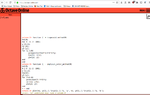
I wrote that code in a script .m and when I run it it is asked to enter a value for N. I give for example 100 and then I get the error message.

I did that in https://octave-online.net/

So, when you run that code it is executed normally without any error? (Thinking)
 
evinda said:
I wrote that code in a script .m and when I run it it is asked to enter a value for N. I give for example 100 and then I get the error message.

I did that in https://octave-online.net/

So, when you run that code it is executed normally without any error?

If I copy and paste your code in octave-online, I don't get any response. (Worried)

I expected that since those functions are not terminated with the [M]end[/M] that should come after. (Nerd)

What did you put in octave-online exactly?
How did you get the error? (Wondering)
 
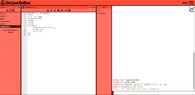
There are two functions that I want to plot. Here you can see the functions I wrote then I press RUN and enter 100 as the value for N and as you can see I get again an error message. What have I done wrong? (Thinking)

View attachment 9067
 
Attachments
  • Screenshot of the Octave Online editor showing ex.m with two functions, trapezoid_method(N) and euler_method(N), and a plot line; the console below reports error: invalid use of script /home/oo/ex.m in index expression after running ex(100).
    run.jpg
    56.5 KB · Views: 163
evinda said:
There are two functions that I want to plot. Here you can see the functions I wrote then I press RUN and enter 100 as the value for N and as you can see I get again an error message. What have I done wrong?

If we put a function into a file named [M]ex.m[/M], then that file must contain exactly a function named [M]ex[/M] and no other statements.
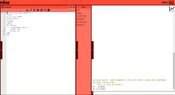
Since that is not the case, we get an error that is unfortunately not very descriptive. (Worried)If we copy and paste your code into the regular command prompt of Octave online, we get:
View attachment 9068

Now we get the error that the variables are not known as I explained. (Nerd)Alternatively, we can create a new file named [M]trapezoid_method.m[/M].
Put the code of the function in there, and only that function.
Click the save button.
Type [M]trapezoid_method(10)[/M] on the command prompt.
Now it will execute the function as desired. (Happy)
 
Attachments
  • Screenshot of the Octave Online console showing two function definitions, trapezoid_method(N) and implicit_euler_method(N), typed at the prompt, followed by an error: 't2' undefined near line 1 column 6.
    Octave.png
    26.7 KB · Views: 168
And what if we write these two function into one?

I mean like that:
Code:
function [ ] = ex(N) 
h=1/N;
A=[-5 -2;-2 -100]; 
%trapezoid_method  
y=[1;1];
t2=[0];
y2=[y];
for (i=1:N)
      y=(eye(2)+h*A+h^2/2*A^2)*y;
      t2=[t2, i*h];
      y2=[y2, y];
end 
%euler_method  
y=[1;1];
t3=[0];
y3=[y];
for (i=1:N)
    y=inv(eye(2)-h*A)*y;
    t3=[t3, i*h];
    y3=[y3, y];
end 
plot(t2, y2(1,:).^2+y2(2,:).^2, 'y', t3, y3(1,:).^2+y3(2,:).^2, 'b'); 
end

So that the variables are known, does the function have to return these? Or how can we fix the error that we get, that the variable are not known? I splitted the two functions into two files, the following:

Code:
function [ ] = euler(N) 
h=1/N;
A=[-5 -2;-2 -100]; 
%trapezoid_method  
%euler_method  
y=[1;1];
t3=[0];
y3=[y];
for (i=1:N)
    y=inv(eye(2)-h*A)*y;
    t3=[t3, i*h];
    y3=[y3, y];
end 
end

Code:
function [ ] = trapezoid(N) 
h=1/N;
A=[-5 -2;-2 -100]; 
%trapezoid_method  
y=[1;1];
t2=[0];
y2=[y];
for (i=1:N)
      y=(eye(2)+h*A+h^2/2*A^2)*y;
      t2=[t2, i*h];
      y2=[y2, y];
end 
end

Then in the command line I wrote the following commands:
octave:1> trapezoid(100)
octave:2> euler(100)
octave:3> plot(t2, y2(1,: ).^2+y2(2,: ).^2, 'y', t3, y3(1,: ).^2+y3(2,: ).^2, 'b');

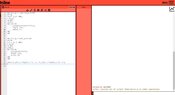
but I get again "error: 't2' undefined near line 1 column 6". What am I doing wrong? (Thinking)

Here's how it looks like at me:View attachment 9069
 
Attachments
  • Screenshot of the Octave Online editor showing trapezoid.m with a function definition and a session error reading 't2' undefined near line 1 column 6.
    oct.jpg
    70.6 KB · Views: 160
evinda said:
And what if we write these two function into one?

I mean like that:

So that the variables are known, does the function have to return these? Or how can we fix the error that we get, that the variable are not known?

That should work yes.
Does it? (Thinking)

evinda said:
I splitted the two functions into two files, the following:

Then in the command line I wrote the following commands:
octave:1> trapezoid(100)
octave:2> euler(100)
octave:3> plot(t2, y2(1,: ).^2+y2(2,: ).^2, 'y', t3, y3(1,: ).^2+y3(2,: ).^2, 'b');

but I get again "error: 't2' undefined near line 1 column 6". What am I doing wrong? (Thinking)

Here's how it looks like at me:

Now we do not get the error that there is something wrong with the script any more. Good! (Happy)

The variables still need to be returned though.
We can do that with:
[M] function [t3, y3] = euler(N)
...[/M]
and:
[M]function [t2, y2] = trapezoid(N)
...[/M]
and:
[M]octave:1> [t2, y2] = trapezoid(100)
octave:2> [t3, y3] = euler(100)
octave:3> plot(t2, y2(1,: ).^2+y2(2,: ).^2, 'y', t3, y3(1,: ).^2+y3(2,: ).^2, 'b'); [/M]
(Emo)
 
Klaas van Aarsen said:
The variables still need to be returned though.
We can do that with:
[M] function [t3, y3] = euler(N)
...[/M]
and:
[M]function [t2, y2] = trapezoid(N)
...[/M]
and:
[M]octave:1> [t2, y2] = trapezoid(100)
octave:2> [t3, y3] = euler(100)
octave:3> plot(t2, y2(1,: ).^2+y2(2,: ).^2, 'y', t3, y3(1,: ).^2+y3(2,: ).^2, 'b'); [/M]
(Emo)

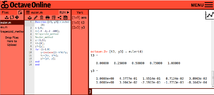
I tried it like that. The command "[t2, y2] = trapezoid(100)" works. But the command "[t3, y3] = euler(100)" seems not to work, I get the following:View attachment 9070(Thinking)
 
Attachments
  • Screenshot of an online MATLAB-style editor showing a file euler.m with a function definition for an implicit Euler method, and a warning that some return values are undefined with empty outputs t3 and y3.
    oct2.jpg
    53.4 KB · Views: 148
evinda said:
I tried it like that. The command "[t2, y2] = trapezoid(100)" works. But the command "[t3, y3] = euler(100)" seems not to work, I get the following:

It seems to work for me:

View attachment 9071

(Wasntme)
 
Attachments
  • Screenshot of Octave Online showing euler.m code defining a function [t3, y3] = euler(N), and command output for euler(4) listing t3 as 0 to 1 in steps of 0.25 and a two-row y3 matrix of numeric values.
    euler.png
    19.8 KB · Views: 154