Connecting Anaconda with Access Database using Pyodbc

  • Thread starter Thread starter WWGD
  • Start date Start date
  • Tags Tags
    Database
Click For Summary

Discussion Overview

The discussion revolves around accessing an Access Database using Pyodbc within Anaconda Jupyter. Participants share code snippets, error messages, and troubleshooting tips related to dynamic queries and data plotting.

Discussion Character

  • Technical explanation
  • Debate/contested
  • Meta-discussion

Main Points Raised

  • One participant shares a code snippet that results in a SyntaxError, indicating a potential issue with string formatting in the connection string.
  • Some participants suggest that a missing single quote character may be the cause of the SyntaxError.
  • There is a discussion about naming conventions for programs and variables, with some arguing that clearer names would help in the long run.
  • Another participant references the usefulness of command-line tools in understanding the current working context of a programmer.
  • A later reply mentions a useful resource for connection strings, indicating a shared interest in troubleshooting database connections.
  • Some participants express personal experiences with database connection issues, including frustrations with ODBC drivers and past projects.
  • One participant humorously refers to their unexpected success in connecting through named pipes, indicating confusion about how it was achieved.

Areas of Agreement / Disagreement

Participants express various viewpoints on the cause of the error and the importance of naming conventions, but no consensus is reached on the best practices or solutions to the initial problem.

Contextual Notes

There are unresolved issues regarding the specific error message and the implications of naming conventions, as well as varying levels of experience among participants with database connections.

WWGD
Science Advisor
Homework Helper
Messages
7,804
Reaction score
13,107
TL;DR
Trying to connect Anaconda with Access Db using Pyodbc , getting 'EOL String
Hi All,
My goal is to access an Access Database from within Anaconda Jupyter and , in Jupyter, use Pyodbc to conduct dynamic queries against my database and do some plotting of the data in Access. My code is below, together with the error message
--------------------------------------------------------------------------------------
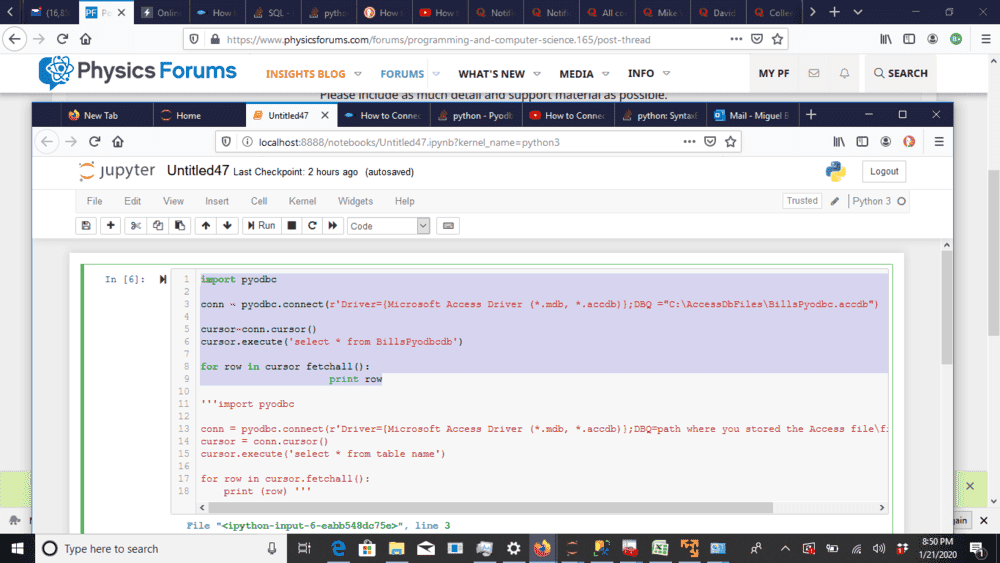
1579657834845.png
Error message is:
File "<ipython-input-6-eabb548dc75e>", line 3
conn = pyodbc.connect(r'Driver={Microsoft Access Driver (*.mdb, *.accdb)};DBQ ="C:\AccessDbFiles\BillsPyodbc.accdb")
^
SyntaxError: EOL while scanning string literal

-----------------------------------------------------------------------------
Any ideas?
 
Technology news on Phys.org
I notice the close paren is red maybe you are missing a single quote character.

r’blah blah “blah” ‘
 
  • Like
Likes   Reactions: WWGD
jedishrfu said:
I notice the close paren is red maybe you are missing a single quote character.

r’blah blah “blah” ‘
Thanks, will check out tmw, just left coffee shop.
 
  • Like
Likes   Reactions: jedishrfu
Untitled47? How do you remember where anything is?
 
Borg said:
Untitled47? How do you remember where anything is?
I have my own system until I learn. Maybe not the best but somehow works.
 
A real programmer let's the computer tell them where they are.
 
jedishrfu said:
A real programmer let's the computer tell them where they are.
?? Not sure I get it.
 
Have you ever used the pwd command in linux? or the date or time commands? or even better the uname -a command?

Each of these commands tells you something about where you are or when you are or what machine you're on and there are many others that tell things you might need to know.
 
Borg said:
Untitled47? How do you remember where anything is?
WWGD said:
I have my own system until I learn. Maybe not the best but somehow works.
Definitely not the best, and I doubt it would work over a longer time span than a week or two.
If you take a small amount of time now to come up with names for your programs and variables (recalling another thread of yours) that are indicative of what they will do, it will really pay dividends when you are looking for examples of specific techniques or are trying to understand what your code is doing when you or others look at it a month or more later.
jedishrfu said:
Each of these commands tells you something about where you are or when you are or what machine you're on and there are many others that tell things you might need to know.
Borg's comment wasn't about where the programmer was, but was instead a comment on using uninformative program names such as Untitled47.
 
  • #10
Thanks @Mark44 but I was responding to @WWGD who asked about my real programmer humor while awaiting if the single quote was the issue in his code which I think it was.
 
  • #11
jedishrfu said:
Thanks @Mark44 but I was responding to @WWGD who asked about my real programmer humor while awaiting if the single quote was the issue in his code which I think it was.
It wasn't clear that your reply referred back to what WWGD said. In the interim, Borg asked "How do you remember where anything is?" -- so your comment seemed to me to be a non sequitur.
 
  • Like
Likes   Reactions: jedishrfu
  • #12
jedishrfu said:
I notice the close paren is red maybe you are missing a single quote character.

r’blah blah “blah” ‘
SyntaxError: EOL while scanning string literal
makes this a cast iron certainty - the parser is telling you that it reached the end of the line before it reached the end of the string!

Somtimes error messages are not very helpful, but you should always read them in case they are :rolleyes:
 
  • Like
Likes   Reactions: WWGD, Timo and jedishrfu
  • #13
  • #14
Thanks, that brought back nightmares of projects long ago using DB2 and related hardware/software issues of broken connections.
 
  • #15
jedishrfu said:
Thanks, that brought back nightmares of projects long ago using DB2 and related hardware/software issues of broken connections.
In case it helps, I am having a few of my own, with nightmares about odbc drivers.
 
  • Like
Likes   Reactions: jedishrfu
  • #16
It seems that Computus, ruler of IT world, granted me the miracle of conecting through named pipes to use sqlcmd. A complete blur; I have no clue how it came to happen.
 
  • Like
Likes   Reactions: pbuk

Similar threads

  • · Replies 2 ·
Replies
2
Views
2K
Replies
5
Views
14K
  • · Replies 5 ·
Replies
5
Views
3K
  • · Replies 7 ·
Replies
7
Views
8K
  • · Replies 13 ·
Replies
13
Views
4K