Data transfer from MS Excel to PSPP

  • Thread starter Thread starter chwala
  • Start date Start date
  • Tags Tags
    Data Excel
Join the discussion
Ask a follow-up here, or get your own question answered by working scientists, mathematicians and engineers — people, not an autocomplete.
Real named experts · corrections over time · the nuance an AI answer skips
16 replies · 5K views
chwala
Gold Member
Messages
2,843
Reaction score
428
Homework Statement:: See attached
Relevant Equations:: analysis stats

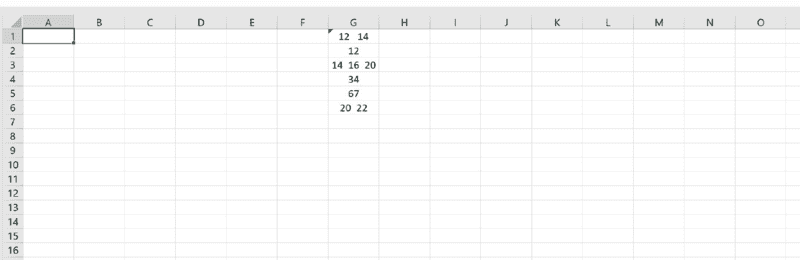
Find below a sample of the data that i want to import onto spss; My intention is to have the data appearing as one variable only on PSPP.
1643943911607.png

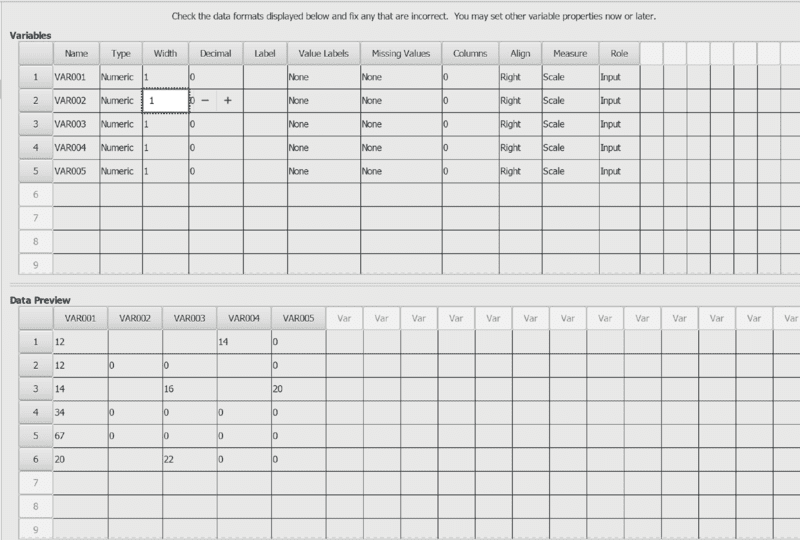
This is how it appears on PSPP;
1643945053852.png

It defaults as 5 variables, ...i used comma delimited and i am aware that the pspp regards any comma/space as a variable i.e if you were to have for instance;{20 30 90} on one excel cell then importing this to pspp( using comma delimited ), yields 5 variables on pspp...which is not exactly what i want. I want the data on Ms excel to be imported onto spss as one variable only.

cheers...
 
Last edited:
Physics news on Phys.org
That is not going to be easy using standard export/import routines. I can see two solutions:
  1. (better) generate data in Excel in a more consistent format
  2. (kludgy) write a simple search and replace script in [insert your favourite scripting language] to process the CSV file into the shape you want.
 
  • Like
Likes   Reactions: chwala
Cheers, the other option would be to have the multiple items appear as one item that is, instead of {a b c}, I would have my item appear as {abc} on excel...then import.
 
Unless you're trying to learn techniques to do the process, it seems data set is small enough you can just create it in SPSS by replicating the data there.
 
  • Like
Likes   Reactions: chwala
FWIW, if you're interested in learning how to scrape/import/export data, then data cleaning is where it's at. Most of the time you'll spent having to deal with mangled data, rather than with the design of models.
 
  • Like
Likes   Reactions: chwala
The actual data set has ##25,000## entries. The attached excel is just a dummy. I wanted help on duplicate entries that appear on a cell. Cheers.
 
  • Like
Likes   Reactions: WWGD
FWIW, if you want to do something beyond
chwala said:
The actual data set has ##25,000## entries. The attached excel is just a dummy. I wanted help on duplicate entries that appear on a cell. Cheers.
My bad. Let me think about it. Though it's an example of data cleaning.
 
WWGD said:
FWIW, if you want to do something beyond

My bad. Let me think about it.
Thanks @WWGD
 
  • Like
Likes   Reactions: WWGD
WWGD said:
My bad. Let me think about it. Though it's an example of data cleaning.
Excel is the wrong tool for data cleaning.

Are you actually creating this data in Excel or are you reading it in from a CSV file? If the latter, please post (an extract from) the CSV file here. What tools do you have available: Python? Perl? Nothing but a web browser?
 
I have the raw data on an excel sheet and i need to import to pspp...i am converting using the csv format. The data is too large to be uploaded here. Kindly note that i was able to import the data and subsequently analysed the data. The only issue was as indicated on post 1. I have data appearing as indicated on excel sheet ...

check column G for e.g Row 1 has two entries { 12 & 14} as shown...on importing to pspp...it defaults as two variables [i.e variable 1 and variable 4 as shown on pspp] ...i want this to appear\default as one variable only hence the reason why i posted this query. I hope this helps ...
 
Last edited:
chwala said:
I have the raw data on an excel sheet
How did it get there? If you are generating it with formulae, just use different formulae. If you have uploaded it from a CSV file it would be easier to work with the original CSV file. If you have been sent the file as an xlsx file then it would probably best to save it as a CSV file. You can then use any decent text editor (e.g. Visual Studio Code) to replace all " " (space) characters with "\n\r" (otherwise known as CRLF). Or write a Python, Perl etc. script to do this.
 
Last edited:
  • Like
Likes   Reactions: chwala
pbuk said:
How did it get there? If you are generating it with formulae, just use different formulae. If you have uploaded it from a CSV file it would be easier to work with the original CSV file. If you have been sent the file as an xlsx file then it would probably best to save it as a CSV file. You can then use any decent text editor (e.g. Visual Studio Code) to replace all "," characters with "\n\r" (otherwise known as CRLF). Or write a Python, Perl etc. script to do this.
Ok thanks for the info...cheers @pbuk
 
pbuk said:
Excel is the wrong tool for data cleaning.

Are you actually creating this data in Excel or are you reading it in from a CSV file? If the latter, please post (an extract from) the CSV file here. What tools do you have available: Python? Perl? Nothing but a web browser?
Well, it does live there at the moment.
 
WWGD said:
Where to? I mean, what else should be used?
pbuk said:
any decent text editor (e.g. Visual Studio Code) to replace all "," characters with "\n\r" (otherwise known as CRLF). Or write a Python, Perl etc. script to do this.

Edit: or you could do it in a browser with some JavaScript like this that I just wrote:
 
Last edited:
Oh wait a minute, it's extra spaces you want to convert to CRLFs, not ","s. I've edited accordingly above.
 
Last edited:
  • Like
Likes   Reactions: chwala