Desmos: Formula input in Firefox

Join the discussion
Registration is free. Ask a follow-up in this thread, or start your own.
6 replies · 5K views
Evgeny.Makarov
Gold Member
MHB
Messages
2,434
Reaction score
4
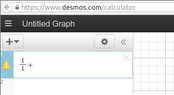
Is it just me or Desmos ruined its formula input? In the past when I typed [m]x[/m], [m]/[/m], [m]1[/m], [m]+[/m], [m]x[/m] I got $\frac{x}{1+x}$. Now I'm getting $\frac{x}{1}+x$. In fact, I can't figure out how to type $\frac{x}{1+x}$ at all. Even if I have $\frac{1}{1x}$ and the cursor is between 1 and $x$ in the denominator, typing $+$ turns it into $\frac{1}{1x}+$. For another example, after I type [m]cos(sin[/m] I get $\cos(\sin\ )$ and the cursor is immediately after "n" (Desmos automatically inserts closing parenthesis). But when I type [m]([/m] again, I get $\cos(\sin\ )(\ )$. The only way for me to enter formulas seems to be to type them in a text editor and then copy-paste them to Desmos.

I am using Firefox 32 in Ubuntu 14.04. I tried these examples in Chrome 37, and they work fine.
 
Physics news on Phys.org
Evgeny.Makarov said:
Is it just me or Desmos ruined its formula input? In the past when I typed [m]x[/m], [m]/[/m], [m]1[/m], [m]+[/m], [m]x[/m] I got $\frac{x}{1+x}$. Now I'm getting $\frac{x}{1}+x$. In fact, I can't figure out how to type $\frac{x}{1+x}$ at all. Even if I have $\frac{1}{1x}$ and the cursor is between 1 and $x$ in the denominator, typing $+$ turns it into $\frac{1}{1x}+$. For another example, after I type [m]cos(sin[/m] I get $\cos(\sin\ )$ and the cursor is immediately after "n" (Desmos automatically inserts closing parenthesis). But when I type [m]([/m] again, I get $\cos(\sin\ )(\ )$. The only way for me to enter formulas seems to be to type them in a text editor and then copy-paste them to Desmos.

I am using Firefox 32 in Ubuntu 14.04. I tried these examples in Chrome 37, and they work fine.

When I type [m]x[/m], [m]/[/m], [m]1[/m], [m]+[/m], [m]x[/m] in both Chrome and Firefox I get $$\frac{x}{1+x}$$. By default once typing in the denominator of the fraction is seems to stay there unless I hit the right-arrow key.

When I type in [m]cos(sin[/m] I immediate see this: $\cos( \sin( \ ))$ and my cursor between the two parentheses after $\sin$, which is logical and convenient. I didn't quite catch what is happening on your computer but I think it's different than this.

I'm using OS X 10.9.4 on a Macbook Pro.
 
Could someone using Firefox in other operating systems, especially Linux, say if they see the behavior I described?
 
Testing...

[desmos="-10,10,-10,10"]x/1+x[/desmos]

I entered the formula as part of selecting Desmos in the quick menu.
I entered a second formula x/1+x (not visible), which behaves differently - as expected.

So entering it in the edit box of setup screen comes out as $\frac x 1 + x$, while entering it in interactive mode comes out as $\frac{x}{1+x}$.

I'm using Firefox 31 on Ubuntu 14.04 here.
 
I like Serena said:
I entered the formula as part of selecting Desmos in the quick menu.
I entered a second formula x/1+x (not visible), which behaves differently - as expected.

So entering it in the edit box of setup screen comes out as $\frac x 1 + 1$, while entering it in interactive mode comes out as $\frac{x}{1+x}$.
Thanks, ILS.

What I meant, in fact, was entering formulas on the Desmos site itself, not on MHB. What I described happens when I go to https://www.desmos.com/calculator and start entering a formula in the top-left corner of the page

View attachment 3454

Could you try this? Are you able to enter $\frac{1}{1+x}$?
 

Attachments

  • desmos.png
    desmos.png
    5.6 KB · Views: 141
OK, it may be just my problem. I do get strange behavior in some text boxes in different applications. (Are they a part of GTK? I am using Unity.) For example, in such diverse applications as Evince and Firefox, when I am entering the name of a bookmark, if I press a capital letter, the input terminates as if I pressed the Enter key. Maybe it's related.