Draw with Teechart,language Visual Basic

  • Thread starter Thread starter nguyen_de89
  • Start date Start date
  • Tags Tags
    Visual
Click For Summary
The discussion revolves around issues with updating a graph using TeeChart in Visual Basic, specifically regarding a delay in data updates that causes the graph to display too many points, making it difficult to see clearly. The user is struggling to manage the graph's data points, wanting to remove the oldest points when new data exceeds 15 points. There is confusion about registration for support, as the user is not a registered customer and lacks a license code. Suggestions include adjusting the pointer size for better visibility and creating a simplified example project to troubleshoot the issue. The conversation highlights the need for clearer communication and understanding of the graph's data management requirements.
nguyen_de89
Messages
3
Reaction score
0
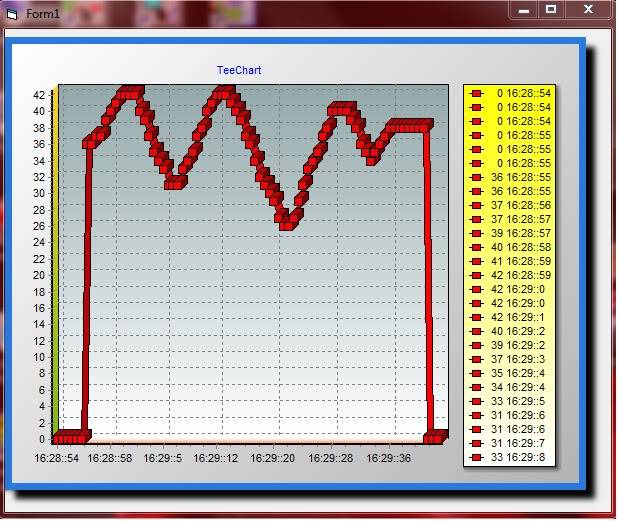
I have one problem about this matter,data update on graph,delay a long time,then it will cornered,i can't this disposition you can help me!
NewBitmapImage.jpg
 
Engineering news on Phys.org
Hello,

I'm not sure to understand the exact situation. Could you please arrange a simple example project we can run as-is to reproduce the problem here?

"Important note: If you are a TeeChart registered customer,
please post your support questions at Steema's Support
monitored Forums for a prompter reply."
http://support.steema.com

--
Best Regards,

Yeray Alonso
Steema Support Central
 
Hi
Sr,i don't know registration that wedside
My problem is data drive left then stand here,so points on graph very thick can't see
i post my file you can see it.Do you use Proteus 7.7

http://www.mediafire.com/?u5o4pxndwgv22lj
 
Hello,

nguyen_de89 said:
i don't know registration that wedside
The support forums are available for Steema customers. If you are a registered customer, you should have a license code and a password you could use to log in that forums.
If you are not a registered customer, please contact us at info at steema dot com.

nguyen_de89 said:
My problem is data drive left then stand here,so points on graph very thick can't see
I'm not sure to understand the problem. Isn't the problem related to drawing speed?
If you want to make the pointer smaller, you could make it smaller with.
Code:
With TChart1.Series(0)
    .asLine.Pointer.HorizontalSize = 2
    .asLine.Pointer.VerticalSize = 2
End With

nguyen_de89 said:
i post my file you can see it.Do you use Proteus 7.7
I've been able to open your project with Visual Basic 6. However does nothing. I think it expects to find something in a COM port...
So, if you still have problems with it, please try to arrange a simple example project we can run a-is to reproduce the problem here.

Thanks in advance.
 
Thanks for reply
But i don't know how i have license code,Do you have yahoo nick,you can give me,i can exchange easier
You don't understand my problem :D
Detail :On graph have two axial (X & Y),On my graph X is Temperature,Y is Time(Second)
When time is run about 15 seconds,on my graph have 15 points homology with time.
My graph is only contain about 15 points.If 16 points are graph to contracted
I want,if >16 points will delete all 15 points and draw 15 points next.
Do you understand my mean?
 
I am trying to understand how transferring electric from the powerplant to my house is more effective using high voltage. The suggested explanation that the current is equal to the power supply divided by the voltage, and hence higher voltage leads to lower current and as a result to a lower power loss on the conductives is very confusing me. I know that the current is determined by the voltage and the resistance, and not by a power capability - which defines a limit to the allowable...

Similar threads

  • · Replies 2 ·
Replies
2
Views
2K
Replies
0
Views
698
  • · Replies 5 ·
Replies
5
Views
1K
  • · Replies 2 ·
Replies
2
Views
1K
  • · Replies 11 ·
Replies
11
Views
4K
  • · Replies 25 ·
Replies
25
Views
7K
Replies
4
Views
3K
  • · Replies 9 ·
Replies
9
Views
3K
  • · Replies 3 ·
Replies
3
Views
1K
  • · Replies 3 ·
Replies
3
Views
2K