F(x) row isn't shown in origin software

3 replies · 3K views · last reply
MatinSAR
Messages
676
Reaction score
207
TL;DR
Hi. Does anyone know why origin doesn't show this row for me? I need it for calculations ...

I am using version 9.
My PC :
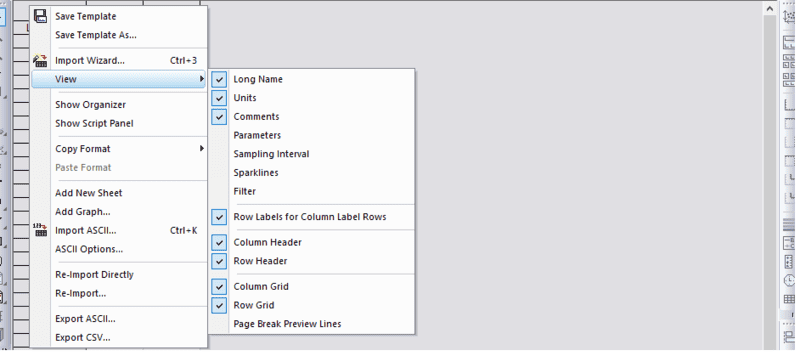
Origin software menu with a View submenu open, showing checked options for Long Name, Units, Comments, Row Labels for Column Label Rows, Column Header, Row Header, Column Grid and Row Grid, and unchecked options for Parameters, Sampling Interval, Sparklines, Filter and Page Break Preview Lines.

There is no option !

Origin's website:
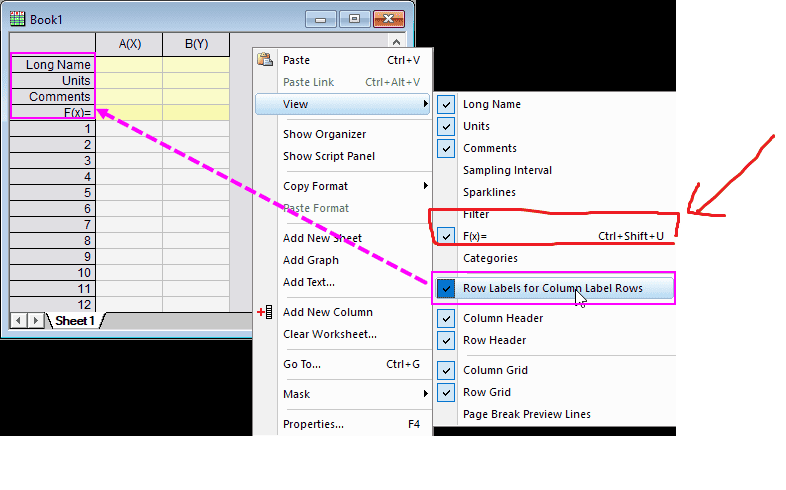
Origin worksheet window Book1 beside its context menu, View submenu open with checkmarks for Long Name, Units, Comments and F(x)= items; Row Labels for Column Label Rows is highlighted with a pink box.
 
No idea, but I note there's a keyboard shortcut in the website screenshot - does that work?
 
Ibix said:
No idea, but I note there's a keyboard shortcut in the website screenshot - does that work?
Thanks for the reply ...
I've tried. That doesn't work.
 
I've installed another version. The problem is solved.
Version: OriginPro 2016 SR0 b9.3.226

Screenshot of an Origin worksheet titled Book1 with columns A to H, showing Long Name, Units, Comments and F(x) header rows above numeric data for lambda, n, R-deg, R-min, L-deg and L-min.