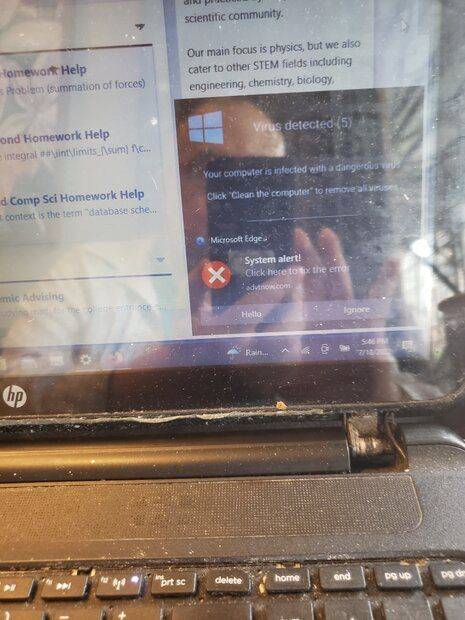
Discussion Overview
The discussion revolves around a user experiencing a spoofed virus warning message that mimics legitimate antivirus software, specifically Windows Defender and McAfee. Participants explore potential causes, solutions, and the nature of the malware involved, with a focus on technical troubleshooting and recovery methods.
Discussion Character
- Exploratory
- Technical explanation
- Debate/contested
- Mathematical reasoning
- Experimental/applied
Main Points Raised
- One participant notes that malware can bypass popup blockers by delaying the popup initiation.
- Another suggests using Windows Safe Mode to delete temporary files as a troubleshooting step.
- There is a proposal to use Wireshark for network monitoring to identify potential threats.
- Several participants discuss the implications of the spoofed message, questioning how it could claim to detect a virus without being installed.
- One participant mentions the possibility of the issue being adware rather than a virus.
- Another suggests using the System Restore feature to revert the system to a previous state.
- Participants share links to tools like the Farbar Recovery Scan Tool and Process Explorer for further investigation.
- There are mentions of legitimate pop-ups from antivirus companies appearing after initial malware issues were addressed, raising questions about the effectiveness of the scans performed.
Areas of Agreement / Disagreement
Participants express a range of views on the nature of the malware and the effectiveness of various solutions. There is no consensus on the exact cause of the issue or the best approach to resolve it, indicating ongoing uncertainty and debate.
Contextual Notes
Some participants highlight limitations in the effectiveness of antivirus software, noting that certain malware may evade detection. There are also discussions about the need for specific settings to be enabled in newer versions of Windows for certain recovery features.
Who May Find This Useful
Individuals experiencing similar issues with malware or virus warnings, as well as those interested in technical troubleshooting methods for computer security problems.