C/C++ Help getting Boost included in my C++ program

Click For Summary
The discussion centers around issues related to including the Boost Filesystem library in a project. The user has attempted to modify the Library Search Path to locate the filesystem.hpp file, trying various include directives and search path configurations without success. They are seeking suggestions for troubleshooting the inclusion of the library. Additionally, they provide a guideline for downloading and setting up Boost, which includes checking the installation script for version compatibility, running the script to create the BOOST environment variable, and configuring build settings in XCode. The user suspects that their problem may stem from the need for a separate build for the Filesystem library, indicating a potential oversight in the setup process.
Jamin2112
Messages
973
Reaction score
12
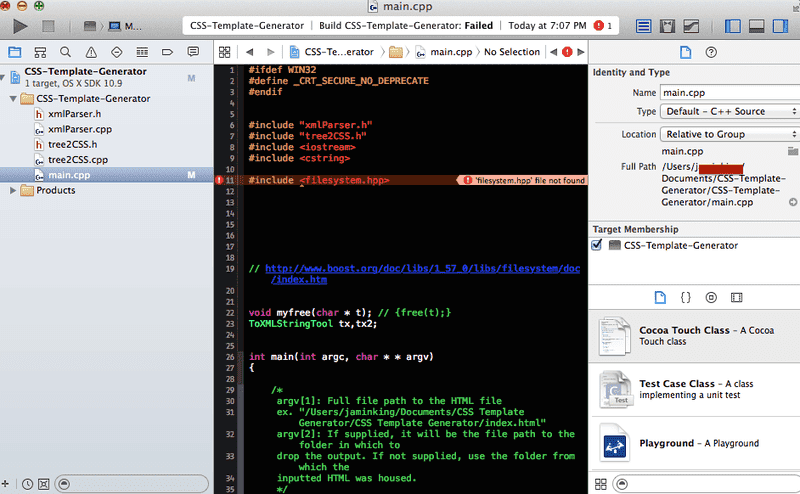
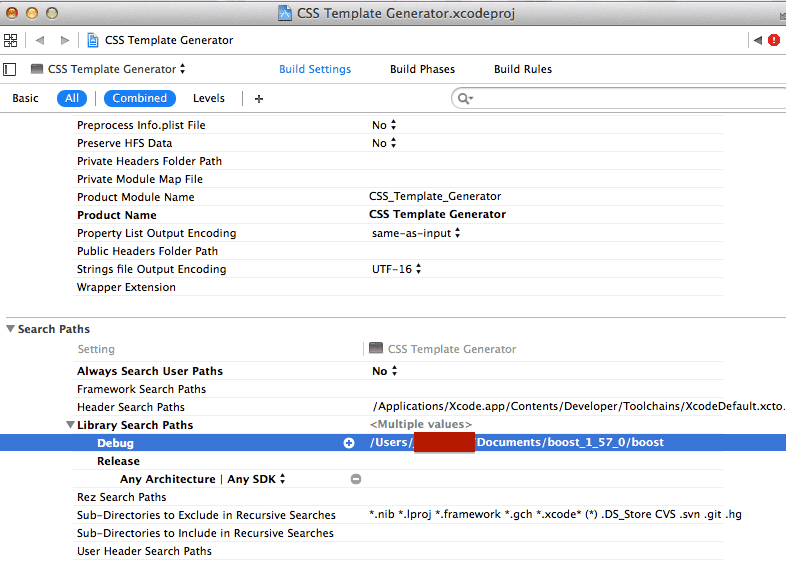
I've changed the Library Search Path to the folder that contains the file I'm trying to use, filesystem.hpp, and then including the file with the directive #include <filesystem.hpp>. I've also tried changing it to "filesystem.hpp"; changing the search to recursive; trying to grab it from the folder 1 level above in the directory by changing the search path 1 level above and changing the directive to #include <boost/filestysem.hpp>, #include "boost/filestysem.hpp", etc.

Hopefully the following screenshots can show you where I'm at.
b56GX.png


24o9kqh.jpg
Any suggestions about what I can try to fix this?
 
  • Like
Likes Silicon Waffle
Technology news on Phys.org
Here is an "imaginary" guideline :DD. Use this with your own risk.

1. Download Boost and extract it into your favorite folder.
2. Check the xxxboostxxx.sh file to see if its version to be installed matches with one you would want to build.
3. Run it ./xxxboostxxx.sh, after which the BOOST environment variable will be created.
4. Create your build settings in XCode (you can use the attachments below then fix the versions of gcc/g++ compiler and boost).
OTHER_LDFLAGS = $(BOOST)/lib/libboost_system-xgcc48-mt-$(BOOST_VERSION)-macosx.a
HEADER_SEARCH_PATHS = $(inherited) $(BOOST)/include/boost-$(BOOST_VERSION)/
LIBRARY_SEARCH_PATHS = $(inherited) $(BOOST)/lib
BOOST_VERSION = 1_57
 

Attachments

Silicon Waffle said:
Here is an "imaginary" guideline :DD. Use this with your own risk.

1. Download Boost and extract it into your favorite folder.

Done.

2. Check the xxxboostxxx.sh file to see if its version to be installed matches with one you would want to build.

It doesn't. Should I change the VERSION variable accordingly?

3. Run it ./xxxboostxxx.sh, after which the BOOST environment variable will be created.

Am I supposed to use a modified version of that script and is supposed to be self-explanatory which portions I need to modify for my own use?
 
I may have detected my problem. I'm trying to use the Filesystem library and it says here that Filesystem requires a separate build.
 
Learn If you want to write code for Python Machine learning, AI Statistics/data analysis Scientific research Web application servers Some microcontrollers JavaScript/Node JS/TypeScript Web sites Web application servers C# Games (Unity) Consumer applications (Windows) Business applications C++ Games (Unreal Engine) Operating systems, device drivers Microcontrollers/embedded systems Consumer applications (Linux) Some more tips: Do not learn C++ (or any other dialect of C) as a...

Similar threads

  • · Replies 2 ·
Replies
2
Views
3K
  • · Replies 10 ·
Replies
10
Views
2K
  • · Replies 6 ·
Replies
6
Views
2K
  • · Replies 5 ·
Replies
5
Views
6K
  • · Replies 27 ·
Replies
27
Views
6K
Replies
19
Views
3K
Replies
14
Views
3K
  • · Replies 10 ·
Replies
10
Views
6K
  • · Replies 5 ·
Replies
5
Views
3K
  • · Replies 15 ·
Replies
15
Views
8K