TumblingDice
Gold Member
- 471
- 47
I've been asked to complete a project that requires secure FTP transmission of confidential legal agreements. Despite a healthy background/experience in data communications in the banking industry, time has passed and I've never used PGP or RSA before. NOTE: Everything will be done under Windows and/or IIS. I have a local IIS server for developing/testing, and a public IIS server (if need be) to support the testing phase.
I need to submit a form to apply for secure connectivity. It's asking for both PGP and RSA public keys that we'll use to download new files
My #1 "void" is how to generate the keys properly. Number #2 is how to deliver them in a professional manner. I've tried on my own, using Kleopatra for PGP generation, and "PuttyGen" on the RSA side. I'm feeling "lost at sea"...
My goal is to completely understand before completing a 'perfect' a software solution, yet I'd appreciate a 'recipe' to follow at the moment, hoping to catch up as I go.
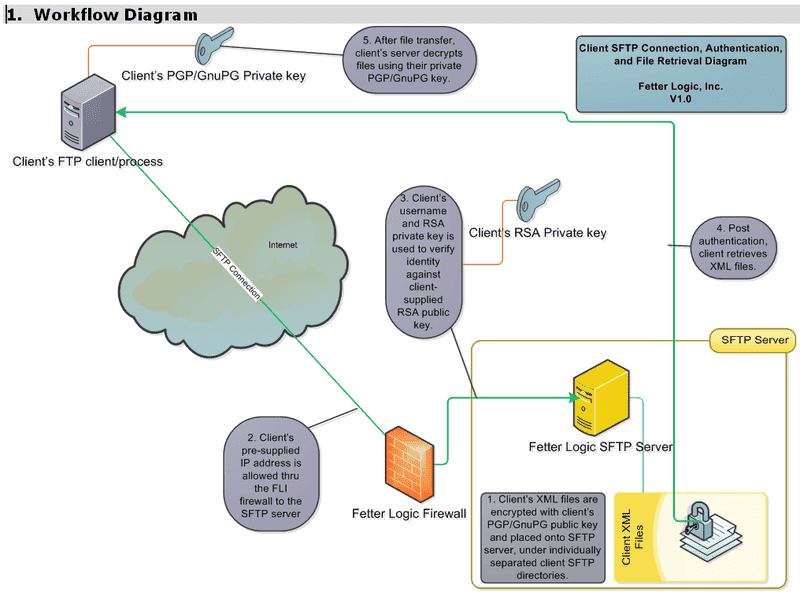
Here is the workflow diagram:
Can anyone help with step-by-step recipes to create both the PGP and RSA keys, and subsequent steps to "do it the right way"...?
The application form I need to submit is a Word doc with numbered questions to fill in. So - in my response to "Public PGP Key for Data Encryption", should I post the '*.pgp' file to a server and provide a link to it? Or should I just 'paste' the open text of the certificate into the Word doc? (Or maybe both.)
And how to deliver the same for the RSA side? Can I paste the open text into the Word doc, or does it need to be installed on a server and communicated from there? My local server isn't public - so I can install on the public server if that's the correct way to begin?
Much TIA!
I need to submit a form to apply for secure connectivity. It's asking for both PGP and RSA public keys that we'll use to download new files
My #1 "void" is how to generate the keys properly. Number #2 is how to deliver them in a professional manner. I've tried on my own, using Kleopatra for PGP generation, and "PuttyGen" on the RSA side. I'm feeling "lost at sea"...
My goal is to completely understand before completing a 'perfect' a software solution, yet I'd appreciate a 'recipe' to follow at the moment, hoping to catch up as I go.
Here is the workflow diagram:
Can anyone help with step-by-step recipes to create both the PGP and RSA keys, and subsequent steps to "do it the right way"...?
The application form I need to submit is a Word doc with numbered questions to fill in. So - in my response to "Public PGP Key for Data Encryption", should I post the '*.pgp' file to a server and provide a link to it? Or should I just 'paste' the open text of the certificate into the Word doc? (Or maybe both.)
And how to deliver the same for the RSA side? Can I paste the open text into the Word doc, or does it need to be installed on a server and communicated from there? My local server isn't public - so I can install on the public server if that's the correct way to begin?
Much TIA!