Hi, How can I stop these annoying pop-ups on my new laptop?

  • Thread starter Thread starter yungman
  • Start date Start date
Click For Summary

Discussion Overview

The discussion revolves around how to stop annoying pop-ups on a new laptop, specifically addressing issues related to potential malware and notification settings. Participants share experiences and suggest various methods for managing pop-ups, including software recommendations and system settings adjustments.

Discussion Character

  • Exploratory
  • Technical explanation
  • Debate/contested
  • Homework-related

Main Points Raised

  • One participant reports frequent pop-ups after acquiring a new laptop and seeks advice on how to eliminate them.
  • Another suggests checking notifications and alerts settings as a potential solution.
  • Some participants express uncertainty about the nature of the pop-ups, with one noting that they have options to disable them.
  • A participant identifies a specific URL associated with malware and questions the effectiveness of the installed Norton antivirus software, recommending the use of Norton Power Eraser.
  • There are multiple acknowledgments of the malware issue, with one participant recalling that the pop-up issue may have originated from a package tracking site.
  • Another participant emphasizes the importance of verifying whether the software is indeed malware before removing it, citing past experiences with difficult-to-remove software.
  • Links to external resources are provided for further guidance on malware removal and pop-up management.
  • One participant reports success in stopping the pop-ups after following suggested instructions and running a malware scan.

Areas of Agreement / Disagreement

Participants express a mix of agreement on the potential malware issue and the need for effective antivirus measures, but there is no consensus on the best approach to fully resolve the pop-up problem. Some participants emphasize different methods and tools, leading to a variety of opinions on the effectiveness of the solutions proposed.

Contextual Notes

Participants reference specific software tools and settings adjustments, but there is uncertainty regarding the effectiveness of these measures and the exact nature of the pop-ups. The discussion includes varying levels of confidence in the antivirus software's performance and the identification of malware.

Who May Find This Useful

Users experiencing similar pop-up issues on their laptops, particularly those concerned about malware and looking for solutions to manage notifications and alerts.

yungman
Messages
5,741
Reaction score
291
TL;DR
Need to stop the pop up on my new computer.
Hi

Just got a new laptop, all of a sudden, I keep getting popups on the lower right of the screen, like McAfee, Chrome something, back doctor etal. I went and uninstalled McAfee that came with the laptop. I have Norton, I can't find any help on popups. What should I do?
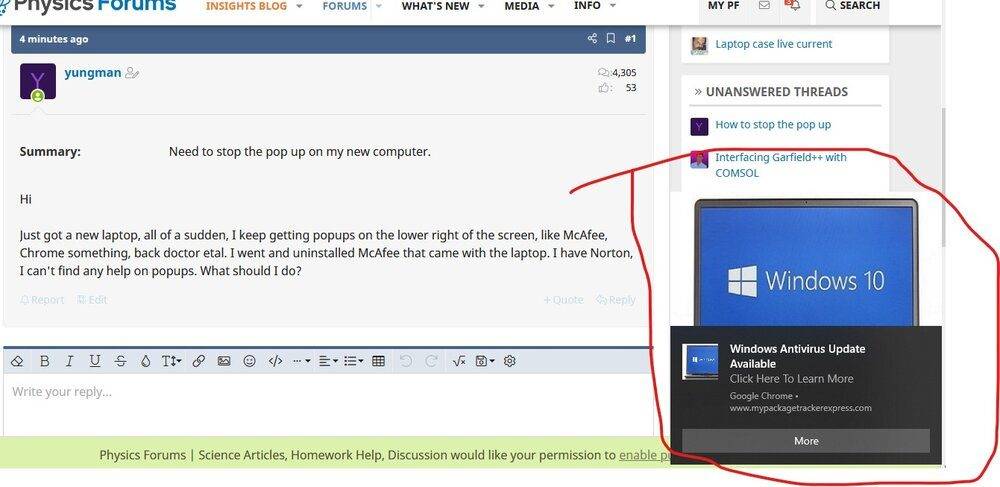
Popup.jpg
 
Computer science news on Phys.org
I don't what those popups look like, but the ones I get have on option to turn them off.
 
I can see the address for mypackagetracker.com in that screen shot - this is malware that has somehow got through Norton. Are you sure Norton is installed correctly and working? Use Norton Power Eraser to get rid of it.
 
  • Like
Likes   Reactions: jedishrfu
pbuk said:
I can see the address for mypackagetracker.com in that screen shot - this is malware that has somehow got through Norton. Are you sure Norton is installed correctly and working? Use Norton Power Eraser to get rid of it.
I think I was trying to track a package that lead to this. The site supposed to led me to track the package. The package had arrived already. How can I get rid of it?

Thanks
 
You better follow What @pbuk said and make sure your virus malware defense is up to date and working.
 
jedishrfu said:
You better follow What @pbuk said and make sure your virus malware defense is up to date and working.
Yeh, I just ran Norton Power Eraser, nothing wrong. It's supposed to download the latest version and scan the computer. What else can I do?

As I said, it's a tracking software for one of the furniture item that I needed to track last week, I knew it was installed at the time. But now I already received the item, do I have to worry about deleting it?
 
  • #10
Verify that it’s malware then delete. In the past, there’s been software that was somewhat useful but was a pain to remove and ultimately deemed malware because of it.
 
  • Like
Likes   Reactions: yungman
  • #12

Similar threads

  • · Replies 12 ·
Replies
12
Views
2K
  • · Replies 5 ·
Replies
5
Views
2K
Replies
73
Views
8K
  • · Replies 3 ·
Replies
3
Views
2K
  • · Replies 1 ·
Replies
1
Views
1K
  • · Replies 123 ·
5
Replies
123
Views
20K
  • · Replies 3 ·
Replies
3
Views
14K
  • · Replies 5 ·
Replies
5
Views
2K
  • · Replies 8 ·
Replies
8
Views
9K
Replies
9
Views
14K