High pass filtering FFT2 matlab

  • Context: MATLAB 
  • Thread starter Thread starter Taylor_1989
  • Start date Start date
  • Tags Tags
    Image processing Matlab
Join the discussion
Ask a follow-up here, or get your own question answered by working scientists, mathematicians and engineers — people, not an autocomplete.
Real named experts · corrections over time · the nuance an AI answer skips
4 replies · 4K views
Taylor_1989
Messages
400
Reaction score
14
I am having a slight issue with my code and honestly cannot understand what I am doing wrong. I am currently trying to using a high pass filter in the frequency domain to form the following image.
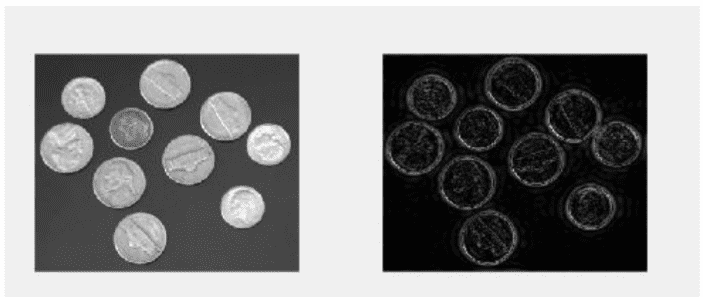
lf.png


So my approach so far after numerous of attempts which I won't list as I believe I am on the correct path, is to use a low pass filter matrix and then subtract from the original image, the issue is I cannot subtract due to the matrix of the low pass filter image being different from the original.

Code:
%reading in the image
A=imread('coins.png');
%applying fouire transform shift to zero postion and fouire transform for
%2D
D = fftshift(fft2(A));
%defing the filter, Low pass filter
h = (1/9).*[1,1,1;1,1,1;1,1,1];
%apllying filter to the frequency domain
B1=filter2(h1,D);
B1 = uint8(round(B1));
G=ifft2(B1);
imshow(log(abs(G)))

The image being produced from this code is shown below
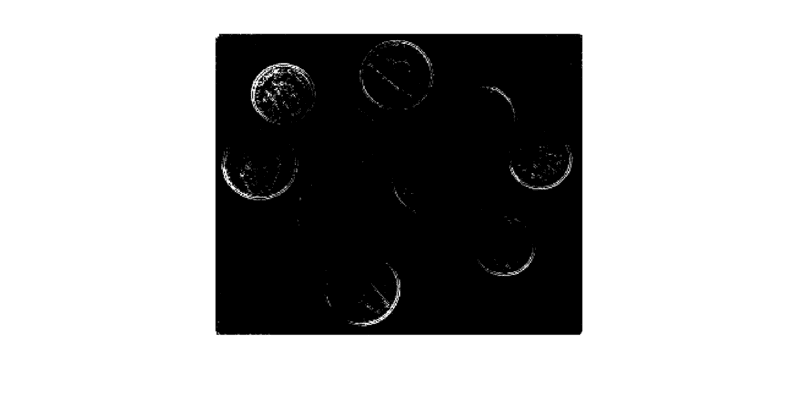
coins.png

But when I run the code to subtract the I get the error code:

Code:
%reading in the image
A=imread('coins.png');
%applying fouire transform shift to zero postion and fouire transform for
%2D
D = fftshift(fft2(A));
%defing the filter, Low pass filter
h = (1/9).*[1,1,1;1,1,1;1,1,1];
%apllying filter to the freqencey domian
B1=filter2(h1,D);
B1 = uint8(round(B1));
G=ifft2(B1);
E=imshow(log(abs(G)))
J = imresize(A,[246 300])
imsubtract(J,E)

Error code

Error using imsubtract (line 52)
X and Y must have the same size and class, or Y must be a scalar double.

Error in signla (line 84)
imsubtract(J,E)

As you can see I have tried to make the images the same size yet it still is not working and I am at a slight loss to why.
 

Attachments

  • lf.png
    lf.png
    25 KB · Views: 1,559
  • coins.png
    coins.png
    5.4 KB · Views: 1,127
on Phys.org
I don't see where you've tried to make E be 246 x 300 or guaranteed that it has that size, so I'm not sure why that's your argument in the resize.

Two suggestions:
1. Put a breakpoint just before the IMSUBTRACT. Manually check size(J) and size(E).

2. Instead of using constants for the argument on that second-to-last line, do this: J = imresize(A, size(E))
 
RPinPA said:
I don't see where you've tried to make E be 246 x 300 or guaranteed that it has that size, so I'm not sure why that's your argument in the resize.

Two suggestions:
1. Put a breakpoint just before the IMSUBTRACT. Manually check size(J) and size(E).

2. Instead of using constants for the argument on that second-to-last line, do this: J = imresize(A, size(E))

I have found that the images were of the same size but the class was not however when I subtract the images the outcome is not what is expected. So this leads me to either my method is wrong in the fact that I am using the wrong kernel or the enitre program is incorrect.

here is my code
Code:
%reading in the image
A=imread('coins.png');
%figure;imagesc(A);colormap gray;colorbar;
%applying fouire transform shift to zero postion and fouire transform for
%2D
D = fftshift(fft2(A));
%defing the filter, Low pass filter
h = (1/9).*[1,1,1;1,1,1;1,1,1]
%apllying filter to the freqencey domian
B1=filter2(h1,D);
B1 = uint8(round(B1));
G=ifft2(B1);
E=(log((abs(G))));
%figure;imagesc(E);colormap gray;colorbar
%figure;imagesc(double(A)-E);colormap gray;colorbar
I2=im2double(A);
k=imsubtract(I2,E)
imshow(k)

ignore the comment out parts I was trying something, so I am not sure where to go from here. Any suggestions?
 
Last edited:
I have come to the conclusion that what I need to do is actually come how change the pixel values in the frequency domain to 0.

Here is my code but I can seem to get the values back into the image.

Code:
%reading in the image
A=imread('coins.png');
%figure;imagesc(A);colormap gray;colorbar;
%applying fouire transform shift to zero postion and fouire transform for
%2D
D = fftshift(fft2(A));
E=log((abs(D)))
I=imagesc(E);colormap gray
%imcrop(I)
K=imcrop(E,[137.5,106.5,24,32])
imshow(K)
K(K<20)=0
imshow(K)
 
Last edited:
Unfortunately I don't have a copy of Matlab to experiment with at the moment. But here's my thought about the mathematics of what you're doing. You want to apply filter D to image A, ##DA##. And then subtract that from the original image, ##A - DA = (1 - D)A## where "1" means the identity matrix.

So maybe you might try 1 - D as your high-pass filter? Or in Matlab, eye(3) - D?

BTW, this simple rectangle filter is probably not an optimal low-pass filter anyway. The FFT is a sinc function which has long tails, meaning it will leave a lot of high frequencies.