How Do Android Volume Controls Vary Across Different Devices?

Click For Summary

Discussion Overview

The discussion revolves around the variations in Android volume controls across different devices, focusing on the differences in how volume settings are organized and function. Participants share their device models and Android versions while exploring the implications for app development aimed at controlling these volume settings.

Discussion Character

  • Exploratory
  • Technical explanation
  • Debate/contested

Main Points Raised

  • One participant describes their project to create an app for controlling volume settings on Android devices, noting differences in volume control layouts between Samsung devices and the standard Google Android image.
  • Another participant expresses willingness to help but mentions they use a flip phone, indicating a lack of relevant experience with Android devices.
  • A participant shares their experience with an LG K4 (2017), detailing the specific volume controls available on their device.
  • Another participant provides information about the LG K8 V (Android 7.0), listing the volume controls as horizontal sliders for various sound types.
  • One participant inquires whether muting the ringtone affects the notification and system volumes, seeking to understand interdependencies among the volume controls.
  • Responses indicate that on some devices, muting the ringtone also mutes notification and system volumes, but they return to previous levels when the ringtone volume is increased again.
  • A participant describes a programming test designed to determine whether volume controls for ringtone, notification, and system streams are linked or independent, noting that results have been successful in emulators and on their Samsung device but require further testing on physical devices.

Areas of Agreement / Disagreement

Participants express varying experiences with volume control behavior across different devices, indicating that there is no consensus on how these controls function universally. Some participants report simultaneous adjustments among volume types, while others suggest that controls may operate independently.

Contextual Notes

Participants' observations are based on specific device models and Android versions, which may limit the generalizability of their claims. The discussion highlights potential differences in volume control implementations that depend on manufacturer customizations.

Who May Find This Useful

This discussion may be useful for Android developers interested in understanding device-specific volume control behaviors, as well as users curious about how different Android devices manage sound settings.

Wrichik Basu
Science Advisor
Insights Author
Gold Member
Messages
2,186
Reaction score
2,694
Summary:

If you own an Android phone and are interested in helping me, please navigate to Settings → Sounds. Here, you will find the volume controls (in some phones, you will have an option "Volume" under which you will find all the controls). Please give me the following: a screenshot of the volume sliders (or a description, whichever is convenient for you), your device model and Android version.

Why I need this:

The volume keys in my phone (a Samsung Galaxy On7) are malfunctioning. I decided to write an app that will have all the volume controls. I will place it in my home screen and thus be able to quickly change the volumes instead of navigating to Settings.

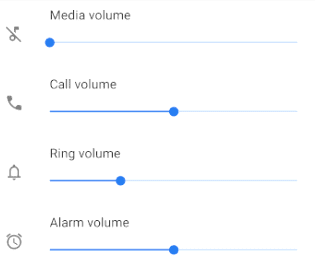
Now, I found that volume control in Samsung differs from original Android image provided by Google. In Samsung, there are separate sliders for Ringtone, Notification and System streams, while in the Google image, these three are clubbed together under "Ring volume":
1593127333237.png


I don't know about other devices.

When I am coding an app, it will be useless to write something that works on Samsung and not on other devices. With the information you provide, I will be able to customize my app such that it supports as many devices as possible.

N.B.: There are some apps available in PlayStore that do the same thing (or almost the same thing). I am interested in writing my own app because that way I will be able to gain some experience in Android programming.
 
  • Like
Likes   Reactions: phinds
Computer science news on Phys.org
Sounds like a good project. I'd help if I could but I'm a dinosaur, still using a flip phone.
 
  • Like
Likes   Reactions: Wrichik Basu
Hi
My device(first of all I'll tell you I am basque(spanish for someones, just basque for others), so I don't know if my post is going to be usefull).
Here it goes:
Device: LGK4(2017)
Android version: 6.0.1

Volumen
Tono
Notificaciones
Táctil y sistema
Multimedia

Hope it helps
 
  • Informative
Likes   Reactions: Wrichik Basu
LG K8 V
Android 7.0

Tap on: Settings, Sound, Volume

The controls are horizontal sliders like you show, with these controls:
  • Ringtone
  • Notification sound
  • Touch feedback & system
  • Music, video, games & other media
 
  • Informative
Likes   Reactions: Wrichik Basu
@mcastillo356 and @berkeman thank you for the information. Can you provide one more information: if you drag the ringtone volume slider to 0 (and thereby put your phone into mute or vibrate state), do the notification and system volumes also become 0? If you again increase the ringtone volume, do the notification and system volumes return to what they were before they became 0?
 
Wrichik Basu said:
if you drag the ringtone volume slider to 0 (and thereby put your phone into mute or vibrate state), do the notification and system volumes also become 0?
For me, Notification sound and Touch feedback & system go to zero.

Wrichik Basu said:
If you again increase the ringtone volume, do the notification and system volumes return to what they were before they became 0
Yes, they returned to their previous settings as soon as the Ringtone volume is non-zero.
 
  • Like
Likes   Reactions: Wrichik Basu
Yes, they move simultaneously. Moving Tono makes Táctil y Sistema and Notificación also 0. And when I restore Tono, it starts to sound until I agree. I move the Tono from the maximum to 0, and from 0 to the maximum, and the other two move the same by themself.
 
  • Like
Likes   Reactions: Wrichik Basu
I programmed a test to distinguish between the two types of volume control.

In Android, it is possible to programmatically control the ringtone, notification, system, media, voice call, and alarm streams separately. We are interested only in the first three.

The test goes somewhat like this: first, initialize all the volumes to some number, say 1. Then, take up a particular stream (say ringtone) and change its volume to some number other than 1. Now, check whether the volume of the other two streams have changed or are still at 1. If they have changed, increment a counter. Next take up the other two streams and do the same with them.

At the end, if you find that on changing the volume of one stream the other two change automatically, you may conclude that it is the Google-type configuration (as shown in the picture in the OP). Otherwise, the three streams can be controlled separately.

This test successfully works in the emulators and my Samsung device, but it has to be tested further on physical devices to conclude that it works everywhere.
 
  • Like
Likes   Reactions: mcastillo356

Similar threads

  • · Replies 16 ·
Replies
16
Views
8K
  • · Replies 1 ·
Replies
1
Views
3K
  • · Replies 9 ·
Replies
9
Views
5K
Replies
6
Views
5K
Replies
13
Views
3K
Replies
8
Views
8K
Replies
3
Views
1K
Replies
4
Views
3K
  • · Replies 15 ·
Replies
15
Views
6K
Replies
3
Views
2K