How Do I Remove a Persistent Popup Claiming My Computer Is Infected?

  • Thread starter Thread starter gmax137
  • Start date Start date
Join the discussion
Ask a follow-up here, or get your own question answered by working scientists, mathematicians and engineers — people, not an autocomplete.
Real named experts · corrections over time · the nuance an AI answer skips
6 replies · 3K views
Messages
3,199
Reaction score
3,821
I recently shut down my computer and since I turned it back on I get an annoying popup screaming that my computer is infected. It includes a link 37yito dot nonspewpa dot com

Anyone else seen this? How do I get rid of it?

Thanks!

here's a jpeg from a screenshot
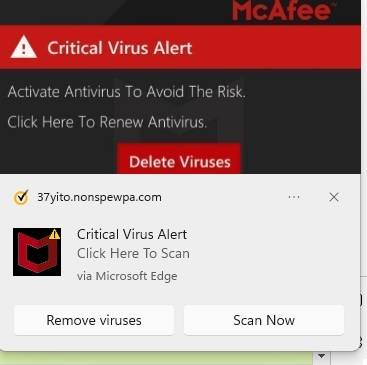
popup.jpg
 
on Phys.org
You need to turn off notifications from nonspewpa.com in whatever browser(s) you use.

In future be more careful about allowing notifications (or don't do it at all).
 
  • Like
Likes   Reactions: gmax137
pbuk said:
In future be more careful about allowing notifications (or don't do it at all).
And that doesn't seem to be a good website either. According to https://malwaretips.com/blogs/remove-nonspewpa-com/,

What is Nonspewpa.com?​

Nonspewpa.com is a site that displays fake messages to trick you into subscribing to its spam push notifications.

If you do subscribe to the Nonspewpa.com notifications, you will start seeing receiving spam popups directly on your desktop or phone even if the browser is closed. These ads are for adult sites, online web games, fake software updates, and unwanted programs.

@gmax137 Did you ever visit this site?
 
gmax137 said:
nope. at least, AFAIK.
It will probably have been when you were visiting a different site; this site will have embedded the malicious site which asked for permission to display requests. This is much harder to do with recent versions of Chrome and Firefox (not sure about Edge), but if you are using IE you are WIDE OPEN to exploits like this.
 
Last edited: