How is PF's "CONTACT US" Button made?

  • Context: JavaScript 
  • Thread starter Thread starter YoungPhysicist
  • Start date Start date
  • Tags Tags
    Html Javascript
Click For Summary

Discussion Overview

The discussion revolves around the implementation of a "CONTACT US" button on a website, specifically how it functions to send emails without relying on a local email client. Participants explore various methods and technologies involved in creating such a feature, including HTML forms, server-side processing, and the differences between mailto links and server-based email sending.

Discussion Character

  • Exploratory
  • Technical explanation
  • Debate/contested

Main Points Raised

  • One participant expresses a desire to implement an email feature similar to the "CONTACT US" button, noting that traditional mailto methods do not work on their new laptop.
  • Another participant explains that the button triggers a dialog that sends messages to the server, contrasting this with mailto links that require a configured email client.
  • Some participants discuss the use of server-side programs to send emails, emphasizing that the form does not interact with client-side email software.
  • There is mention of using JavaScript and CSS to create the popup form overlay, with a focus on how the email is sent via an HTML form.
  • One participant shares a source code example for a simple contact form using HTML and PHP, highlighting PHP's role in processing form submissions and sending emails.
  • Several participants clarify that the contact form's functionality relies on server-side processing rather than solely on HTML or client-side email clients.

Areas of Agreement / Disagreement

Participants generally agree that the "CONTACT US" button does not rely on an email client and that server-side processing is necessary to send emails. However, there is some confusion regarding the exact implementation details and methods, indicating that the discussion remains somewhat unresolved.

Contextual Notes

Participants mention various technologies and methods, including SMTP, JavaScript, and PHP, but do not reach a consensus on a single implementation approach. There are also references to potential limitations in understanding how different systems interact.

YoungPhysicist
Insights Author
Messages
350
Reaction score
203
I would like to add a email sending feature to my website, something like the the "CONTACT US" button here on PF.
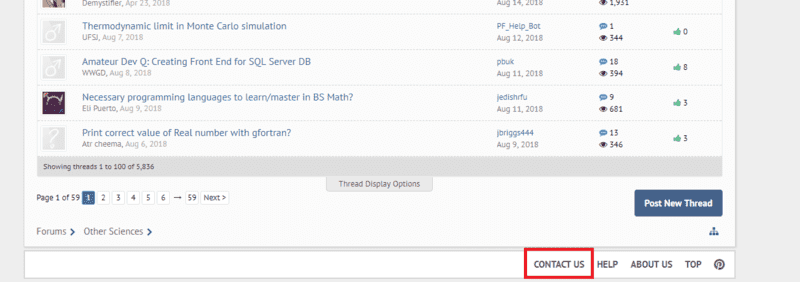
test.png

When I was searching this topic online, I get various paragraphs from CodeProject and StackOverflow, I saw methods using mailto: and some other stuff, but none of those work on my new laptop. Windows says that it needs an email client.

But as I am trying to use the "CONTACT US" button here on the exact same computer, it worked! So it uses a totally different method that works everywhere.

Do anyone have a idea of how it was made?
 

Attachments

  • test.png
    test.png
    26.9 KB · Views: 818
Technology news on Phys.org
The Contact button brings up a dialog that sends your message back to PF's server just like any other action on the site (like clicking a link). A mailto link uses information on your computer to open whatever email program (like Outlook) has been set up as default on your computer. In order to send email with that, you have to have your email program set up to communicate with an email server. For most people, this is provided by your ISP or a service like gmail. If you don't have an email program set up, your computer can't use the mailto link.
 
  • Like
Likes   Reactions: jedishrfu
Google blogger software uses a dialog with the google host to forward your message to the owner of the blog. That means the google machine takes on the responsibility of being the one with the email client.

There may be some javascript apis from google that would allow that for a custom web application.

Aso this scheme might work:

https://www.makeuseof.com/tag/7-simple-steps-gmail-desktop-email-client/
 
  • Like
Likes   Reactions: YoungPhysicist and Borg
Young physicist said:
Do anyone have a idea of how it was made?
It seems you are asking a couple questions. First the popup is a combination of a little javascript and some css. Javascript detects the click and then loads the contact form overlay. The email is sent via html form.
 
  • Like
Likes   Reactions: YoungPhysicist
Greg Bernhardt said:
The email is sent via html form.
Yeah,I know. I mean which way exactly is the form constructed,so it works everywhere.Like the source code or something (the “view source code”’ function on my browser didn’t help much)

But according to what @jedishrfu said in the previous post,looks like it can’t be done only by html.It has to work with some email client,either on the computer or external.
 
Young physicist said:
Yeah,I know. I mean which way exactly is the form constructed,so it works everywhere.Like the source code or something (the “view source code”’ function on my browser didn’t help much)

But according to what @jedishrfu said in the previous post,looks like it can’t be done only by html.It has to work with some email client,either on the computer or external.
Not sure what you are really getting at. The form has nothing to do with an email client.
 
  • Like
Likes   Reactions: QuantumQuest
Young physicist said:
It has to work with some email client,either on the computer or external.

It works with a program on the server side that sends email using the information submitted with the HTML form. It doesn't interact with any email software on the client computer.
 
  • Like
Likes   Reactions: QuantumQuest
Young physicist said:
I saw methods using mailto: and some other stuff, but none of those work on my new laptop. Windows says that it needs an email client.

Yes, a mailto: url basically tells your browser "load whatever the default email client program is on this computer and start composing a new email with this to address". But that's not what PF's "Contact Us" button is doing, as should be obvious if you hover your mouse over it to look at the URL it points to.
 
  • #10
SMTP (Simple Mail Transfer Protocol) is invoked on the physical machine that hosts the forum. So when you send email, there has to be:

A DNS connection to resolve the destination URL reference (example: me@mycompany.com) into an octet string which is the internet actual address.
An smtp process (mail server) that takes the message and uses the mail protocol to connect to the smtp process "mycompany.com" uses to receive email.
It initiates a conversation, which you can actually emulate from a telnet terminal. Try it. It is how you test an email (Exchange in windows parlance) server.

https://docs.microsoft.com/en-us/exchange/mail-flow/test-smtp-with-telnet?view=exchserver-2019

This shows the Windows how to. If you really want the nitty gritty stuff you probably should run WSL ubuntu (Linux Windows Service) which provides a pretty good embedded version of Linux. Requires Windows 10 and is free. I am assuming you are not using Linux to start with.

Most email messages use some type of encoding protocol. So to actually send a readable "cool" email, rather than simply test a connection, you need to run base64 (or windows version of it) on a candidate file - usually html. Then send the encoded file.

I've left out details.
 
  • #11
Here, you can find the source code for a simple contact form using HTML and PHP.

PHP is a popular server-side language that can read the input values the user sent (found in the array $_POST) and can send email with the function mail($to, $subject, $body, $from).
 
  • #12
Greg Bernhardt said:
Not sure what you are really getting at. The form has nothing to do with an email client.

PeterDonis said:
It works with a program on the server side that sends email using the information submitted with the HTML form. It doesn't interact with any email software on the client computer.
Well,sorry. I mistreated this question. I thought that the contact button can be made simply by html code and nothing else.

Later I thought that it can be used by using a gmail client.

At last, thanks to @PeterDonis, I know what it really is.
 

Similar threads

  • · Replies 2 ·
Replies
2
Views
3K
  • · Replies 1 ·
Replies
1
Views
2K
  • · Replies 3 ·
Replies
3
Views
2K
  • · Replies 22 ·
Replies
22
Views
2K
  • · Replies 21 ·
Replies
21
Views
2K
  • · Replies 2 ·
Replies
2
Views
2K
  • · Replies 15 ·
Replies
15
Views
7K
Replies
4
Views
1K
  • · Replies 1 ·
Replies
1
Views
2K
  • · Replies 11 ·
Replies
11
Views
24K