How to add Ammeter in LT Spice Schematic?

  • Thread starter Thread starter Tarek EEIT
  • Start date Start date
  • Tags Tags
    Ammeter Schematic
Click For Summary
SUMMARY

LT Spice does not include a dedicated ammeter component; however, users can measure current effectively using alternative methods. By adding a very small resistor, such as 1 milliohm, users can hover over it to view the current at that point in the circuit. In DC operating point mode, existing resistors can also be used to read current values. Additionally, in Transient mode, clicking on a component displays the current waveform, and a zero-volt DC voltage source can be utilized to simulate an ammeter's behavior.

PREREQUISITES
  • Familiarity with LT Spice schematic design
  • Understanding of DC operating point and Transient simulation modes
  • Basic knowledge of resistor values and their impact on current measurement
  • Ability to interpret current waveforms in simulation software
NEXT STEPS
  • Learn how to use LT Spice for DC operating point analysis
  • Explore current measurement techniques using resistors in LT Spice
  • Investigate the use of voltage sources in circuit simulations
  • Study the differences between DC and Transient simulation modes in LT Spice
USEFUL FOR

Electronics engineers, circuit designers, and students learning to simulate circuits in LT Spice will benefit from this discussion.
Tarek EEIT
Messages
2
Reaction score
0
It may sound so silly question but I am trying for last 2 hours and no result.

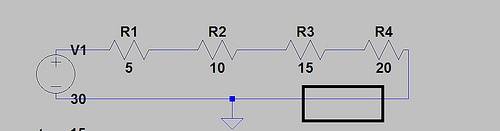
I have drawn the following schematic in LT Spice and want to add an ammeter in the black rectangle. In component menu, I don't find anything named ammeter.

6656046985_51ca5b45de.jpg


Any clue? Your help is appreciated.
 
Engineering news on Phys.org
There isn't an ammeter in LT Spice. However, you can certainly measure current.

You can do this by adding a VERY small resistor like 1 milliohm and then moving your mouse onto it. This will give the current at that point.

You can also just do this with any of the existing resistors. Just move your mouse onto them and read off the current in the box at the bottom of the screen.

This would be used when you have the simulation in DC operating point mode.

In Transient mode, you just click on a component and get the current waveform through it.

Another way is to use a DC voltage source of zero volts in the position you require. This will look like an ammeter and behave like one. Just put a label next to it to infer that it is an ammeter.
 
vk6kro said:
There isn't an ammeter in LT Spice. However, you can certainly measure current.

You can do this by adding a VERY small resistor like 1 milliohm and then moving your mouse onto it. This will give the current at that point.

You can also just do this with any of the existing resistors. Just move your mouse onto them and read off the current in the box at the bottom of the screen.

This would be used when you have the simulation in DC operating point mode.

In Transient mode, you just click on a component and get the current waveform through it.

Another way is to use a DC voltage source of zero volts in the position you require. This will look like an ammeter and behave like one. Just put a label next to it to infer that it is an ammeter.

Awesome reply. Thanks for your comment. I didn't thought in this way. I just tried your process and it works!
 
Most likely this can only be answered by an "old timer". I am making measurements on an uA709 op amp (metal can). I would like to calculate the frequency rolloff curves (I can measure them). I assume the compensation is via the miller effect. To do the calculations I would need to know the gain of the transistors and the effective resistance seen at the compensation terminals, not including the values I put there. Anyone know those values?

Similar threads

  • · Replies 15 ·
Replies
15
Views
5K
  • · Replies 6 ·
Replies
6
Views
2K
Replies
24
Views
4K
  • · Replies 2 ·
Replies
2
Views
3K
  • · Replies 4 ·
Replies
4
Views
2K
Replies
31
Views
7K
  • · Replies 30 ·
2
Replies
30
Views
5K
Replies
16
Views
9K
  • · Replies 24 ·
Replies
24
Views
9K
Replies
6
Views
6K