How to Calculate Area Using the Limit Process?

  • Context: MHB 
  • Thread starter Thread starter karush
  • Start date Start date
  • Tags Tags
    Area Limit Process
Click For Summary
SUMMARY

The discussion focuses on calculating area using the limit process, specifically addressing an error in the summation formula. The correct formula is identified as $\displaystyle \sum_{i=1}^ni=\frac{n(n+1)}{2}$, which resolves the issue leading to an incorrect area calculation of 128.25. Participants also discuss the use of Word 2010's equation writer and suggest converting equations to LaTeX for better formatting in Math Help Boards using MathType. This conversion process enhances clarity and presentation of mathematical expressions.

PREREQUISITES
  • Understanding of limit processes in calculus
  • Familiarity with summation notation
  • Basic knowledge of LaTeX for typesetting equations
  • Experience with Word 2010 and MathType for equation conversion
NEXT STEPS
  • Learn how to use LaTeX for mathematical typesetting
  • Explore the capabilities of MathType for converting equations
  • Study the limit process in calculus in more depth
  • Research best practices for presenting mathematical content online
USEFUL FOR

Students, educators, and professionals in mathematics or engineering fields who require accurate calculations and clear presentation of mathematical concepts.

karush
Gold Member
MHB
Messages
3,240
Reaction score
5
I tried this by the limit process but somewhere can't find my error
wolfram says it is 128.25 any suggest or find error?:cool:

View attachment 473
 
Physics news on Phys.org
Hi karush,

Can I ask you how are you typing up those equations? Is it through Latex or Mathtype or what?

Jameson
 
One possible place for your error is where you have:

$\displaystyle \sum_{i=1}^ni=\frac{n(2n+1)}{2}$

You should have:

$\displaystyle \sum_{i=1}^ni=\frac{n(n+1)}{2}$

edit: Yes, once you change this, you will get the correct answer.
 
yep that fixed it ... thanks
hard to see errors like this
should always study with someone...

the equations was from Word2010 equation writer,,,,, I know junk compared to TeX
 
Karush, I'm glad you found an answer so quickly. I don't have anything to add to the answer, but I wanted to mention that there are ways to get your formula from Word 2010 into Math Help Boards so that it looks nice over here (like MarkFL's did in his reply). I'm sure you know MHB uses LaTeX for input. It also uses MathJax for displaying the LaTeX equations. If you have MathType, there's a quick way to convert the Word 2010 equation into LaTeX, then just copy & paste it over here. You don't have to put any tags around it or anything. Here's an example:

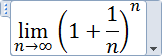
  1. I'll use one of the Word 2010 sample equations for the example:
    View attachment 474.
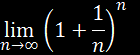
  2. Unless you want to convert all the equations in your Word document, select the equation you want. If you have more than one equation to convert, Make a selection that covers all the equations.
    View attachment 475
  3. In Word's MathType tab, choose the Convert Equations command, and make these selections in the dialog: "Equation types to convert": Word 2007 and later (OMML) equations, and "Convert equations to": Text using MathType translator: Math Help Boards. Note that you can have more boxes checked on the left side than just the "Word 2007" one, but you must have that one checked. On the right, if one or both of the boxes at the bottom are checked, it's OK, but they don't need to be.
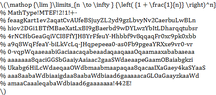
  4. Click Convert. The MathType macro will do its magic, and when it's finished you'll see a dialog telling you how many equations were converted. You'll see something like this:
    View attachment 476
  5. Copy it (all of it) and paste it into your MHB post. If you want to make sure the math looks right, click Preview Post. This one looks like this: \(\mathop {\lim }\limits_{n \to \infty } {\left( {1 + \frac{1}{n}} \right)^n}
    % MathType!MTEF!2!1!+-
    % feaagKart1ev2aqatCvAUfeBSjuyZL2yd9gzLbvyNv2CaerbuLwBLn
    % hiov2DGi1BTfMBaeXatLxBI9gBaerbd9wDYLwzYbItLDharqqtubsr
    % 4rNCHbGeaGqiVCI8FfYJH8YrFfeuY-Hhbbf9v8qqaqFr0xc9pk0xbb
    % a9q8WqFfeaY-biLkVcLq-JHqpepeea0-as0Fb9pgeaYRXxe9vr0-vr
    % 0-vqpWqaaeaabiGaciaacaqabeaadaqaaqaaaOqaamaaxababaaeaa
    % aaaaaaa8qaciGGSbGaaiyAaiaac2gaaSWdaeaapeGaamOBaiabgkzi
    % Ukabg6HiLcWdaeqaaOWdbmaabmaapaqaa8qacaaIXaGaey4kaSYaaS
    % aaa8aabaWdbiaaigdaa8aabaWdbiaad6gaaaaacaGLOaGaayzkaaWd
    % amaaCaaaleqabaWdbiaad6gaaaaaaa!442E!
    \)
  6. If you ever want to use any of the equations from MHB in Word, whether they're your equations or someone else's, right-click the equation and choose Show Math As > MathML Code. Copy the entire contents of the pop-up box and paste it into Word. If you don't have MathType, it will paste as an OMML equation (IOW, a "Word equation"). If you have MathType, it will ask if you want an OMML equation or a MathType equation. Choose whatever you want.

Bob
 

Attachments

  • 1.png
    1.png
    933 bytes · Views: 103
  • 2.png
    2.png
    778 bytes · Views: 93
  • 3.png
    3.png
    9.8 KB · Views: 110
thank for info, I will try this, new brave world ... MathType

I have done a lot Latex... but is timely(Time) especially when it already done someplace else.

r
 

Similar threads

  • · Replies 53 ·
2
Replies
53
Views
6K
  • · Replies 24 ·
Replies
24
Views
4K
  • · Replies 9 ·
Replies
9
Views
2K
  • · Replies 3 ·
Replies
3
Views
1K
  • · Replies 2 ·
Replies
2
Views
3K
  • · Replies 20 ·
Replies
20
Views
2K
  • · Replies 2 ·
Replies
2
Views
3K
  • · Replies 13 ·
Replies
13
Views
3K
  • · Replies 7 ·
Replies
7
Views
1K
  • · Replies 8 ·
Replies
8
Views
2K