JDD
- 15
- 0
Homework Statement:: How to control volume by hovering and scrolling anywhere in Mac Menu Bar
Relevant Equations:: none
Hi,
I use both Mac's and pc's. Mac's are great but here's one thing
I can do in my pc's that I have not been able to find how to do
in my Mac.
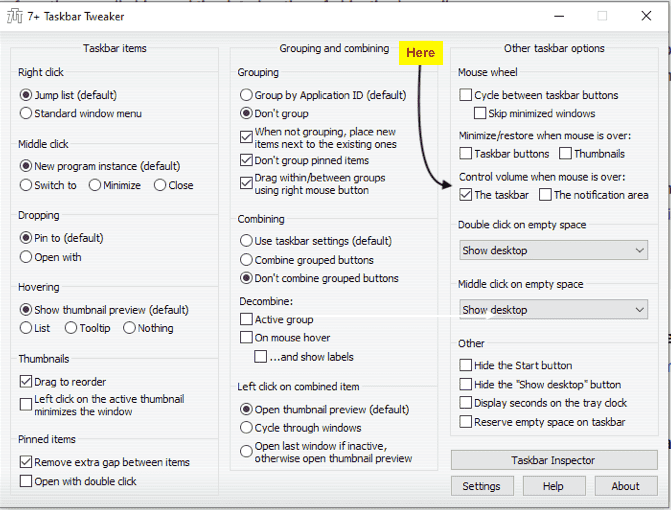
In my pc's (Win7, Win10) I have a utility called "7+ Taskbar Tweaker"
that has an option to allow me to control the speaker volume
by putting the mouse anywhere in the taskbar and as I scroll
up/down while the mouse is still in the taskbar the volume
changes up/down:
This is really very handy and so much more efficient than how
volume control is done in a Mac where one has to,
Mouse up to the Menu bar,
Click on the speaker,
Mouse over to the speaker slide,
Scroll and adjust the volume.
I'm hoping there is a way to have the same ability in a Mac that
I have in my pc's i.e., to control the volume by simply mousing
up to anywhere in the Menu bar and then simply scrolling up/down
to change the volume up/down.
Does anyone have any suggestions or know of a way to have this in a Mac?
Many thanks!
Relevant Equations:: none
Hi,
I use both Mac's and pc's. Mac's are great but here's one thing
I can do in my pc's that I have not been able to find how to do
in my Mac.
In my pc's (Win7, Win10) I have a utility called "7+ Taskbar Tweaker"
that has an option to allow me to control the speaker volume
by putting the mouse anywhere in the taskbar and as I scroll
up/down while the mouse is still in the taskbar the volume
changes up/down:
This is really very handy and so much more efficient than how
volume control is done in a Mac where one has to,
Mouse up to the Menu bar,
Click on the speaker,
Mouse over to the speaker slide,
Scroll and adjust the volume.
I'm hoping there is a way to have the same ability in a Mac that
I have in my pc's i.e., to control the volume by simply mousing
up to anywhere in the Menu bar and then simply scrolling up/down
to change the volume up/down.
Does anyone have any suggestions or know of a way to have this in a Mac?
Many thanks!